Control Flow and Functions
Control flow is the path taken through a program. Without control flow, a program can only run statements from top to bottom once. With selection and iteration, a program can make decisions and repeat work.
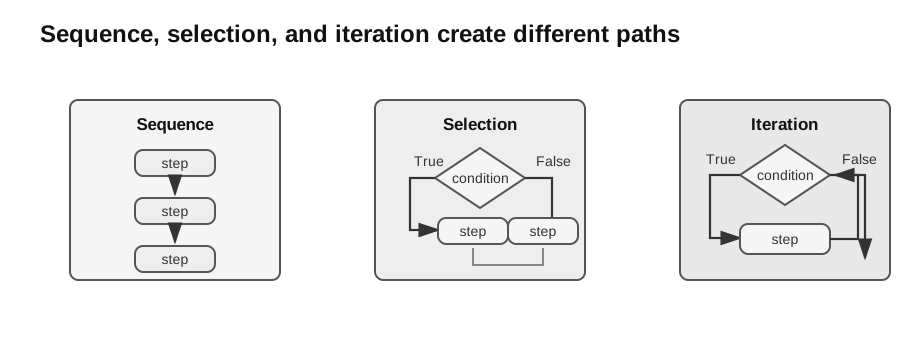
Caption: Sequence follows one path, selection chooses a branch, and iteration returns to a condition until the stopping path is taken.
Prerequisite Bridge: Algorithmic Representations (Unit 1.1)
Flowcharts, pseudocode, and decision tables are governed by Algorithmic Representation. They are retained here only to connect designs to Python control flow.
Before coding, an algorithm may be represented using pseudocode or a flowchart. Pseudocode describes logic using structured English and programming constructs; it is not Python and should not depend on Python punctuation.
INPUT mark
IF mark >= 50 THEN
    OUTPUT "Pass"
ELSE
    OUTPUT "Fail"
ENDIF
A flowchart uses standard symbols: terminators for start/end, parallelograms for input/output, rectangles for processing, diamonds for decisions, and arrows for control flow.
Sequence
Sequence means statements run in order.
width = 8
height = 5
area = width * height
print(area)
The order matters. area cannot be calculated before width and height have values.
Selection
Selection chooses between paths using a condition.
if mark >= 50:
    result = "Pass"
else:
    result = "Fail"
A condition should evaluate to True or False.
Common comparison operators:
| Operator | Meaning |
|---|---|
== | equal to |
!= | not equal to |
< | less than |
<= | less than or equal to |
> | greater than |
>= | greater than or equal to |
Combine conditions with and, or, and not:
if mark >= 0 and mark <= 100:
    print("valid mark")
Designing Conditions
A good condition says exactly what must be true for a branch to run.
Weak condition:
if age:
    print("age entered")
This relies on Python truthiness and may be unclear for beginners. A clearer condition is:
if age != "":
    print("age entered")
For syllabus and exam work, prefer explicit logic unless the question is specifically about Python truth values.
Iteration
Iteration repeats a block of statements.
Use a for loop when iterating over a known sequence:
scores = [72, 85, 68]
total = 0

for score in scores:
    total = total + score
Use a while loop when repetition depends on a condition:
number = 1

while number < 100:
    number = number * 2
For while loops, always check:
- what makes the condition true initially;
- what changes inside the loop;
- why the loop eventually stops.
Loop Invariants
A loop invariant is a property true before the first iteration and preserved after every iteration. Establish initialization, explain maintenance, and then use the stopping condition to state what the invariant implies at termination.
scores = [72, 85, 68]
total = 0

for score in scores:
    total = total + score
After each iteration, total is the sum of the scores processed so far. That invariant explains the purpose of the loop.
Range and Off-by-One Errors
range(5) produces 0, 1, 2, 3, 4.
for i in range(5):
    print(i)
If you need 1, 2, 3, 4, 5, write:
for i in range(1, 6):
    print(i)
Off-by-one errors happen when a loop starts or stops one step too early or too late.
Repeat-Until and While Logic
In pseudocode, a WHILE loop tests before the body and may execute zero times. A REPEAT ... UNTIL loop tests after the body, so it executes at least once.
REPEAT
    INPUT choice
UNTIL choice = "Y" OR choice = "N"
Python has no direct repeat-until statement, but the same logic can be written using while True and break when appropriate.
Break, Continue, and Pass
break exits a loop early.
for value in values:
    if value < 0:
        break
continue skips the rest of the current iteration.
for value in values:
    if value < 0:
        continue
    print(value)
pass does nothing. It can be used as a temporary placeholder while designing code.
Decision Tables
A decision table is useful when several Boolean conditions combine to determine actions. Each column represents one rule, showing one combination of conditions and the resulting action.
For two conditions there are up to combinations; for three conditions there are up to . After listing all combinations, redundant rules may be merged using a dash to mean “condition does not matter”.
Decision tables are best used during analysis. They help ensure that no combination is overlooked before the logic is translated into selection statements.
| Condition/action | R1 | R2 | R3 |
|---|---|---|---|
| member? | Y | Y | N |
| spend at least 100? | Y | N | – |
| 20% discount | X | ||
| 10% discount | X | ||
| no discount | X |
The dash merges both non-member spending cases because that condition does not affect the action.
Functions and Procedures
A function packages a task under a name.
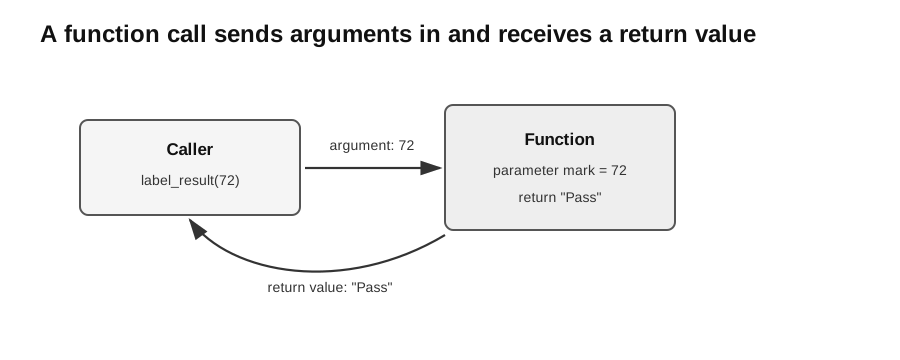
Caption: The caller passes [60, 80] as an argument; the parameter scores receives that value inside calculate_average. The function computes and returns 70.0; a procedure may instead finish with no meaningful return value.
def calculate_average(scores):
    if len(scores) == 0:
        raise ValueError("scores must be non-empty")
    total = 0
    for score in scores:
        total = total + score
    return total / len(scores)
Contract: scores contains at least one numeric value. Test a singleton, several mixed values, and invalid []; the invalid call raises before division and changes no external state.
Short fragments that use names such as mark, values, or temperature assume those values were supplied by earlier input. A standalone program must initialise or input them first.
Worked Debugging Method
If a loop intended to total [2, 3] returns 3, tabulate expected and actual total after each item. The first divergence occurs when the first value is overwritten rather than accumulated. Replace total = value with total = total + value, then rerun normal [2, 3], boundary [5], and empty [] cases.
The parameter scores receives the input list. The return statement sends the result back to the caller.
A procedure is a subprogram used mainly for its action rather than for returning a value. In Python, procedures are still written with def, but they may not return a meaningful value. If execution reaches the end without a return value, Python returns None.
def print_result(name, mark):
    print(name, "scored", mark)
Parameters, Arguments, and Scope
A parameter is the name written in a function definition. An argument is the actual value supplied in a call.
def rectangle_area(width, height):  # parameters
    return width * height

area = rectangle_area(8, 5)         # arguments
Variables created inside a function are normally local to that call. Keeping state local reduces accidental interference between different parts of a program.
Decomposition
Decomposition means breaking a problem into smaller tasks.
Instead of one long block:
name = input("Name: ")
mark = int(input("Mark: "))
if mark >= 50:
    print(name, "Pass")
else:
    print(name, "Fail")
Use named functions:
def is_pass(mark):
    return mark >= 50


def result_label(mark):
    if is_pass(mark):
        return "Pass"
    return "Fail"
This makes the logic easier to test.
Tracing Example
Trace:
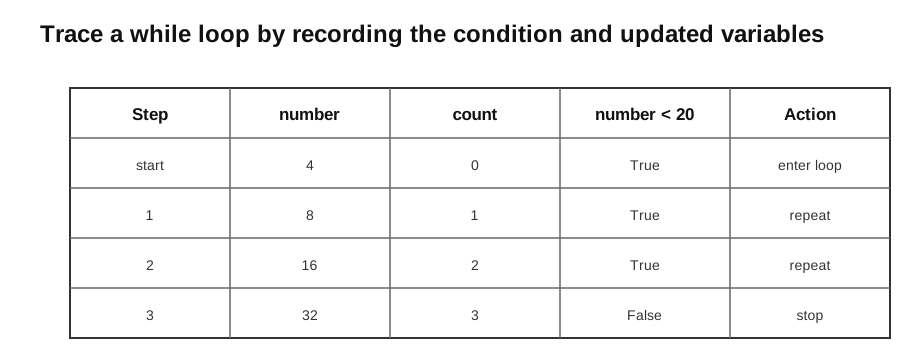
Caption: A loop trace records the condition and the variable updates after each repetition.
count = 0
number = 4

while number < 20:
    number = number * 2
count = count + 1| Step | number | count | number < 20 |
|---|---|---|---|
| start | 4 | 0 | True |
| after 1st iteration | 8 | 1 | True |
| after 2nd iteration | 16 | 2 | True |
| after 3rd iteration | 32 | 3 | False |
The loop stops when number becomes 32.
For a beginner, the safest loop-tracing method is:
- Write the initial values before the loop starts.
- Test the condition before entering the loop.
- Run the whole loop body once.
- Record every variable that changed.
- Test the condition again before deciding whether to repeat.
Common Bugs
- Using
=instead of==in a condition. - Forgetting to update the condition variable in a
whileloop. - Using
range(n)when the intended last value isn. - Returning too early from inside a loop.
- Making a function do too many unrelated jobs.
- Using a variable before it has been assigned.
Check Your Understanding
Try these before looking back at the explanations:
- What is the difference between selection and iteration?
- Why must a
whileloop usually change at least one variable used in its condition? - In
def result_label(mark):, what ismarkcalled? - Why is
returndifferent fromprint()?
Answers:
- Selection chooses between paths once; iteration repeats a path.
- Without a relevant change, the condition may stay true forever.
- A parameter.
returnsends a value back to the caller;print()displays text but does not pass a value back for later calculation.