Linked Lists
A linear linked list stores data in nodes. Each node contains:
- data;
- a link to the next node.
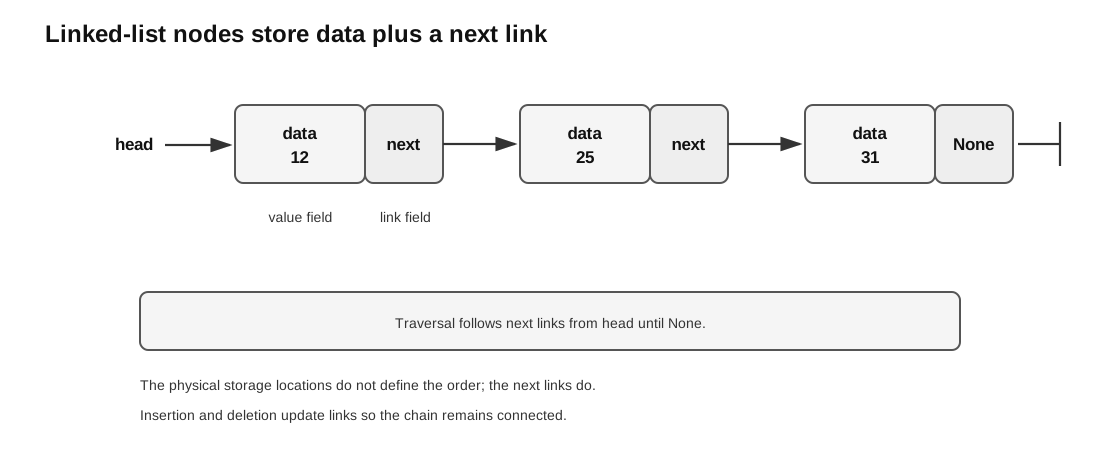
Caption: Each node stores a data value and a next link; traversal starts at head and follows next links until None.
Unlike an array, the nodes do not have to be stored next to each other in memory. The order comes from the links.
You can read this note directly without first reading the hub. The only Python ideas assumed are objects with attributes, None, and while loops. If those are unfamiliar, read Control Flow and Functions first.
In pseudocode, <- means assignment: store the value on the right into the variable or field on the left.
Why Linked Lists Exist
In an array or Python list, position is mainly controlled by indexes. In a linked list, position is controlled by links.
That difference changes how operations work:
| Operation idea | Array mental model | Linked-list mental model |
|---|---|---|
| move to next item | increase index | follow next link |
| insert near front | may shift many items | adjust a few links |
| delete a node | may shift later items | link around the node |
| find a value | check indexes in order | follow links from head |
The trade-off is that a linked list has no direct random access to “index 5”. To reach a later node, start at head and follow links.
A linked list is useful when the program often needs to insert or delete items without shifting many later items. Once the node and predecessor are already known, the link update is ; finding them from head may still take . It is less suitable when the program often needs direct access to an item at a particular index.
Node, Link, and Head Pointer
A simple singly linked-list node has two fields:
| Field | Meaning |
|---|---|
data | the stored value |
next | a link to the next node |
The list itself needs a pointer to the first node. In these notes, this pointer is called head. Some exam materials call the same idea start.
Important rules:
headpoints to the first node.- Each node points to the next node.
- The last node points to
Nonein Python-style notation. - In an array-based linked list, the end marker is often
-1instead ofNone. - If
headisNone, the list is empty.
Example:
head -> 12 -> 25 -> 31 -> NoneThis means:
- the first node stores
12; - the next node stores
25; - the next node stores
31; 31is the last node because itsnextlink isNone.
The beginner rule is: the list order is the order obtained by following links from head, not necessarily the order in memory or array indexes.
Singly Linked List Boundary
This note focuses on singly linked lists. Each node has only one link, pointing to the next node.
The H2 Computing core excludes:
- doubly linked lists;
- circular linked lists.
Do not confuse a circular linked list with a circular queue. A circular queue is part of this topic, but a circular linked list is not core syllabus content.
Traversal
Traversal means visiting nodes in order from the head.
Pseudocode:
current <- head

WHILE current is not None
    VISIT current.data
    current <- current.next
ENDWHILE
The beginner trace rule is: never jump to a node unless a link points there.
Trace example:
| Step | current.data | Next action |
|---|---|---|
| 1 | 12 | move to next node |
| 2 | 25 | move to next node |
| 3 | 31 | move to None |
| 4 | None | stop |
For this list:
head -> 12 -> 25 -> 31 -> NoneThe traversal output is:
12, 25, 31Traversal takes time for a list with nodes, because every node may need to be visited.
Search
Search is traversal with a target value.
class Node:
    def __init__(self, data):
        self.data = data
        self.next = None


def contains(head, target):
    current = head
    while current is not None:
        if current.data == target:
            return True
        current = current.next
    return False
Worst-case search checks every node, so a linked-list search is linear in the number of nodes.
Example search trace for target 31:
| Step | Current value | Test | Action |
|---|---|---|---|
| 1 | 12 | 12 == 31 is false | move to next |
| 2 | 25 | 25 == 31 is false | move to next |
| 3 | 31 | 31 == 31 is true | return True |
Example search trace for target 40:
| Step | Current value | Test | Action |
|---|---|---|---|
| 1 | 12 | 12 == 40 is false | move to next |
| 2 | 25 | 25 == 40 is false | move to next |
| 3 | 31 | 31 == 40 is false | move to None |
| 4 | None | end of list | return False |
Ordered Linked-List Search
Cohesive Singly Linked-List Model
This model places create, traverse, search, insert, edit, and first-match deletion under one contract. None is the end marker; duplicates are allowed; search, edit, and delete act on the first match from head.
class SinglyLinkedList:
    def __init__(self):
        self.head = None

    def values(self):
        result = []
        current = self.head
        while current is not None:
            result.append(current.data)
            current = current.next
        return result

    def search(self, target):
        current = self.head
        while current is not None:
            if current.data == target:
                return current
            current = current.next
        return None

    def insert_front(self, data):
        new_node = Node(data)
        new_node.next = self.head
        self.head = new_node

    def update_first(self, old_data, new_data):
        node = self.search(old_data)
        if node is None:
            return False
        node.data = new_data
        return True

    def delete_first(self, target):
        previous = None
        current = self.head
        while current is not None and current.data != target:
            previous = current
            current = current.next
        if current is None:
            return False
        if previous is None:
            self.head = current.next
        else:
            previous.next = current.next
        return True
For an ordered linked list, directly changing a key can break order. Delete and reinsert the new key unless it still fits between its neighbours.
Some linked lists are kept in sorted order. For example:
head -> 12 -> 25 -> 31 -> 44 -> NoneIf the list is ordered in increasing order, search can stop early when the current value becomes larger than the target.
Pseudocode:
current <- head

WHILE current is not None AND current.data < target
    current <- current.next
ENDWHILE

IF current is not None AND current.data = target THEN
    RETURN True
ELSE
    RETURN False
ENDIF
Example: search for 20.
| Step | Current value | Reason |
|---|---|---|
| 1 | 12 | 12 < 20, so continue |
| 2 | 25 | 25 > 20, so stop |
Since the list is ordered, once 25 is reached, the target 20 cannot appear later. The search returns False.
This early stopping only works when the list is known to be ordered.
Insert at the Front
To insert a new node at the front:
- Create the new node.
- Point the new node to the old head.
- Move
headto the new node.
Python:
def insert_front(head, value):
    new_node = Node(value)
    new_node.next = head
    return new_node
The order of pointer updates matters. If head is changed before the new node is linked to the old list, the old list may become unreachable.
Worked trace:
Before:
head -> 25 -> 31 -> None

Insert 12:
new_node.data <- 12
new_node.next <- head
head <- new_node

After:
head -> 12 -> 25 -> 31 -> None
Insert at the End
To insert at the end, traverse until the last node is reached. The last node is the node whose next link is None.
Pseudocode:
new_node <- Node(value)

IF head is None THEN
    head <- new_node
ELSE
    current <- head
    WHILE current.next is not None
        current <- current.next
    ENDWHILE
    current.next <- new_node
ENDIF
Worked trace:
Before:
head -> 12 -> 25 -> None

Insert 31 at end:
current starts at 12
current moves to 25
25.next <- new_node

After:
head -> 12 -> 25 -> 31 -> None
The empty-list case must be handled separately because there is no last node to update.
Insert After a Given Node
To insert after a known node, change two links in the correct order.
Suppose we want to insert 25 after 12:
Before:
head -> 12 -> 31 -> None
Safe update order:
new_node.data <- 25
new_node.next <- current.next
current.next <- new_node
After:
head -> 12 -> 25 -> 31 -> NoneIf current.next is overwritten before it is copied into new_node.next, the rest of the list may be lost.
Insert into an Ordered Linked List
In an ordered linked list, a new value should be inserted so that the order is preserved.
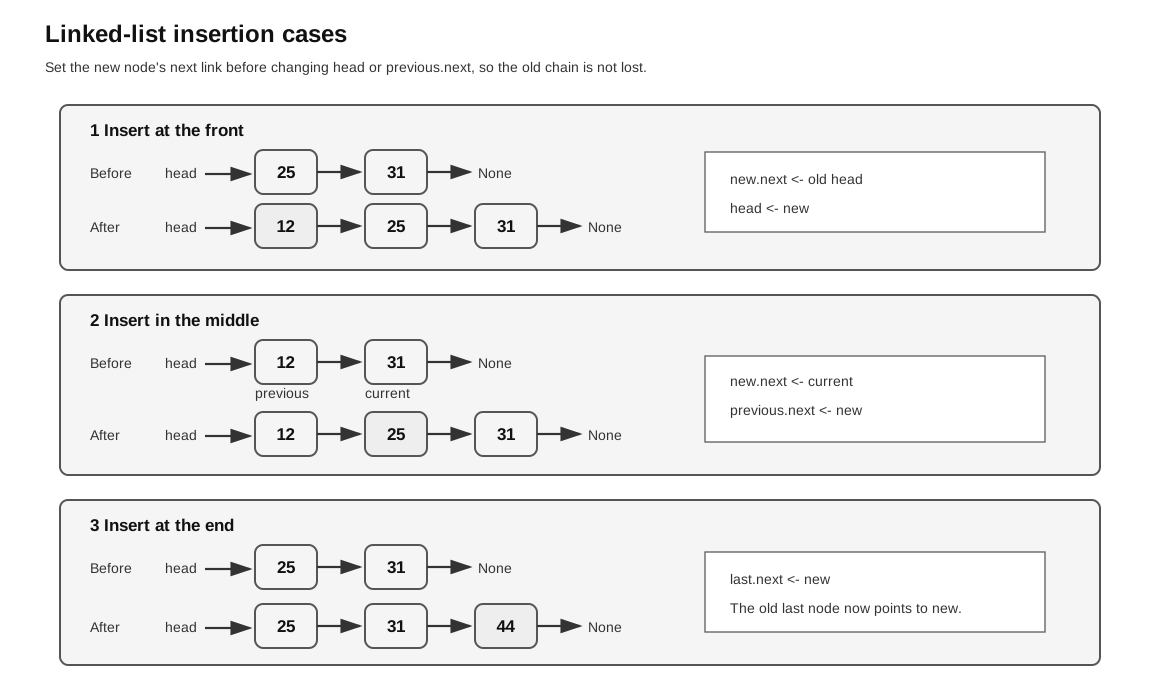
Caption: Read each case from Before to After, then verify reachability from head. The safe order is to point the new node at the old successor first and only then redirect head or previous.next; reversing these updates can lose the old tail.
For increasing order, stop at the first node whose value is not smaller than the new value.
Pseudocode:
new_node <- Node(value)

IF head is None OR value <= head.data THEN
    new_node.next <- head
    head <- new_node
ELSE
    previous <- head
    current <- head.next

    WHILE current is not None AND current.data < value
        previous <- current
        current <- current.next
    ENDWHILE

    new_node.next <- current
    previous.next <- new_node
ENDIF
Worked trace: insert 25 into this ordered list.
Before:
head -> 12 -> 31 -> 44 -> None| Step | previous | current | Reason |
|---|---|---|---|
| 1 | 12 | 31 | 31 is not less than 25, so stop |
Pointer updates:
new_node.next <- current      # 25 points to 31
previous.next <- new_node     # 12 points to 25
After:
head -> 12 -> 25 -> 31 -> 44 -> NoneThis example shows why both previous and current are useful. current identifies where the new node should go, while previous is the node whose link must be changed.
Delete a Node
To delete a node from a singly linked list, the previous node must be linked around the deleted node.
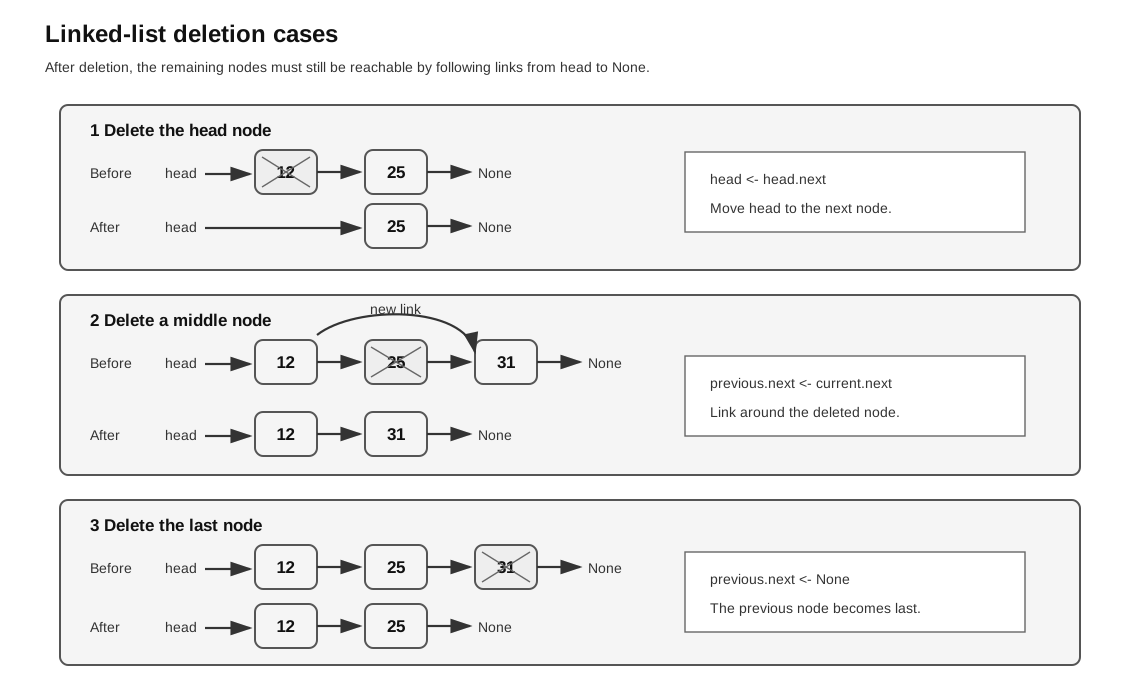
Caption: Identify whether the target is the head, middle, or last node, then follow the shown bypass update. After deletion, retrace from head: every retained node must be reached exactly once and the chain must end at None.
Pseudocode for deleting the first matching value:
IF head is None THEN
    RETURN head
ENDIF

IF head.data = target THEN
    RETURN head.next
ENDIF

previous <- head
current <- head.next

WHILE current is not None
    IF current.data = target THEN
        previous.next <- current.next
        RETURN head
    ENDIF
    previous <- current
    current <- current.next
ENDWHILE

RETURN head
The special case is deleting the first node, because the head pointer itself must change.
Python version:
def delete_first(head, target):
    if head is None:
        return head
    if head.data == target:
        return head.next

    previous = head
    current = head.next
    while current is not None:
        if current.data == target:
            previous.next = current.next
            return head
        previous = current
        current = current.next
    return head
Worked trace for deleting 25:
Before:
head -> 12 -> 25 -> 31 -> None

previous points to 12
current points to 25
previous.next <- current.next

After:
head -> 12 -> 31 -> None
The deleted node is no longer part of the chain because no used node points to it.
Deletion Cases
There are four common deletion cases.
| Case | Example | Action |
|---|---|---|
| empty list | head -> None | nothing to delete |
| delete head | head -> 12 -> 25 -> None, delete 12 | set head <- head.next |
| delete middle node | 12 -> 25 -> 31, delete 25 | set previous.next <- current.next |
| delete last node | 12 -> 25 -> 31, delete 31 | set previous.next <- None |
Deleting the last node uses the same link-around idea as deleting a middle node. Since current.next is None, previous.next <- current.next makes the previous node become the new last node.
If the target is not found, the list should remain unchanged.
Pointer Update Order Matters
Many linked-list bugs come from changing a link too early.
Safe insertion between previous and current:
new_node.next <- current
previous.next <- new_node
Safe deletion of current after previous:
previous.next <- current.nextA good exam habit is to write down the old links before changing them. This helps prevent losing part of the list.
Array-Based Linked List
Some syllabus questions represent linked lists using parallel arrays or records stored in an array. Instead of real memory addresses, links store array indices.
Example:
| Index | Data | Next |
|---|---|---|
| 0 | Ann | 2 |
| 1 | empty | 3 |
| 2 | Bo | -1 |
| 3 | empty | -1 |
If head = 0, the used linked list is:
index 0 -> index 2 -> end
Ann -> Bo
The empty slots can be tracked by a free-space list.
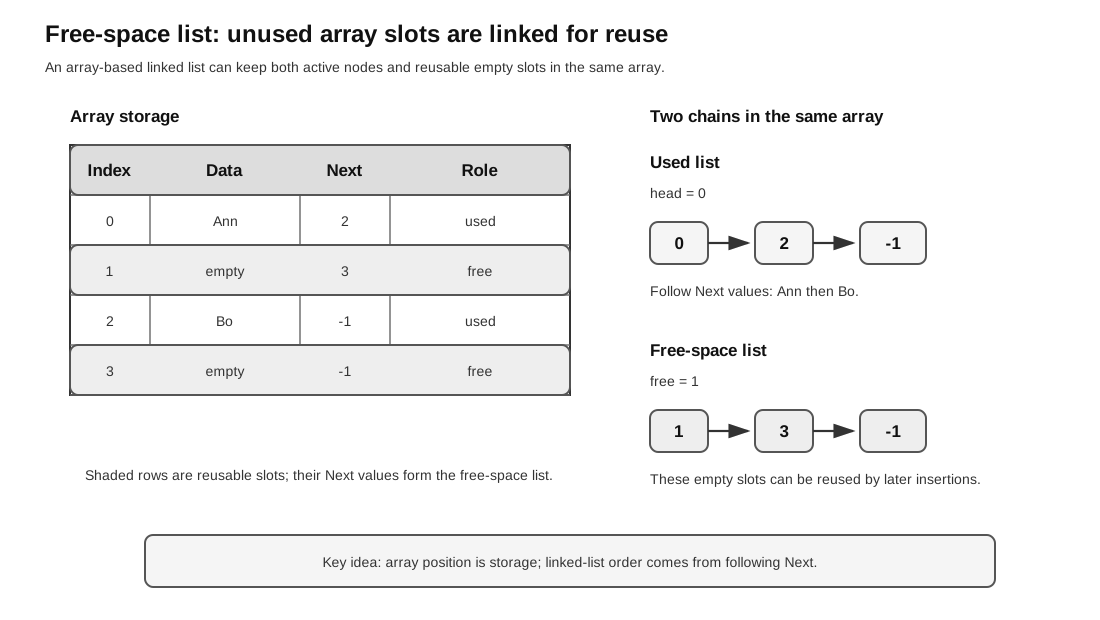
Caption: Start at head for used nodes and at free for reusable slots. Follow each Next field to -1; the two chains must not overlap and together must account for every array slot.
The key idea is that the array index is only a storage location. It is not necessarily the linked-list order.
Used List and Free-Space List
An array-based linked list often keeps two linked lists inside the same array:
- the used list, starting at
head; - the free-space list, starting at
freeornext_free.
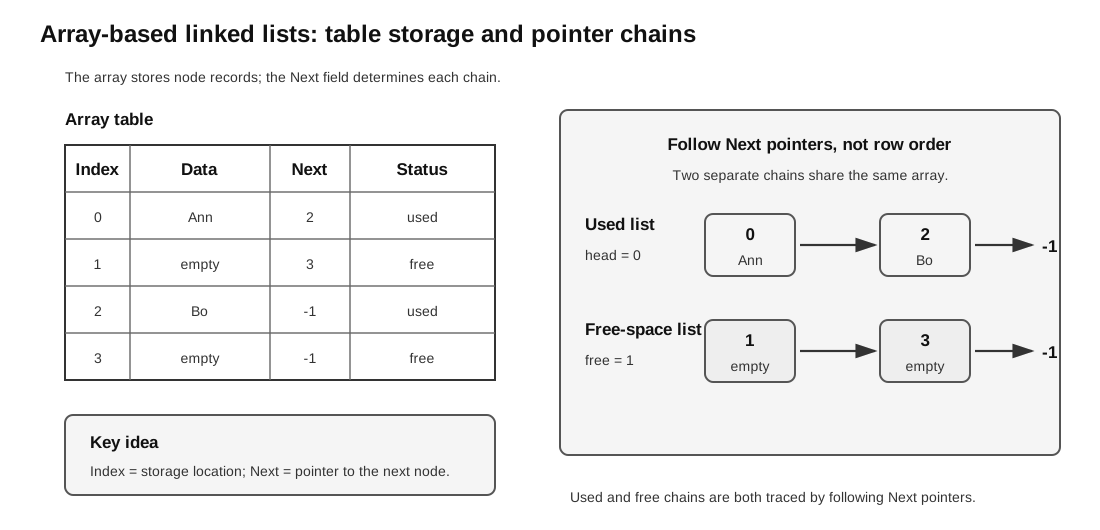
Caption: Do not read rows in index order. Trace head -> 0 -> 2 -> -1 and free -> 1 -> 3 -> -1, then compare the visited indexes with the table’s used/free status.
Example:
| Index | Data | Next |
|---|---|---|
| 0 | Ann | 2 |
| 1 | empty | 3 |
| 2 | Bo | -1 |
| 3 | empty | -1 |
head = 0
free = 1
Used list:
0 -> 2 -> -1
Ann -> Bo
Free-space list:
1 -> 3 -> -1This means slots 1 and 3 are available for future insertions.
Free-Space List
A free-space list stores the available nodes or array slots that can be reused for insertion.
In an array implementation, the program may keep:
head, which points to the first used node;free, which points to the first unused node.
When inserting:
- If
free = -1, report no available slot and leave all state unchanged. - Otherwise, take an index from the free-space list.
- Store the new data in that slot.
- Link the new slot into the used linked list.
When deleting:
- Link around the deleted node in the used list.
- Only after it is safely unlinked, add the deleted node’s slot back to the free-space list.
This is how a fixed array can simulate dynamic linked allocation.
Free-Space List Insertion Trace
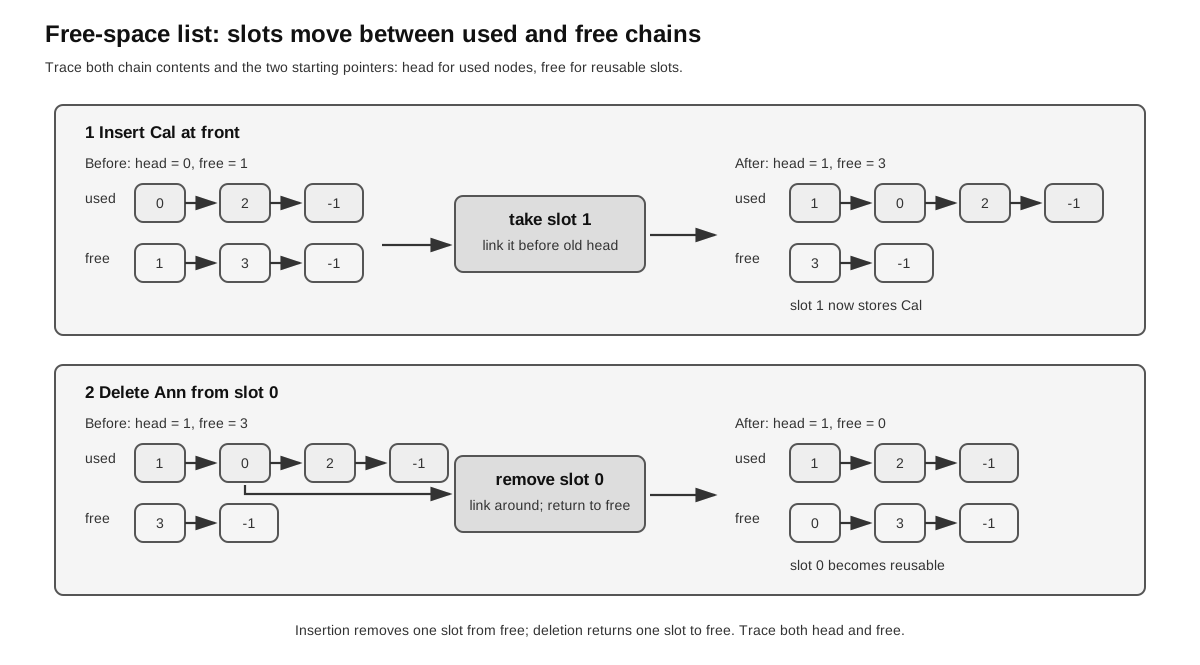
Caption: For insertion, check free != -1, remove its first slot, and link that slot into the used chain. For deletion, unlink the used slot first, then prepend it to the free chain. Read both Before and After chains and verify no index is lost or shared.
Suppose the array is:
| Index | Data | Next |
|---|---|---|
| 0 | Ann | 2 |
| 1 | empty | 3 |
| 2 | Bo | -1 |
| 3 | empty | -1 |
head = 0
free = 1
Insert Cal at the front of the used list.
First inspect free. If it were -1, insertion would fail without changing head, free, or any array entry. Here free = 1, so a slot is available.
Step 1: take the first free slot.
new_index <- free        # new_index = 1
free <- array[1].Next    # free becomes 3
Step 2: store the new data.
array[1].Data <- CalStep 3: link the new slot into the used list.
array[1].Next <- head    # 1 points to old first node, 0
head <- 1                # head now points to Cal
After insertion:
| Index | Data | Next |
|---|---|---|
| 0 | Ann | 2 |
| 1 | Cal | 0 |
| 2 | Bo | -1 |
| 3 | empty | -1 |
head = 1
free = 3
Used list:
1 -> 0 -> 2 -> -1
Cal -> Ann -> Bo
Free-space list:
3 -> -1Free-Space List Deletion Trace
Start from:
| Index | Data | Next |
|---|---|---|
| 0 | Ann | 2 |
| 1 | Cal | 0 |
| 2 | Bo | -1 |
| 3 | empty | -1 |
head = 1
free = 3
Delete Ann, which is at index 0.
The used list before deletion is:
1 -> 0 -> 2 -> -1
Cal -> Ann -> Bo
Since index 0 is after index 1, update the used list first:
array[1].Next <- array[0].Next # 1 now points to 2Then return index 0 to the free-space list:
array[0].Data <- empty
array[0].Next <- free             # 0 points to old free slot, 3
free <- 0                         # free now starts at 0
After deletion:
| Index | Data | Next |
|---|---|---|
| 0 | empty | 3 |
| 1 | Cal | 2 |
| 2 | Bo | -1 |
| 3 | empty | -1 |
head = 1
free = 0
Used list:
1 -> 2 -> -1
Cal -> Bo
Free-space list:
0 -> 3 -> -1The deleted slot is not wasted. It is available for reuse.
Structural Invariants, Efficiency, and Boundary Tests
Following next from head must reach each used node exactly once and terminate at None or -1; otherwise a node has been lost or a cycle exists. In an array representation, the used and free chains must be disjoint, terminate, and together account for every slot.
Changing a known link is , but locating the node or predecessor from head may be . Arbitrary insertion or deletion is therefore not automatically constant-time: distinguish finding the location from updating links.
Test empty and singleton lists, head/middle/tail operations, absent and duplicate targets, ordered insertion at every region, no free slot, one free slot, an empty used list, and returning the only used slot to the free chain.
Worked debugging example: if insertion after A performs A.next <- X before saving the old A.next, the old tail may become unreachable. Expected traversal is A -> X -> old tail; an actual traversal ending at X exposes the first broken invariant. Correct order: X.next <- A.next, then A.next <- X, then rerun the trace.
Common Exam Representations
Linked lists can be represented in several ways.
| Representation | What the link stores |
|---|---|
| object nodes | reference to the next node |
| parallel arrays | index of the next item |
| table of records | index or pointer in a Next field |
| diagram | arrow to the next node |
When answering a question, follow the representation used in the question. For example, if the table uses -1 as the end marker, keep using -1 rather than switching to None.
Trace Checklist
For any linked-list question, record:
- the value of
headorstart; - the value of
freeornext_freeif a free-space list is used; - the current node during traversal;
- the previous node when deletion or insertion after a node is involved;
- every changed
nextlink; - the end marker, usually
Noneor-1; - the order of nodes obtained by following links from
head.
A useful check after each operation is to trace from head to the end. If the final list cannot be followed correctly, one of the links has probably been updated wrongly.
Common Mistakes
- Treating the array index as the list order.
- Forgetting to update
headwhen inserting or deleting at the front. - Losing the rest of the list by overwriting a link too early.
- Searching only the first node.
- Forgetting that a linear linked list ends at
Noneor an end marker. - Forgetting to keep both
previousandcurrentwhen deleting or inserting in the middle. - Removing a node from the used list but forgetting to return its slot to the free-space list.
- Continuing ordered-list search even after the current value has passed the target.
- Mixing up a circular queue with a circular linked list. Circular linked lists are excluded from the core syllabus.
Check Your Understanding
- What two fields does a simple linked-list node store?
- Why is deletion at the head a special case?
- In an array-based linked list, what does the
Nextfield store? - What is the purpose of the free-space list?
- Why is the array index not necessarily the linked-list order?
- In an ordered linked list, why can search sometimes stop before the end?
- When inserting a node between
previousandcurrent, which link should be set first? - When a node is deleted from an array-based linked list, why should its slot be returned to the free-space list?
Answers:
- Data and a link to the next node.
- The
headpointer must move to the next node. - The index of the next node, or an end marker.
- It tracks unused slots that can be reused for future insertions.
- The list order is defined by the
Nextlinks, not by the physical order of array indexes. - Once the current value is greater than the target, the target cannot appear later in an increasing ordered list.
- Set
new_node.next <- currentfirst, then setprevious.next <- new_node. - Otherwise the fixed array will gradually lose reusable space after deletions.