Errors and Debugging
Debugging starts by identifying what kind of error you are dealing with. Different error types produce different symptoms and require different fixes.
You can read this note directly if you know basic Python if statements, functions, and assertions. The main beginner skill is to describe what happened before trying to fix it.
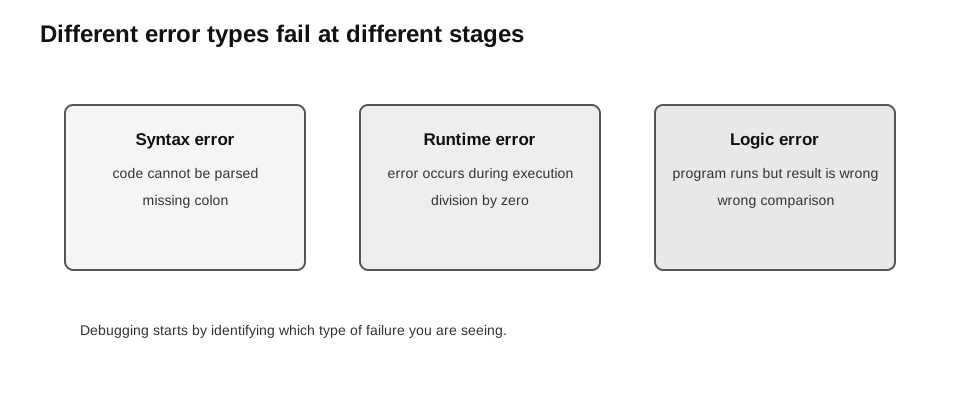
Caption: Use the execution stage and symptom to classify the fault. Syntax errors prevent successful parsing; runtime errors interrupt an executing program with an exception; logic errors allow execution but violate the intended requirement.
Quick Diagnosis
| Symptom | Likely error type |
|---|---|
| Python reports invalid syntax before normal execution begins | syntax error |
| execution raises an exception; if unhandled, normal execution is interrupted | runtime error |
| execution follows the wrong path, changes the wrong state, produces a wrong result, or fails to terminate as required | logic error |
This is only a first diagnosis. The symptom is evidence, not the underlying cause. A complete answer should identify the faulty line or condition, explain why it produces that symptom, and state a correction.
Syntax Errors
A syntax error occurs when code breaks the grammatical rules of Python, so Python cannot parse it successfully.
Example:
if mark >= 50
    result = "Pass"
The colon is missing after the condition. The program cannot run until the syntax is fixed.
Correct version:
if mark >= 50:
    result = "Pass"
Other common causes include:
- unmatched brackets or quotation marks;
- incorrect indentation;
- misspelt keywords;
- missing commas or colons where required.
Beginner debugging tip: inspect the line before the highlighted line as well. The reported location may be where Python finally detects the problem rather than where it began.
Runtime Errors
A runtime error occurs after execution has started.
Example:
age = int("abc")Python can parse this code, but converting "abc" to an integer raises a ValueError.
Run these as separate examples because the first unhandled exception would otherwise prevent the second line from being reached:
result = 10 / 0values = [10, 20, 30]
item = values[20]These can raise ZeroDivisionError and IndexError respectively.
Handling Predictable Exceptions
Exception handling lets a program respond to a predictable runtime problem instead of crashing.
def read_int(text):
    if not isinstance(text, str):
        return None
    try:
        return int(text)
    except ValueError:
        return None
Example use:
age = read_int("abc")

if age is None:
    print("Invalid age")
Catch specific exceptions where possible. A broad or bare except can hide unrelated bugs and make debugging harder.
Exception handling does not make invalid data valid. It only controls how the program responds to the error.
There are two different kinds of correction:
- If the program uses a wrong index or an unintended zero denominator, correct that programming cause.
- If invalid external input is predictable, catch the specific exception, explain the requirement, and request another input.
For read_int, the input contract is text and None is the sentinel for conversion failure. A successful conversion always returns an integer, so the sentinel cannot be confused with a valid result.
Logic Errors
A logic error occurs when the program runs but its output, control flow, state change, or termination behaviour violates the requirement.
Example:
def is_pass(mark):
    return mark > 50
If the pass mark is 50, the comparison is wrong because 50 should pass.
Correct version:
def is_pass(mark):
    return mark >= 50
Logic errors do not usually produce an exception message, so they are often found through tracing and carefully chosen test cases.
mark | Buggy mark > 50 | Correct mark >= 50 |
|---|---|---|
| 49 | False | False |
| 50 | False | True |
| 51 | True | True |
The extreme value 50 exposes the fault.
Debugging Workflow
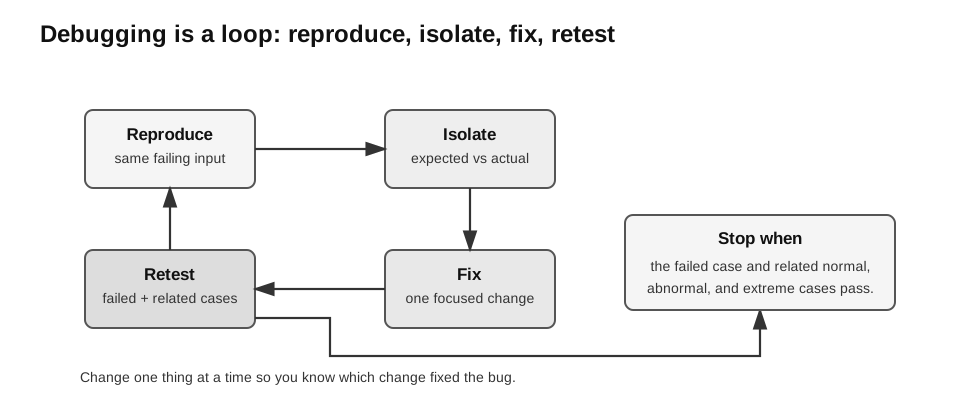
Caption: Keep the original failing input and expected result throughout the loop. After one focused correction, rerun that case and nearby or related cases; this checks the fix and guards against a regression elsewhere.
Use this workflow:
- Reproduce the problem with one specific input.
- State the expected behaviour.
- Record the actual behaviour or exception.
- Trace values and control flow near the failure.
- Isolate the smallest faulty section.
- Change one cause at a time.
- Retest the failed case.
- Retest related normal, abnormal, and extreme cases.
The last step is regression testing: previously passing behaviour is checked again after a change. This term is useful professional enrichment; the syllabus-level requirement is the underlying habit of retesting related cases.
Changing several parts at once makes it difficult to know which edit fixed the fault or introduced a new one.
Trace Example
Buggy code:
def valid_mark(mark):
    return type(mark) is int and 0 < mark < 100
Expected rule:
Marks from 0 to 100 inclusive are valid.Trace for mark = 0:
| Expression | Value |
|---|---|
0 < mark | False |
mark < 100 | True |
| whole expression | False |
The implementation excludes both valid boundaries.
Correct version:
def valid_mark(mark):
    return type(mark) is int and 0 <= mark <= 100
Retests:
assert valid_mark(0) is True
assert valid_mark(50) is True
assert valid_mark(100) is True
assert valid_mark(-1) is False
assert valid_mark(101) is False
assert valid_mark(True) is False
assert valid_mark(50.5) is False
assert valid_mark("50") is False
assert valid_mark(None) is False
Paper 1 and Paper 2 Emphasis
For a written explanation, be ready to:
- classify an error as syntax, logic, or runtime;
- explain the symptom;
- identify the cause;
- describe the correction.
For practical work, be ready to:
- reproduce the bug;
- read exception messages;
- trace variable values;
- make a focused correction;
- rerun appropriate test cases.
Common Mistakes
- Calling an incorrect answer a syntax error.
- Assuming code is correct because it runs without crashing.
- Treating all exceptions as the same type of error.
- Catching every exception and hiding the real cause.
- Changing many lines without isolating the fault.
- Retesting only the failed input and ignoring nearby boundaries.
Check Your Understanding
- Which error type is caused by a missing colon?
- Which error type is raised by
int("abc")? - Which error type is caused by using
>instead of>=? - Why should a fixed boundary bug be retested with nearby values?
Answers:
- Syntax error.
- Runtime error.
- Logic error.
- Nearby values check whether the revised condition handles both the boundary and surrounding cases correctly.