Client-Server and Socket Programming
You can read this note directly if you know Python functions, strings, loops, and basic file-running skills. Socket programming lets two running programs exchange data across a network.
The key idea is simple:
program -> bytes -> socket -> network -> socket -> bytes -> programHowever, beginners often make one important mistake. They imagine that two Python programs share variables once they are connected. They do not. Each program has its own memory. They communicate only by sending and receiving bytes.
Beginner Problem
Suppose a client program wants to send the text message hello to a server program.
The message must go through several transformations:
client string -> encode -> bytes -> socket -> bytes -> decode -> server stringSo both programs must agree on several things:
| Question | Example answer |
|---|---|
| Which computer should the client contact? | 127.0.0.1 |
| Which service on that computer should it contact? | port 50007 |
| What kind of socket is used? | TCP socket |
| How is text converted to bytes? | UTF-8 encoding |
| How does the receiver know a message is complete? | for example, message ends with \n |
| What does the message mean? | application-level protocol rules |
This note explains these ideas step by step.
Client and Server
In a client-server architecture:
- the server waits for requests;
- the client initiates contact;
- the server processes a request and sends a response.
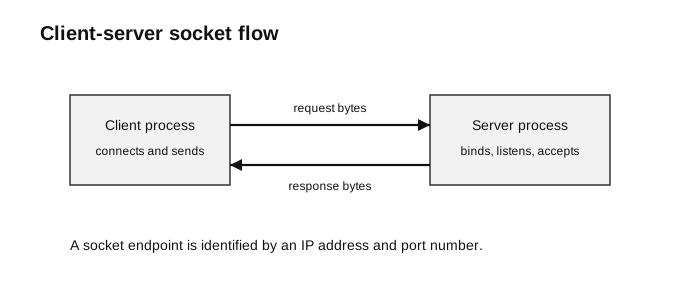
Caption: The server creates a listening socket, binds it to a known local port, and waits in accept(). A client connects to that address and port; accept() then returns a different connected socket for exchanging request and response bytes with that client. The client normally has an operating-system-selected temporary source port. Closing the connected socket does not close the listening socket.
Example:
| Application | Client | Server |
|---|---|---|
| web browsing | browser | web server |
| email app | mail server | |
| online game | game client | game server |
| simple socket program | Python client program | Python server program |
The words client and server describe roles in a communication session.
A client is usually the process that starts the communication. A server is usually the process that waits to be contacted. In simple H2 Computing socket programs, the server is started first and waits at accept(), while the client connects later using connect().
Process, Host, IP Address, and Port
A network message must reach the correct process.
There are two levels to think about:
| Level | Identifier | Meaning |
|---|---|---|
| host/device | IP address | which computer to contact |
| process/service | port number | which program or service on that computer to contact |
A socket endpoint is identified by an IP address and port number.
127.0.0.1:50007127.0.0.1 is the loopback address. It means this same computer. This is useful when testing a server and client on one machine.
50007 is the port used by the example service.
A useful beginner analogy is:
| Network idea | Delivery analogy |
|---|---|
| IP address | building address |
| port number | room or counter inside the building |
| socket | communication doorway used by a program |
The analogy is not perfect, but it helps separate the roles.
Why Ports Are Needed
One computer may run many network programs at the same time.
For example, a computer may run:
- a web server;
- an email service;
- a game server;
- a custom Python socket server.
The IP address tells the network which host to reach. The port number tells the host which process or service should receive the data.
Common examples:
| Service | Common port |
|---|---|
| HTTP web server | 80 |
| HTTPS web server | 443 |
| SMTP mail sending | 25 |
| custom classroom socket program | often a large unused port such as 50007 |
For classroom examples, choose the same port number in the server and client. If the server binds to port 50007 but the client connects to port 50008, the client is trying to contact the wrong service.
Sockets as the Program-Network Interface
A socket is a software interface that lets a program send data to, and receive data from, the network.
For H2 Computing, the most common socket model is a TCP socket:
socket.socket(socket.AF_INET, socket.SOCK_STREAM)This means:
| Part | Meaning |
|---|---|
socket.AF_INET | use IPv4 addresses |
socket.SOCK_STREAM | use TCP stream sockets |
A TCP socket gives the program a reliable ordered byte stream. This means TCP helps deliver bytes in order, but the application still needs to decide where each complete message begins and ends.
This point is important. TCP does not automatically understand your message structure. It only carries bytes.
Bytes and Encoding
Sockets send bytes, not Python strings directly.
message = "HELLO"
data = message.encode("utf-8")
text = data.decode("utf-8")
Encoding turns a string into bytes. Decoding turns bytes back into a string.
The following are different Python objects:
"HELLO"      # str
b"HELLO"     # bytes
A common beginner error is to write:
connection.sendall("HELLO") # wrong: this is a stringA socket needs bytes:
connection.sendall("HELLO".encode("utf-8"))or:
connection.sendall(b"HELLO")Use .encode() when you start from a string. Use .decode() when you receive bytes and want to process them as text.
Server Socket and Connection Socket
A beginner should distinguish two server-side sockets.
| Socket | Role |
|---|---|
| listening socket | waits for new clients |
| connection socket | communicates with one accepted client |
In the code below, server is the listening socket. connection is the new socket returned by accept() for one client.
connection, address = server.accept()The server uses connection.recv(...) and connection.sendall(...) to communicate with that client.
This distinction helps explain why a server can keep listening for future clients after accepting one connection.
Iterative Server
An iterative server handles one client connection at a time. It accepts a connection, serves it, closes it, then goes back to wait for another connection.
It is easier to write than a concurrent server, but it cannot truly serve many clients at the same time.
Run order for the examples:
- start the server program;
- leave it running;
- run the client program in another terminal or process;
- read the response printed by the client;
- run the client a second time, because this example server accepts two clients.
Small echo-style server (minimal but not message-safe):
This first example is intentionally short. It can demonstrate one tiny localhost exchange, but one recv() call is not guaranteed to return one complete application message. Use the framed version later in this note as the recommended exemplar.
import socket

HOST = "127.0.0.1"
PORT = 50007

server = socket.socket(socket.AF_INET, socket.SOCK_STREAM)
server.bind((HOST, PORT))
server.listen()

for _ in range(2):
    connection, address = server.accept()
    data = connection.recv(1024)
    message = data.decode("utf-8")
    reply = "ACK: " + message
    connection.sendall(reply.encode("utf-8"))
    connection.close()

server.close()
Important calls:
| Call | Meaning |
|---|---|
socket.socket(...) | create a TCP socket |
bind((HOST, PORT)) | attach server socket to address and port |
listen() | allow the socket to wait for incoming connections |
accept() | accept one client connection; blocks while waiting |
recv(1024) | receive up to 1024 bytes |
sendall(...) | send bytes through the socket |
close() | close the socket |
Server trace for one client:
| Step | Server action |
|---|---|
| 1 | accept() waits until a client connects |
| 2 | recv(1024) receives bytes from that client |
| 3 | decode("utf-8") turns bytes into text |
| 4 | server builds a reply string |
| 5 | encode("utf-8") turns reply text into bytes |
| 6 | sendall(...) sends the reply |
| 7 | connection closes |
| 8 | the loop returns to accept() for the next client |
Matching Client
import socket

HOST = "127.0.0.1"
PORT = 50007

client = socket.socket(socket.AF_INET, socket.SOCK_STREAM)
client.connect((HOST, PORT))
client.sendall("hello".encode("utf-8"))
data = client.recv(1024)
client.close()

print(data.decode("utf-8"))
Expected output:
ACK: helloClient trace:
| Step | Client action |
|---|---|
| 1 | creates a socket |
| 2 | connects to server IP and port |
| 3 | encodes and sends "hello" |
| 4 | receives reply bytes |
| 5 | closes the socket |
| 6 | decodes bytes and prints the reply |
The client must connect to an address that reaches the server and to the port on which the service is listening. In this loopback example, the constants happen to match exactly. In other systems a server may bind to all local interfaces while a remote client uses one specific reachable address.
In this example:
| Server line | Matching client line |
|---|---|
HOST = "127.0.0.1" | HOST = "127.0.0.1" |
PORT = 50007 | PORT = 50007 |
server.bind((HOST, PORT)) | client.connect((HOST, PORT)) |
Blocking Calls
Some socket calls may block. A blocked program is waiting for something to happen.
| Call | Why it may block |
|---|---|
accept() | waits until a client connects |
recv(1024) | waits until some bytes arrive or the connection closes |
This is why a server may look stuck after it is started. It is often not broken. It is waiting at accept().
What recv(1024) Really Means
recv(1024) means receive up to 1024 bytes.
It does not mean:
- receive exactly 1024 bytes;
- receive one complete message;
- receive everything the other side sent.
This is one of the most important ideas in socket programming.
For example, suppose the server sends:
connection.sendall(b"Hello from server\n")The client may receive all the bytes in one call:
b"Hello from server\n"But for longer messages, or in real network conditions, a program may receive only part of a message first. The remaining bytes may arrive later.
Therefore, a socket program should not assume that one recv() call always gives one complete application message.
Designing a Simple Protocol
A protocol is an agreed set of rules for communication.
A socket only moves bytes. The application protocol gives meaning to those bytes.
A protocol should answer questions such as:
- What encoding is used?
- How does the receiver know a message is complete?
- What commands are allowed?
- What reply should be sent for each command?
- What happens if the input is invalid?
A very simple protocol may be:
Client sends one line of UTF-8 text ending with \n.
Server replies with ACK: followed by the same text, also ending with \n.
Example communication:
client sends: hello\n
server sends: ACK: hello\n
The newline character \n is used as a delimiter. It marks the end of one message.
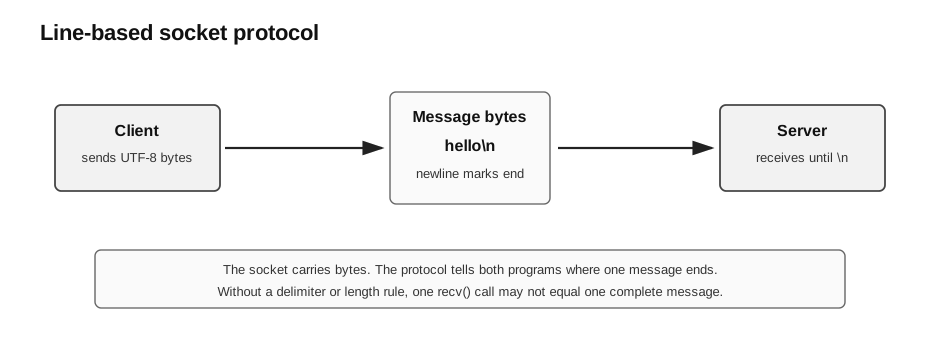
Caption: TCP supplies an ordered byte stream, not message boundaries. The receiver therefore accumulates chunks until it finds b"\n", partitions at the first delimiter, and decodes exactly one frame. A closed connection before the delimiter is incomplete input, and an input-size limit prevents unbounded buffering. If payload text may contain newlines, the protocol needs escaping or another framing rule.
Receiving Until the End of a Message
If the protocol says that each message ends with \n, the receiver can keep calling recv() until it sees b"\n".
MAX_MESSAGE_BYTES = 4096
data = b""

while b"\n" not in data and len(data) <= MAX_MESSAGE_BYTES:
    chunk = connection.recv(1024)
    if chunk == b"":
        break
    data += chunk

if b"\n" not in data:
    raise ValueError("incomplete or oversized message")

line, separator, remainder = data.partition(b"\n")
message = line.decode("utf-8")
This is safer than assuming one recv(1024) call receives a complete message.
If recv() returns b"", the other side has closed the connection normally. If no delimiter has arrived, the data is an incomplete frame and must not be processed as a normal request. A socket exception is a different failure from this orderly closure.
For beginner H2 examples, this pattern is often enough:
create empty bytes variable
repeat receiving bytes
append new bytes to previous bytes
stop when newline is found
stop if the connection closes
reject if no delimiter was received or the limit was exceeded
partition at the first delimiter and decode exactly one frame
Improved Line-Based Echo Server
The previous echo server receives once. The following version follows a simple line-based protocol.
import socket

HOST = "127.0.0.1"
PORT = 50007
MAX_MESSAGE_BYTES = 4096

def receive_line(sock):
    data = b""
    while b"\n" not in data:
        chunk = sock.recv(1024)
        if chunk == b"":
            raise ValueError("peer closed before newline")
        data += chunk
        if len(data) > MAX_MESSAGE_BYTES:
            raise ValueError("message too long")
    line, separator, remainder = data.partition(b"\n")
    if remainder:
        raise ValueError("expected one request per connection")
    return line.decode("utf-8")

with socket.socket(socket.AF_INET, socket.SOCK_STREAM) as server:
    server.setsockopt(socket.SOL_SOCKET, socket.SO_REUSEADDR, 1)
    server.bind((HOST, PORT))
    server.listen()

    for _ in range(2):
        connection, address = server.accept()
        with connection:
            try:
                message = receive_line(connection)
                reply = "ACK: " + message + "\n"
                connection.sendall(reply.encode("utf-8"))
            except (ValueError, UnicodeDecodeError, ConnectionError):
                # Reject this client; the listening loop can continue.
                pass
Matching client:
import socket

HOST = "127.0.0.1"
PORT = 50007
MAX_MESSAGE_BYTES = 4096

def receive_line(sock):
    data = b""
    while b"\n" not in data:
        chunk = sock.recv(1024)
        if chunk == b"":
            raise ValueError("server closed before newline")
        data += chunk
        if len(data) > MAX_MESSAGE_BYTES:
            raise ValueError("reply too long")
    line, separator, remainder = data.partition(b"\n")
    if remainder:
        raise ValueError("expected one reply per connection")
    return line.decode("utf-8")

with socket.socket(socket.AF_INET, socket.SOCK_STREAM) as client:
    client.connect((HOST, PORT))
    client.sendall("hello\n".encode("utf-8"))
    print(receive_line(client))
Expected output:
ACK: helloThe main improvement is not the reply itself. The main improvement is that both sides now know how to detect the end of a message.
Mini Protocol Example: PING and PONG
Many exam-style socket questions give either the server code or the client code and ask students to write the matching program.
Consider this protocol:
request bytes: b"PING\n"
success reply: b"PONG\n"
other complete request: b"ERROR\n"
Server:
import socket

HOST = "127.0.0.1"
PORT = 50007
MAX_MESSAGE_BYTES = 4096

def receive_line(sock):
    data = b""
    while b"\n" not in data:
        chunk = sock.recv(1024)
        if chunk == b"":
            raise ValueError("incomplete request")
        data += chunk
        if len(data) > MAX_MESSAGE_BYTES:
            raise ValueError("request too long")
    line, separator, remainder = data.partition(b"\n")
    if remainder:
        raise ValueError("expected one request")
    return line.decode("utf-8")

with socket.socket(socket.AF_INET, socket.SOCK_STREAM) as server:
    server.setsockopt(socket.SOL_SOCKET, socket.SO_REUSEADDR, 1)
    server.bind((HOST, PORT))
    server.listen()
    connection, address = server.accept()
    with connection:
        try:
            message = receive_line(connection)
            connection.sendall(b"PONG\n" if message == "PING" else b"ERROR\n")
        except (ValueError, UnicodeDecodeError, ConnectionError):
            pass
Matching client:
import socket

HOST = "127.0.0.1"
PORT = 50007
MAX_MESSAGE_BYTES = 4096

def receive_line(sock):
    data = b""
    while b"\n" not in data:
        chunk = sock.recv(1024)
        if chunk == b"":
            raise ValueError("incomplete reply")
        data += chunk
        if len(data) > MAX_MESSAGE_BYTES:
            raise ValueError("reply too long")
    line, separator, remainder = data.partition(b"\n")
    if remainder:
        raise ValueError("expected one reply")
    return line.decode("utf-8")

with socket.socket(socket.AF_INET, socket.SOCK_STREAM) as client:
    client.connect((HOST, PORT))
    client.sendall(b"PING\n")
    print(receive_line(client))
Expected output:
PONGWhen writing the matching client, look for:
| Server behaviour | Client must do |
|---|---|
server binds to 127.0.0.1, 50007 | connect to 127.0.0.1, 50007 |
server waits for a line ending with \n | send a line ending with \n |
server expects PING | send PING |
| server replies with bytes | receive bytes and decode if needed |
How to Read Socket Exam Questions
When given server code and asked to write the client, ask:
- What IP address and port should the client connect to?
- Does the server receive first or send first?
- What exact bytes or text does the server expect?
- Does the message need a delimiter such as
\n? - What reply should the client expect?
- Should the client decode the reply before printing?
When given client code and asked to write the server, ask:
- What IP address and port does the client connect to?
- Does the client send first or receive first?
- What exact message does the client send?
- What response does the client expect?
- Should the server loop to serve more than one client?
- When should sockets be closed?
This is usually more important than memorising code line by line.
Iterative Server with Continuous Service
The earlier server accepts only two clients. A more realistic iterative server may run continuously.
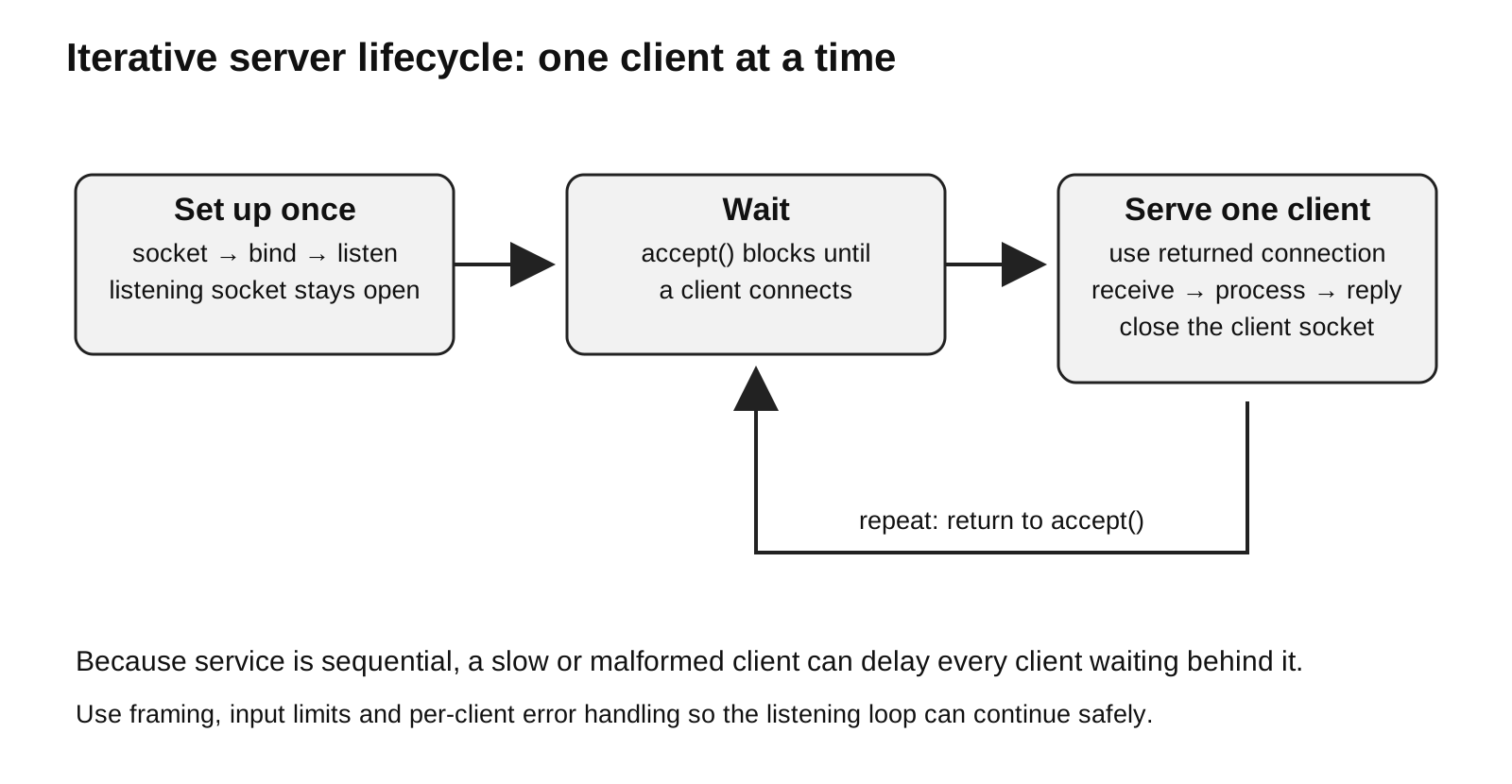
Caption: Setup occurs once. The listening socket remains open while the server repeatedly waits in accept(), serves exactly one client through the returned connected socket, closes that connection, and returns to accept(). Because clients are served sequentially, framing, size limits, and per-client error handling prevent one malformed client from stopping or monopolising the service.
import socket

HOST = "127.0.0.1"
PORT = 50007
MAX_MESSAGE_BYTES = 4096

def receive_line(sock):
    data = b""
    while b"\n" not in data:
        chunk = sock.recv(1024)
        if chunk == b"":
            raise ValueError("incomplete request")
        data += chunk
        if len(data) > MAX_MESSAGE_BYTES:
            raise ValueError("request too long")
    line, separator, remainder = data.partition(b"\n")
    if remainder:
        raise ValueError("expected one request")
    return line.decode("utf-8")

with socket.socket(socket.AF_INET, socket.SOCK_STREAM) as server:
    server.setsockopt(socket.SOL_SOCKET, socket.SO_REUSEADDR, 1)
    server.bind((HOST, PORT))
    server.listen()

    while True:
        connection, address = server.accept()
        with connection:
            try:
                message = receive_line(connection)
                reply = "ACK: " + message + "\n"
                connection.sendall(reply.encode("utf-8"))
            except (ValueError, UnicodeDecodeError, ConnectionError):
                # Reject this client and return to accept().
                pass
This server is still iterative. It can serve many clients over time, but only one at a time.
If one client takes a long time, the server cannot handle another client until the current one is finished.
A concurrent server can handle multiple clients at the same time, for example by using threads. Concurrent servers are useful in real systems, but they are outside the core beginner socket programming requirement here.
Turn-Based Communication Pattern
Some H2 questions use a simple turn-based game, such as tic-tac-toe.
A turn-based socket protocol often follows this pattern:
server sends move
client receives move
client sends move
server receives move
repeat
The exact commands must be agreed.
Example protocol:
MOVE5\n means player chooses cell 5.
END\n means player quits or the game ends.
If the server sends first, the client must receive first. If the client sends first, the server must receive first.
This is a common source of errors. If both programs call recv() first, both sides wait forever. If both programs call sendall() first, the logic may not match the intended turn order.
Common Mistakes
| Mistake | Why it is wrong |
|---|---|
| Forgetting to run the server before the client | the client has nothing to connect to |
| Using different port numbers in client and server | the client contacts the wrong service |
| Sending a string instead of bytes | sockets send bytes, not Python strings |
| Forgetting to decode received bytes | received data may be bytes, not str |
Thinking recv(1024) receives the whole message | it receives up to 1024 bytes |
| Forgetting a message delimiter | receiver may not know when a message ends |
| Expecting an iterative server to handle many clients at the same time | it handles one client at a time |
Using accept() in the client | accept() is for the server side |
Using connect() in the server listening socket | connect() is for the client side |
| Forgetting to close sockets after use | resources may remain open |
Exam-Answer Wording
Useful wording for short-answer questions:
| Question type | Good answer |
|---|---|
| What is client-server architecture? | A model where a client initiates communication by sending requests to a server, and the server waits for requests, processes them, and returns responses. |
| What does a port number identify? | A process or service on a host. |
Why are .encode() and .decode() used? | Sockets transmit bytes, while Python text is represented as strings. Encoding converts strings to bytes; decoding converts bytes back to strings. |
What does accept() do? | It waits for an incoming client connection and returns a new socket for communicating with that client. |
What does recv(1024) do? | It receives up to 1024 bytes from the socket. |
| What is an iterative server? | A server that handles one client at a time, then returns to wait for the next client. |
| Why is a protocol needed? | It defines agreed rules for message format, meaning, and how to detect complete messages. |
Check Your Understanding
- Which process initiates contact in client-server architecture?
- What does a port number identify?
- Why does socket code use
.encode()and.decode()? - What does an iterative server do after serving one client?
- Why is
recv(1024)not guaranteed to return a complete message? - What problem does a newline delimiter
\nsolve? - In a turn-based game, what may happen if both sides call
recv()first?
Answers:
- The client.
- A process or service on a host.
- Sockets send bytes, while Python text is stored as strings.
- It closes that connection and returns to wait for the next client.
- Because
recv(1024)receives up to 1024 bytes that are currently available, not necessarily one complete application-level message. - It marks the end of a message so the receiver knows when the complete message has arrived.
- Both programs may block while waiting for the other side to send data.