Character Encoding: ASCII and Unicode
You can read this note directly if you understand that computers store bit patterns. Character encoding answers this question: how can a computer store text such as letters, digits, punctuation, and symbols using numbers?
Characters Are Not Drawings
A character is the abstract symbol, such as A.
A font controls how that character is drawn on screen or paper.
An encoding controls how that character is stored as data.
For example, A can appear in many fonts, but it still has the same Unicode code point U+0041.
The Basic Idea
A character encoding maps characters to numeric codes.
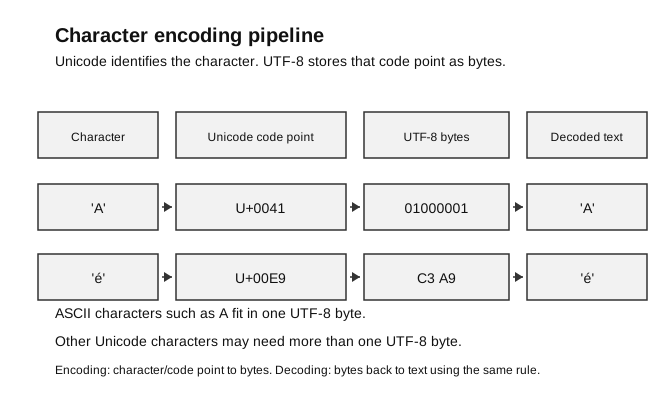
Caption: Unicode assigns each character a code point; UTF-8 is one encoding that turns that code point into bytes. The 0x prefix in the byte column means hexadecimal byte notation, and matching decoding reconstructs the character.
For example, the character A has Unicode code point U+0041, which is denary 65.
In Python:
print(ord("A"))
print(chr(65))
Output:
65
A
ord() gives the numeric code point for a one-character string. chr() converts a code point back to a character.
ASCII
ASCII is a 7-bit character encoding with codes 0 to 127, giving 128 code positions. It includes printable characters and control characters. It represents a limited set of characters, including:
- uppercase and lowercase English letters;
- digits;
- common punctuation;
- control characters such as newline.
Common examples:
| Character | Denary code |
|---|---|
A | 65 |
B | 66 |
a | 97 |
0 | 48 |
| space | 32 |
ASCII is useful historically and remains important because many common characters have the same code point in Unicode.
The phrase “extended ASCII” can refer to several incompatible 8-bit encodings; it is not one single universal extension.
Limitation: ASCII cannot represent most characters used by languages outside basic English, nor many symbols and emoji.
Beginner checkpoint: the character "7" is not the same as the integer 7. The character "7" has ASCII/Unicode code point 55. The integer 7 is a numeric value used in arithmetic.
Unicode
Unicode is a much larger standard. It assigns code points to characters from many writing systems and symbol sets.
Examples:
| Character | Unicode code point | Python value from ord() |
|---|---|---|
A | U+0041 | 65 |
é | U+00E9 | 233 |
你 | U+4F60 | 20320 |
Unicode solves the problem that different older encodings could assign different meanings to the same byte value.
Where Unicode Is Used
Unicode allows the same standard to identify characters across systems and languages. Examples include:
- multilingual web pages and apps displaying several writing systems together;
- messaging systems exchanging names, symbols, and emoji;
- documents and databases storing international text consistently;
- filenames and user interfaces containing non-English characters.
Unicode supplies code points for the characters. A concrete encoding such as UTF-8 is still needed when those code points are stored or transmitted as bytes.
Using ASCII Codes in Programs
Python’s ord() returns a Unicode code point. For a standard ASCII character, that numerical value is also its ASCII code. One useful program operation is converting a digit character to its integer value:
def ascii_digit_value(character):
    if not isinstance(character, str) or len(character) != 1:
        raise ValueError("enter exactly one character")
    code = ord(character)
    if not ord("0") <= code <= ord("9"):
        raise ValueError("character must be an ASCII digit")
    return code - ord("0")

assert ascii_digit_value("0") == 0
assert ascii_digit_value("7") == 7
assert ascii_digit_value("9") == 9
for invalid in ("", "12", "A", None, 7):
    try:
        ascii_digit_value(invalid)
        assert False
    except ValueError:
        pass
This trace distinguishes three values:
character "7" → ASCII/Unicode code 55 → subtract code for "0" (48) → integer 7Encoding Versus Decoding
Encoding turns text into bytes.
Decoding turns bytes back into text.
In Python, bytes are displayed with a leading b, such as b'Hi'. That leading b means the value is bytes, not an ordinary text string.
Example:
message = "Hi"
data = message.encode("utf-8")
print(data)
print(data.decode("utf-8"))
Output:
b'Hi'
Hi
UTF-8 is a common encoding for Unicode text. Every standard ASCII character uses the corresponding single byte in UTF-8, while many other characters use multiple bytes.
Example:
print("A".encode("utf-8"))
print("你".encode("utf-8"))
The exact byte output is different because 你 needs more bytes in UTF-8 than A.
For a beginner, the key lesson is not to memorise every byte pattern. The key lesson is that the same text must be encoded before storage and decoded with the matching rule when read back.
Why the Encoding Must Match
If text is encoded using one encoding but decoded using the wrong encoding, the result may be wrong or the program may raise an error.
Practical rule:
import os
import tempfile

with tempfile.TemporaryDirectory() as folder:
    path = os.path.join(folder, "message.txt")
    with open(path, "w", encoding="utf-8") as file:
        file.write("Hi")
    with open(path, "r", encoding="utf-8") as file:
        text = file.read()
    assert text == "Hi"
Specifying the encoding makes the program’s assumption explicit.
Beginner Model
Think in layers:
| Layer | Example |
|---|---|
| character | A |
| code point | U+0041 |
| denary value | 65 |
| byte pattern in UTF-8 | 01000001 |
Every standard ASCII character uses the corresponding single byte in UTF-8. That does not mean ASCII and Unicode are the same system. Unicode covers far more characters.
Common Mistakes
- Saying ASCII and Unicode are fonts.
- Thinking every character uses exactly one byte.
- Confusing a character such as
"7"with the integer7. - Forgetting that the same bytes must be decoded with the correct encoding.
- Assuming ASCII can represent all text.
Check Your Understanding
- What does
ord("A")return? - What does
chr(65)return? - Why is Unicode needed if ASCII already exists?
- What is the difference between encoding and decoding?
Answers:
65."A".- ASCII represents only a limited set of characters; Unicode represents characters from many writing systems and symbol sets.
- Encoding turns characters into bytes; decoding turns bytes back into characters.