File I/O
This is a bridge note. The PDF anchor for file input/output is stored under programming_fundamentals, but the official syllabus point on storing and retrieving data from serial and sequential text files belongs to 2.3 Implementing Algorithms and Data Structures.
File I/O matters because variables disappear when a program ends, but files persist on disk.
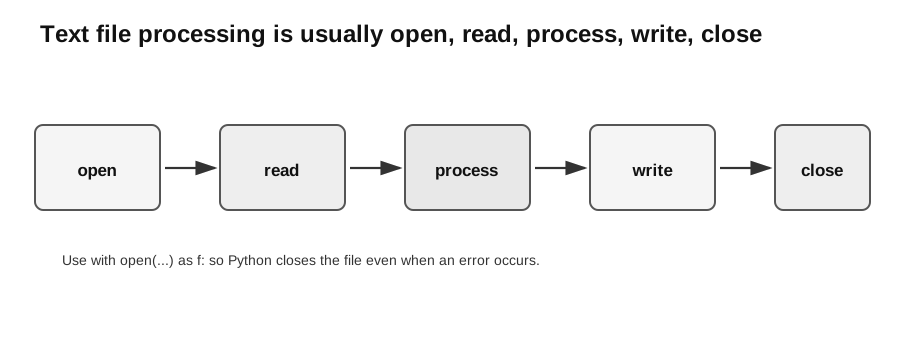
Caption: This is a read-transform-write workflow, not a rule that every task must both read and write. Choose the mode first, perform the required read and/or write operations, and let with open(...) close the file when the context exits.
Why Use Files?
Files allow a program to:
- read a large amount of data without manual re-entry;
- store output for later use;
- exchange data with other programs;
- keep records between program runs.
A file is a named location on storage. For syllabus work, focus first on text files because their contents can be read as characters and lines.
Opening Files
Python uses open() to open a file.
file = open("scores.txt", "r")
contents = file.read()
file.close()
The mode controls the operation:
| Mode | Meaning | Important risk |
|---|---|---|
"r" | read | file must exist |
"w" | write | creates a missing file; truncates existing contents |
"a" | append | creates a missing file; otherwise adds to the end |
Prefer the with form because it closes the file automatically:
with open("scores.txt", "r", encoding="utf-8") as file:
    contents = file.read()
Reading Methods
read() reads the whole file as one string.
with open("message.txt", "r", encoding="utf-8") as file:
    text = file.read()
readline() reads one line at a time.
It returns "" at end-of-file. When a stored line has a newline, the returned string normally retains "\n"; use strip() only when removing surrounding whitespace is intended.
with open("message.txt", "r", encoding="utf-8") as file:
    first_line = file.readline()
readlines() reads all lines into a list of strings.
with open("message.txt", "r", encoding="utf-8") as file:
    lines = file.readlines()
For many exam-style tasks, iterating directly over the file is simple and memory-friendly:
with open("scores.txt", "r", encoding="utf-8") as file:
    for line in file:
        score = int(line.strip())
        print(score)
Writing and Appending
Writing:
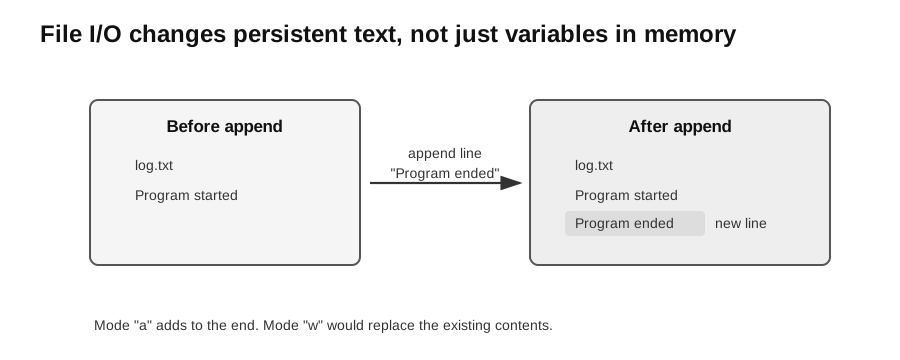
Caption: Mode "a" creates a missing file or appends after existing contents; mode "w" creates a missing file or truncates an existing one before writing. write() adds no newline automatically.
with open("result.txt", "w", encoding="utf-8") as file:
    file.write("Pass\n")
Appending:
with open("log.txt", "a", encoding="utf-8") as file:
    file.write("Program started\n")
Remember that write() does not automatically add a newline. Add "\n" when each item should appear on a new line.
For beginners, it helps to separate two kinds of state:
| State | Where it lives | Example |
|---|---|---|
| variable state | memory while the program runs | passes = 3 |
| file state | storage that persists after the program ends | the lines inside scores.txt |
Reading copies text from the file into variables. Writing or appending changes the file contents.
Serial and Sequential Text Files
These terms describe file organisation, not Python access modes.
A serial file stores records in the order they were added. To find a record, the program may need to read from the start until it reaches the target.
A sequential file stores records in order by a key field. The key field is unique and ordered, but not necessarily consecutive.
For example:
1001,Aisha,72
1004,Bo,85
1008,Chen,68
If the first field is the key and records are sorted by ascending unique key, search begins at the start and may stop unsuccessfully once the current key exceeds the target. Otherwise it stops when found or at end-of-file.
Processing Line-Based Data
Example: read marks from lines and count passes.
def count_passes(path):
    passes = 0
    with open(path, "r", encoding="utf-8") as file:
        for line in file:
            mark = int(line.strip())
            if mark >= 50:
                passes = passes + 1
    return passes
The important state change is passes = passes + 1, which updates the count only when the current mark is at least 50.
Contract for this simple version: every line is non-blank and contains one integer mark in 0..100; an empty file is allowed and returns 0. A blank or malformed line violates the precondition and the unguarded example raises ValueError. If validity is not guaranteed, implement a clear reject or skip-and-report policy. Test empty, one-line, marks 0/50/100, blank, and malformed files.
Worked debugging method: under a reject policy, a blank line should produce a clear line-numbered error, whereas direct int(line.strip()) gives an unexplained ValueError. Trace line number and cleaned text, validate before conversion, then rerun empty, valid, blank, and malformed inputs.
Updating Records in a Text File
Text files are normally processed sequentially. To change or remove a record safely, a common approach is:
- read the original file;
- write the required records to a new temporary file;
- replace the old file after processing succeeds.
Do not expect a simple text file to support changing the length of one middle line in place.
CSV-Style Data
The csv module is useful practical support rather than a separately named core operation. Define behaviour for empty, header-only, short, and malformed rows; next(reader) on an empty file raises StopIteration unless guarded.
CSV stands for comma-separated values. It stores tabular data as text.
name,mark
Aisha,72
Bo,85
Chen,68
Python has a csv module for robust CSV processing. For simple syllabus examples, first understand the idea of one record per line and fields separated by commas.
Precondition for the concise snippet below: the file exists, has a header, and every later row contains at least two fields with an integer mark in field 1. Empty/header-only/short/malformed inputs require validation before next(reader), indexing, or conversion.
import csv

with open("marks.csv", "r", encoding="utf-8", newline="") as file:
    reader = csv.reader(file)
    header = next(reader)
    for row in reader:
        name = row[0]
        mark = int(row[1])
        print(name, mark)
JSON Resource Files
This is optional enrichment. It helps connect file processing to practical resource files, but JSON processing is outside the core syllabus outcome on serial and sequential text files unless a task explicitly supplies this context.
Some practical tasks provide JSON files instead of plain text or CSV. JSON stores structured data using familiar shapes:
| JSON shape | Python shape after loading |
|---|---|
| object | dictionary |
| array | list |
| string | string |
| number | integer or float |
| true/false | True/False |
Example JSON file:
[
  {"asset_id": "L001", "kind": "laptop", "age_days": 380},
  {"asset_id": "T014", "kind": "tablet", "age_days": 1250}
]
Read it with Python’s json module:
import json

with open("devices.json", "r", encoding="utf-8") as file:
    devices = json.load(file)

for device in devices:
    if device["age_days"] > 1000:
        print(device["asset_id"], device["kind"])
The important skill is inspecting the loaded structure before writing the full solution. If you are unsure what shape the data has, print a small sample:
print(type(devices))
print(devices[0])
Do not guess field names. Read them from the supplied file or from the question.
Date and Time Fields in Files
This is optional enrichment. It is useful for practical tasks that supply date fields, but detailed date parsing is not an examinable core requirement of file I/O unless the question provides the required format or library context.
Resource files may store dates as strings. Before calculating with dates, convert the string into a date or datetime object.
from datetime import datetime

raw_date = "2026-07-08"
installed_on = datetime.strptime(raw_date, "%Y-%m-%d").date()
today = datetime.strptime("2026-07-20", "%Y-%m-%d").date()

age_days = (today - installed_on).days
print(age_days)
The format string must match the file data:
| File value | Format string |
|---|---|
2026-07-08 | "%Y-%m-%d" |
08/07/2026 | "%d/%m/%Y" |
2026-07-08 14:30 | "%Y-%m-%d %H:%M" |
If date conversion fails, check the exact separator, field order, and whether there are leading or trailing spaces.
Common Bugs
- Opening a file from the wrong folder.
- Using
"w"when you meant"a", causing old contents to be overwritten. - Forgetting to close a file when not using
with. - Forgetting that file data is read as text and may need
int()orfloat(). - Guessing JSON keys without inspecting the loaded dictionary.
- Treating date strings as dates before converting them.
- Forgetting to strip newline characters before conversion or comparison.
- Writing values without converting them to strings.
Check Your Understanding
Try these before looking back at the explanations:
- Which mode overwrites an existing file?
- Which mode adds to the end of an existing file?
- Why is
line.strip()often used beforeint(line.strip())? - Why is
with open(...) as file:preferred over manually callingclose()? - After
json.load(file), what Python types should you expect? - Why must a date string be converted before calculating the number of days between two dates?
Answers:
"w"."a".- It removes newline characters and surrounding whitespace before conversion.
- Python closes the file automatically when the
withblock ends. - Usually dictionaries, lists, strings, numbers, and Boolean values, depending on the JSON structure.
- String subtraction has no date meaning; Python needs
dateordatetimeobjects to calculate a duration.