SQLite with Python and NoSQL
You can read this note directly if you know basic Python functions, variables, lists, tuples, dictionaries, and simple SQL.
This note connects programs to databases.
H2 Computing requires practical work with both relational SQL databases and NoSQL databases. This note therefore develops two core paths: Python’s sqlite3 module for SQLite, and current PyMongo methods for a MongoDB document database. The aim is not to memorise one product; it is to understand the data model, use safe CRUD operations, and justify the appropriate choice.
Beginner Problem
A program can store data in variables while it is running:
books = ["Data Trails", "Networks First"]But this data disappears when the program ends unless it is saved somewhere.
A database allows the program to store data persistently and retrieve it later:
Python program -> SQLite database -> stored recordsFor example, a school library program may need to:
- add a new book;
- record that a student borrowed a book;
- search for available books;
- update a book’s availability;
- keep the data after the program closes.
This is why a Python program often needs a database.
Big Picture
SQL and Python have different jobs.
| SQL responsibility | Python responsibility |
|---|---|
| define database tables | decide when setup code should run |
| insert, update, delete, or select records | collect input values and pass them into SQL statements |
| filter, sort, group, and join table rows | process the results returned by the database |
| describe what should happen to the data | control the flow of the program |
| use placeholders for supplied values | provide the parameter values safely |
A useful mental model is:
SQL describes the database operation.
Python decides when to run it and what to do with the result.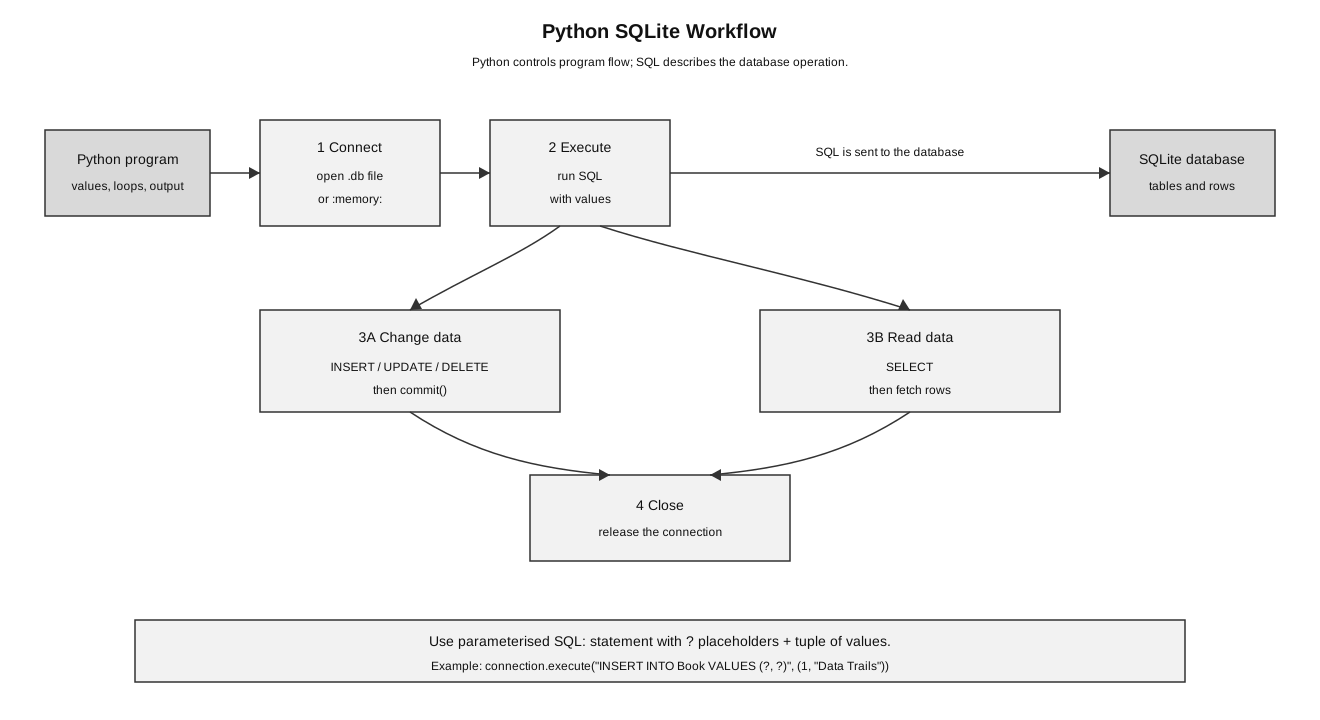
Caption: A Python program opens a SQLite connection, enables required connection settings, and executes parameterised SQL. A successful write is committed; a failed transaction is rolled back. A read fetches cursor rows, and the connection is closed after the work finishes.
SQLite Workflow in Python
The basic workflow is:
- import
sqlite3; - connect to a database;
- execute SQL statements;
- commit changes when stored data is modified;
- fetch results when reading data;
- close the connection.
import sqlite3

connection = sqlite3.connect(":memory:")
connection.execute("PRAGMA foreign_keys = ON")
connection.execute("CREATE TABLE Book (book_id INTEGER PRIMARY KEY, title TEXT)")
connection.execute("INSERT INTO Book VALUES (?, ?)", (1, "Data Trails"))
connection.commit()
rows = connection.execute("SELECT title FROM Book").fetchall()
connection.close()

print(rows)
Output:
[('Data Trails',)]fetchall() returns a list of tuples. Each tuple is one result row.
In the output:
[('Data Trails',)]- the square brackets mean a list of rows;
- the parentheses mean one row tuple;
- the comma appears because the tuple has one selected field.
In-Memory Database Versus File Database
SQLite can connect to an in-memory database or a database file.
sqlite3.connect(":memory:")This creates a temporary database in memory. It is useful for quick examples and tests. The data disappears when the program ends.
sqlite3.connect("library.db")This connects to a database file called library.db. If the file does not exist, SQLite can create it. Data in the file can remain after the program ends.
| Connection | Meaning | Typical use |
|---|---|---|
":memory:" | temporary database stored in memory | examples, testing, short demonstrations |
"library.db" | database stored in a file | small local apps, school lab tasks, persistent storage |
Beginner warning: if your data disappears every time the program ends, check whether you used ":memory:" instead of a database file.
A Complete Mini SQLite Program
This disposable program creates a small Book table in memory, inserts two records, reads them back, and closes the connection. It cannot overwrite a learner’s existing database file.
import sqlite3

# 1. Connect to a disposable in-memory database.
connection = sqlite3.connect(":memory:")
connection.execute("PRAGMA foreign_keys = ON")

# 2. Create the table for this demonstration.
connection.execute("""
CREATE TABLE Book (
    book_id INTEGER PRIMARY KEY,
    title TEXT NOT NULL,
    author TEXT NOT NULL,
    available INTEGER NOT NULL CHECK (available IN (0, 1))
)
""")

# 3. Insert records using parameterised queries.
connection.execute(
    "INSERT INTO Book VALUES (?, ?, ?, ?)",
    (1, "Data Trails", "M Tan", 1)
)

connection.execute(
    "INSERT INTO Book VALUES (?, ?, ?, ?)",
    (2, "Networks First", "L Wong", 1)
)

# 4. Save changes.
connection.commit()

# 5. Read records.
cursor = connection.execute(
    "SELECT book_id, title, author FROM Book WHERE available = ?",
    (1,)
)

rows = cursor.fetchall()

for row in rows:
    print(row)

# 6. Close the connection.
connection.close()
Possible output:
(1, 'Data Trails', 'M Tan')
(2, 'Networks First', 'L Wong')
Trace the program:
| Step | Code idea | What happens |
|---|---|---|
| connect | sqlite3.connect(":memory:") | opens a disposable database for a safe demonstration |
| configure | PRAGMA foreign_keys = ON | enables SQLite foreign-key enforcement for this connection |
| create | CREATE TABLE | creates the demonstration table |
| insert | INSERT INTO Book VALUES ... | adds rows to the table |
| commit | connection.commit() | saves the inserted rows |
| select | SELECT ... WHERE ... | retrieves matching rows |
| fetch | fetchall() | returns result rows to Python |
| loop | for row in rows | processes each returned row |
| close | connection.close() | releases the database connection |
Cursor and Result Rows
When a SELECT statement is executed, the database may return rows. Python receives these rows through a cursor.
The short code fences from here to “Mini Pattern” are focused excerpts, not a single program to run in note order. Each assumes that an open connection and the stated table/data already exist. Use the complete disposable program above as the executable model.
cursor = connection.execute(
    "SELECT book_id, title FROM Book WHERE book_id = ?",
    (1,)
)
A cursor is like a handle for the query result. It lets the program fetch rows returned by the database.
row = cursor.fetchone()After fetchone(), row may be:
(1, 'Data Trails')The first item is book_id; the second item is title, matching the order in the SELECT clause.
If no matching row exists, fetchone() returns None.
if row is None:
    print("Book not found")
else:
    print(row[1])
fetchone() Versus fetchall()
| Method | Meaning | Typical use |
|---|---|---|
fetchone() | fetch one result row | when expecting zero or one matching record |
fetchall() | fetch all result rows as a list | when expecting several matching records |
Example:
cursor = connection.execute(
    "SELECT title FROM Book WHERE available = ?",
    (1,)
)

rows = cursor.fetchall()
If two books are available, rows may be:
[('Data Trails',), ('Networks First',)]A common beginner mistake is forgetting that each row is a tuple. To get the title from the first row:
first_title = rows[0][0]The first [0] selects the first row. The second [0] selects the first field inside that row.
Parameterised Queries
Do this:
connection.execute(
    "INSERT INTO Book VALUES (?, ?, ?, ?)",
    (3, "Algorithms Today", "S Lee", 1)
)
Avoid building SQL by joining user input into the SQL string:
sql = "INSERT INTO Book VALUES (" + user_input + ")"
connection.execute(sql)
Parameterised queries keep the SQL structure separate from the data values. This reduces syntax errors and helps protect against SQL injection.
Beginner model:
SQL statement:  INSERT INTO Book VALUES (?, ?, ?, ?)
Values:         (3, "Algorithms Today", "S Lee", 1)
The ? placeholders mark where values should go. SQLite receives the statement and the values separately.
Why String Concatenation Is Unsafe
Suppose a program builds a query like this:
title = input("Enter title: ")
sql = "SELECT * FROM Book WHERE title = '" + title + "'"
rows = connection.execute(sql).fetchall()
This is weak because the user input becomes part of the SQL command itself. If the input contains quotes or SQL fragments, the query may break or behave in an unintended way.
Use parameters instead:
title = input("Enter title: ")
rows = connection.execute(
    "SELECT * FROM Book WHERE title = ?",
    (title,)
).fetchall()
This keeps the command structure fixed and treats title as a value.
The One-Item Tuple Trap
When passing one parameter, the comma matters.
(1,)   # correct one-item tuple
(1)    # just the integer 1
Correct:
cursor = connection.execute(
    "SELECT title FROM Book WHERE book_id = ?",
    (1,)
)
Incorrect:
cursor = connection.execute(
    "SELECT title FROM Book WHERE book_id = ?",
    (1)
)
The second version passes an integer, not a tuple of parameters.
Commit and Rollback
commit() saves changes.
Use commit() after statements that modify stored data, such as:
INSERT;UPDATE;DELETE;- table creation or schema changes when needed.
For SELECT, no commit is needed because no stored data is changed.
connection.execute(
    "UPDATE Book SET available = ? WHERE book_id = ?",
    (0, 1)
)
connection.commit()
rollback() reverts uncommitted changes.
connection.execute(
    "UPDATE Book SET available = ? WHERE book_id = ?",
    (0, 1)
)
connection.rollback()
After rollback(), the update is not saved.
Beginner warning: if an INSERT, UPDATE, or DELETE appears to work during the program but disappears later, check whether commit() was called.
Transaction with an error path
A write sequence should have a stated success and failure contract. In this pattern, a committed baseline is followed by a second transaction: either every statement succeeds and commits, or an SQLite error rolls back every uncommitted change in that second transaction. Assertions verify the post-state before the connection closes.
import sqlite3

connection = sqlite3.connect(":memory:")
connection.execute(
    "CREATE TABLE Counter (counter_id INTEGER PRIMARY KEY, value INTEGER CHECK(value >= 0))"
)
connection.execute("INSERT INTO Counter VALUES (?, ?)", (1, 10))
connection.commit()  # committed baseline

error_occurred = False
try:
    connection.execute("INSERT INTO Counter VALUES (?, ?)", (2, 20))
    connection.execute("UPDATE Counter SET value = ? WHERE counter_id = ?", (-1, 1))
    connection.commit()
except sqlite3.Error:
    error_occurred = True
    connection.rollback()

assert error_occurred is True
assert connection.execute("SELECT value FROM Counter WHERE counter_id = 1").fetchone() == (10,)
assert connection.execute("SELECT COUNT(*) FROM Counter WHERE counter_id = 2").fetchone() == (0,)
connection.close()
rollback() affects only changes not yet committed. It is not a substitute for a backup, because a backup protects against loss or corruption beyond the current transaction.
Safe Update Example
A library program wants to mark a book as unavailable after it is borrowed.
book_id = int(input("Enter book ID: "))

connection.execute(
    "UPDATE Book SET available = ? WHERE book_id = ?",
    (0, book_id)
)
connection.commit()
The WHERE condition matters. Without it, every book might be marked unavailable.
# Dangerous: updates every row
connection.execute("UPDATE Book SET available = 0")
This is an SQL logic error, not a Python syntax error. The program may run, but the data may be wrong.
Mini Pattern: Search and Display Records
A common Paper 2-style pattern is:
- collect a search value;
- run a parameterised
SELECTquery; - fetch rows;
- check whether results exist;
- display the results.
keyword = input("Enter part of the title: ")

cursor = connection.execute(
    "SELECT book_id, title, author FROM Book WHERE title LIKE ?",
    ("%" + keyword + "%",)
)

rows = cursor.fetchall()

if len(rows) == 0:
    print("No matching books found")
else:
    for row in rows:
        print(row[0], row[1], row[2])
The % symbols are SQL wildcards used with LIKE.
"%data%" means any title containing data.NoSQL Idea
Relational databases store data in tables with fields and relationships. NoSQL databases use other models, such as:
- document stores;
- key-value stores;
- wide-column stores;
- graph databases.
At syllabus depth, the most useful beginner comparison is usually between a relational table model and a document model.
Document databases store each record as a document-like structure. In Python, a document is similar to a dictionary:
student = {
    "student_id": 101,
    "name": "Aisha",
    "interests": ["robotics", "databases"],
    "guardian": {"name": "Mr Rahman", "phone": "91234567"}
}
This nested structure can be convenient when related data is usually read together.
In a relational design, guardian might be stored in a separate table and linked by a key. In a document design, guardian details may be nested inside the student document if the application usually reads student and guardian details together.
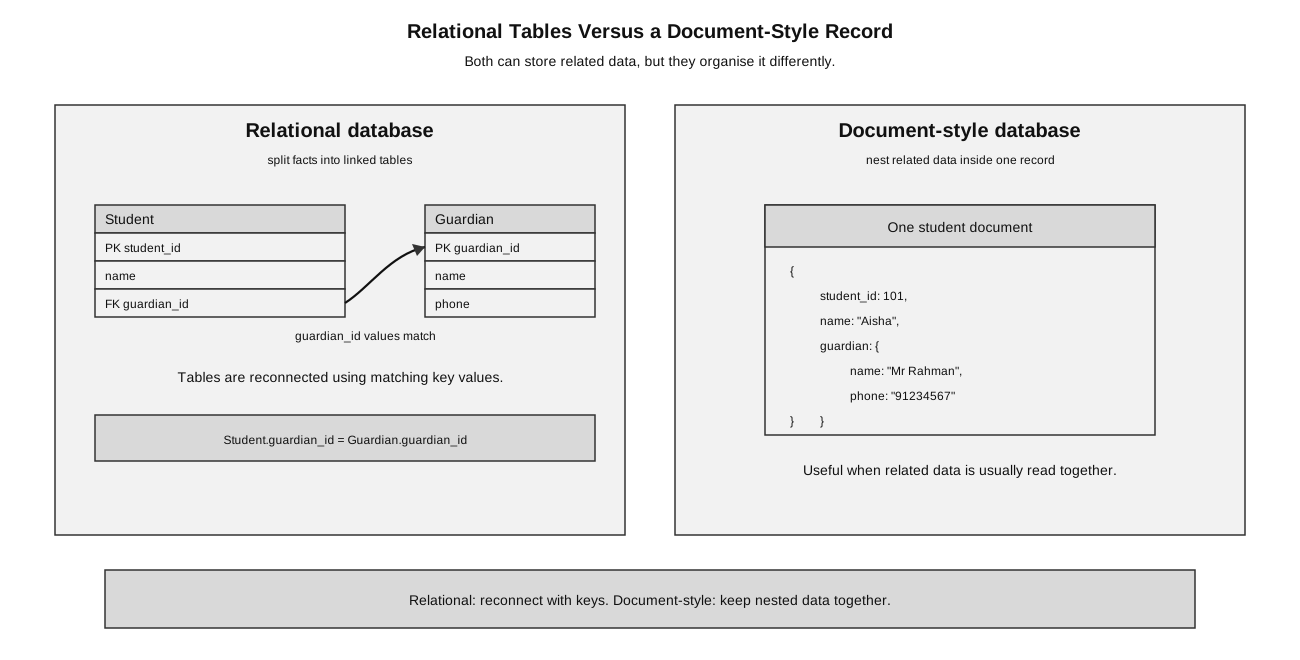
Caption: A relational design stores the shared guardian fact once and reconnects it through a key. A document may embed related data for convenient whole-record reads, but embedding the same guardian in several student documents can duplicate a shared fact; document designs may use references instead when that trade-off matters.
When SQL Feels Natural and When Documents Feel Natural
SQL relational databases feel natural when the data is structured and relationships matter.
Example:
Student(student_id, name, class_id)
Class(class_id, tutor)
Book(book_id, title, author)
Loan(loan_id, student_id, book_id, loan_date)
This is suitable when:
- records have clear fields;
- relationships between records matter;
- consistency is important;
- joins are useful;
- the structure is stable.
Document-style data may feel natural when records are nested or vary in shape.
Example:
product = {
    "name": "Laptop A",
    "category": "laptop",
    "specifications": {
        "screen_size": "14 inch",
        "RAM": "16 GB",
        "storage": "512 GB"
    },
    "reviews": [
        {"user": "Aisha", "rating": 5},
        {"user": "Bo", "rating": 4}
    ]
}
This may be suitable when:
- records have flexible structures;
- related nested data is often read together;
- different items may have different attributes;
- the application does not always need many joins.
SQL Versus NoSQL
| Feature | SQL relational database | NoSQL document database |
|---|---|---|
| structure | tables with schema | flexible documents |
| records | rows in tables | document-like records |
| relationships | joins using keys | often nested or referenced |
| good for | structured, consistent data | flexible or changing data |
| examples | SQLite, MySQL, PostgreSQL | MongoDB-style document stores |
The comparison is about tendencies and design choices, not universal laws:
| Requirement or trade-off | Relational tendency | NoSQL/document tendency |
|---|---|---|
| schema | predefined tables support uniform, structured records | flexible documents support varying or evolving fields |
| relationships | keys and joins make cross-record relationships explicit | related data may be embedded or referenced; repeated embedding can duplicate shared facts |
| consistency | transactions commonly emphasise ACID properties and immediate constraint checking | some distributed designs trade immediate consistency for availability or partition tolerance, although capabilities differ by product/configuration |
| scaling | server-based relational systems can scale vertically and may also support distributed scaling | many NoSQL systems are designed for horizontal distribution across nodes |
| data shape | strong fit for structured, interrelated records | strong fit for nested, semi-structured, high-volume, or rapidly changing records |
Avoid two false absolutes: SQL systems are not limited to one server, and NoSQL systems do not all sacrifice immediate consistency. Justify from the stated workload and product behavior.
SQL is often suitable for school records, banking transactions, library loans, and systems needing strong consistency.
NoSQL is often suitable for large-scale flexible content, logs, product catalogues with varying attributes, nested profiles, and rapidly changing data shapes.
For example, a financial transfer system benefits from transactional consistency across related account records. A sensor-ingestion or activity-log system may benefit from flexible documents and horizontal distribution because records arrive at high volume and may evolve in shape. The scenario requirements—not which technology is newer—drive the choice.
Important: NoSQL does not mean “no structure”. It means the database does not follow the traditional relational table model in the same way.
Concept Scaffold: Documents as Python Dictionaries
Without needing a MongoDB server, the idea can be modelled with Python lists and dictionaries:
students = [
    {"name": "Aisha", "class_id": "24S01"},
    {"name": "Bo", "class_id": "24S02"},
    {"name": "Chen", "class_id": "24S01"},
]

matches = []
for student in students:
    if student["class_id"] == "24S01":
        matches.append(student["name"])
After the loop:
matches = ["Aisha", "Chen"]This is concept scaffolding only. It helps relate a document to a familiar dictionary, but it is not a database operation and does not replace PyMongo.
Practical MongoDB CRUD with PyMongo
Before this code runs, a MongoDB server must be available and the pymongo package installed. MongoClient represents the connection to the server; selecting a database or collection does not necessarily store it permanently until data is inserted.
from uuid import uuid4
from pymongo import ASCENDING, MongoClient

client = MongoClient("mongodb://localhost:27017/", serverSelectionTimeoutMS=3000)
database_name = "school_demo_" + uuid4().hex
server_ready = False

try:
    client.admin.command("ping")  # fail clearly if the server is unavailable
    server_ready = True
    collection = client[database_name]["students"]
    collection.create_index([("student_id", ASCENDING)], unique=True)

    insert_result = collection.insert_many([
        {"student_id": 101, "name": "Aisha", "class_id": "24S01", "score": 78},
        {"student_id": 102, "name": "Bo", "class_id": "24S02", "score": 65},
    ])
    assert len(insert_result.inserted_ids) == 2

    one_student = collection.find_one(
        {"student_id": 101},
        {"_id": 0, "name": 1, "score": 1},
    )
    assert one_student == {"name": "Aisha", "score": 78}

    high_scorers = list(collection.find(
        {"score": {"$gte": 70}},
        {"_id": 0, "name": 1, "score": 1},
    ))
    assert high_scorers == [{"name": "Aisha", "score": 78}]

    update_result = collection.update_one(
        {"student_id": 102},
        {"$set": {"score": 69}},
    )
    assert update_result.matched_count == 1
    assert update_result.modified_count == 1

    delete_result = collection.delete_one({"student_id": 102})
    assert delete_result.deleted_count == 1
    assert collection.count_documents({}) == 1
finally:
    try:
        if server_ready:
            client.drop_database(database_name)
    finally:
        client.close()
MongoDB automatically gives every document a unique _id unless one is supplied. The example also creates a unique index on the application’s logical student_id; MongoDB does not make arbitrary fields unique by default.
The second dictionary passed to find_one or find is a projection: values of 1 include named fields, while {"_id": 0} excludes _id from the returned document. Do not freely mix inclusion and exclusion in one projection apart from this special _id case.
$set updates or adds the named fields without replacing the whole document. $unset removes named fields, for example {"$unset": {"temporary_note": ""}}.
Read the filters as conditions:
| PyMongo form | Meaning |
|---|---|
{"student_id": 101} | equality match |
{"score": {"$gte": 70}} | score at least 70 |
{"$and": [{...}, {...}]} | both conditions must hold |
{"$or": [{...}, {...}]} | at least one condition must hold |
{"field": {"$exists": True}} | the document contains the field |
For multiple records, use insert_many, update_many, or delete_many deliberately. Current PyMongo uses list_database_names(), list_collection_names(), and count_documents(filter); avoid obsolete examples using database_names(), collection_names(), cursor .count(), insert(), update(), or remove().
Choosing Between SQL and NoSQL in a Question
Use the information given in the question.
| Scenario clue | Better reasoning |
|---|---|
| fixed fields, clear relationships, need consistency | relational database is likely suitable |
| nested records, flexible attributes, varying record shapes | document-style NoSQL may be suitable |
Python lab task using sqlite3 | use SQLite and parameterised SQL |
| exam asks about tables, keys, joins, normalisation | use relational database concepts first |
Weak answer:
NoSQL is better because it is newer.Better answer:
A NoSQL document database may be suitable if records have flexible nested structures and are usually read as whole documents. A relational database may be better if the data has stable tables, clear relationships, and needs consistent joins using keys.Common Mistakes
- Forgetting to call
commit()afterINSERT,UPDATE, orDELETE. - Closing the connection before fetching query results.
- Passing a one-item parameter tuple as
(value)instead of(value,). - Concatenating user input into SQL strings.
- Forgetting that
fetchall()returns a list of tuples. - Treating
:memory:as if it saves data permanently. - Running
UPDATEorDELETEwithout a suitableWHEREcondition. - Saying NoSQL means “no database structure at all”.
- Assuming NoSQL is always better than SQL.
- Mixing up Python dictionaries with actual database storage. A dictionary can model document-like data, but it is not automatically a database.
How to Answer This in Exams
For SQLite with Python questions:
- identify the database operation required;
- write the SQL statement;
- use
?placeholders for supplied values; - pass parameters as a tuple;
- call
commit()if data is changed; - use
fetchone()orfetchall()if data is read; - close the connection when finished.
For SQL versus NoSQL questions:
- describe the structure of the data;
- identify whether relationships and consistency are important;
- identify whether records are flexible or nested;
- choose a suitable database model;
- justify the choice using the scenario.
Check Your Understanding
- What does
sqlite3.connect()do? - What is the difference between
sqlite3.connect(":memory:")andsqlite3.connect("library.db")? - Why should values be passed using
?placeholders? - Why does
(1,)mean something different from(1)? - When is
commit()needed? - What does
fetchall()return? - Give one situation where a document database may be suitable.
- Why is it wrong to say NoSQL means “no structure”?
Answers:
- It opens a connection to an SQLite database file or an in-memory database.
":memory:"creates a temporary database that disappears when the program ends;"library.db"stores data in a file.- To keep data values separate from SQL structure and reduce injection risk.
(1,)is a one-item tuple;(1)is just the integer1.- After statements that change stored data, such as
INSERT,UPDATE, orDELETE. - It returns a list of tuples, where each tuple is one result row.
- When records have flexible nested structures, such as product catalogues with varying attributes.
- NoSQL data still has structure, but it is not organised using the traditional relational table model in the same way.