Web Input, Uploads, Databases, and Testing
You can read this note directly if you know basic Flask routes and HTML forms. This note connects user input to validation, processing, storage, retrieval, and displayed output.
Beginner Mental Model
A complete small web application often follows this path:
HTML form
-> Flask request
-> Python validation and processing
-> SQLite storage or retrieval
-> Jinja template
-> browser display
For an uploaded image, the file itself is normally saved in a folder while useful metadata, such as its title and filename, is stored in the database.
When something fails, identify the first broken layer rather than changing every part at once.
Form to Flask Flow
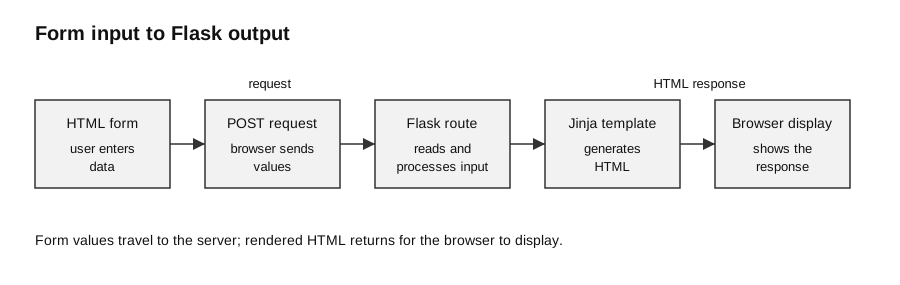
Caption: Follow the POST path from left to right. The input’s HTML name becomes a key in the request body; the request method and URL select the Flask route; the route reads request.form, validates the value, and branches. Invalid input returns the form with a useful error, while valid input is processed and passed to Jinja. Flask then constructs an HTTP response from the rendered HTML. A separate GET request commonly serves the initial form.
HTML:
<form method="post" action="/add">
  <label for="title">Title</label>
  <input id="title" name="title" type="text">
  <button type="submit">Add</button>
</form>
Flask:
from flask import Flask, request, render_template

app = Flask(__name__)


@app.route("/add", methods=["POST"])
def add():
    title = request.form["title"].strip()

    if title == "":
        return render_template(
            "form.html",
            error="Enter a title."
        )

    return render_template("result.html", title=title)
The server must validate input even if the HTML form also uses client-side restrictions. A user can bypass or alter browser-side checks.
Input Validation
Useful checks include:
| Input | Possible check |
|---|---|
| required text | not empty after removing surrounding spaces |
| score | integer and within an allowed range |
| filename | non-empty and acceptable extension |
| category | one of the allowed values |
| identifier | expected format and length |
Validation should happen before database insertion or file saving where possible.
Example:
score_text = request.form["score"]

try:
    score = int(score_text)
except ValueError:
    return render_template("form.html", error="Enter a whole number.")

if not 0 <= score <= 100:
    return render_template("form.html", error="Score must be from 0 to 100.")
Image Upload Flow
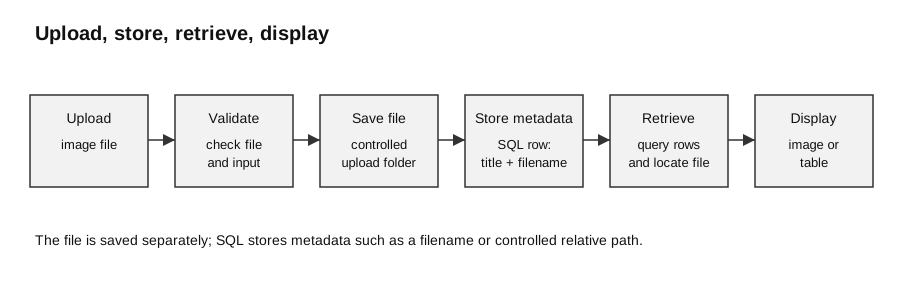
Caption: Follow the data and the ownership of each step. The browser sends a multipart POST request; Flask checks the form field and uploaded file before saving anything; the server creates a controlled filename, saves the file outside the template folder, and inserts only metadata through parameterised SQL. A later query supplies rows to Jinja, while a separate file-serving route supplies image bytes to the browser.
HTML:
<form method="post"
      action="/upload"
      enctype="multipart/form-data">
  <label for="photo">Image</label>
  <input id="photo" type="file" name="photo">
  <button type="submit">Upload image</button>
</form>
Flask route:
from pathlib import Path
from uuid import uuid4
from flask import Flask, request
from werkzeug.utils import secure_filename

app = Flask(__name__)

UPLOAD_DIR = Path("uploads")
UPLOAD_DIR.mkdir(exist_ok=True)
ALLOWED_EXTENSIONS = {".jpg", ".jpeg", ".png"}


@app.route("/upload", methods=["POST"])
def upload():
    photo = request.files.get("photo")

    if photo is None or photo.filename == "":
        return "No file selected", 400

    submitted_name = secure_filename(photo.filename)
    suffix = Path(submitted_name).suffix.lower()
    if submitted_name == "" or suffix not in ALLOWED_EXTENSIONS:
        return "Choose a JPG or PNG image", 400

    stored_name = f"{uuid4().hex}{suffix}"
    save_path = UPLOAD_DIR / stored_name
    photo.save(save_path)

    return {"stored_name": stored_name}, 201
Beginner trace:
| Step | What happens |
|---|---|
| 1 | browser sends the file using multipart/form-data |
| 2 | Flask reads it from request.files["photo"] |
| 3 | Python checks whether the submission is acceptable |
| 4 | server saves the file |
| 5 | database stores metadata if required |
| 6 | a template displays the result |
The submitted filename is untrusted input: it can contain path fragments, collide with an existing file, or use a misleading extension. secure_filename() removes unsafe path syntax, while a server-generated unique name avoids collisions. Extension checking is a useful syllabus-level control, but production systems should also limit request size and verify actual file content; these deeper controls are enrichment.
SQLite Table
Example table for uploaded-image metadata:
CREATE TABLE IF NOT EXISTS Photo (
    photo_id INTEGER PRIMARY KEY,
    title TEXT NOT NULL,
    filename TEXT NOT NULL
);
Python setup:
import sqlite3


def open_database():
    connection = sqlite3.connect("gallery.db")
    connection.row_factory = sqlite3.Row
    return connection
Create the table:
def create_table(connection):
    connection.execute("""
        CREATE TABLE IF NOT EXISTS Photo (
            photo_id INTEGER PRIMARY KEY,
            title TEXT NOT NULL,
            filename TEXT NOT NULL
        )
    """)
    connection.commit()
Parameterised SQL
Insert values using parameters:
def add_photo(connection, title, filename):
    connection.execute(
        "INSERT INTO Photo (title, filename) VALUES (?, ?)",
        (title, filename)
    )
    connection.commit()
Do not build SQL by concatenating form input:
# Avoid this
sql = "INSERT INTO Photo (title) VALUES ('" + title + "')"
Parameters keep data values separate from SQL structure and reduce SQL injection risk.
Retrieval
def get_photos(connection):
    return connection.execute(
        """
        SELECT photo_id, title, filename
        FROM Photo
        ORDER BY title
        """
    ).fetchall()
A route can pass the rows to a template:
@app.route("/photos")
def photos():
    connection = open_database()
    try:
        rows = get_photos(connection)
    finally:
        connection.close()

    return render_template("photos.html", photos=rows)
Important: with connection: manages a SQLite transaction, but it does not itself close the connection. Close explicitly, or use contextlib.closing, when the request has finished using it.
Displaying Formatted Output
<table>
  <tr>
    <th>Title</th>
    <th>File</th>
  </tr>

  {% for photo in photos %}
    <tr>
      <td>{{ photo["title"] }}</td>
      <td>{{ photo["filename"] }}</td>
    </tr>
  {% endfor %}
</table>
The route variable and template variable must agree:
render_template("photos.html", photos=rows){% for photo in photos %}If uploaded images are to be displayed, Flask must also provide a route or suitable static location from which the browser can request each saved file.
One Complete Processing Sequence
1. user enters title and chooses an image
2. browser submits text fields and file
3. Flask reads request.form and request.files
4. Python validates both inputs
5. image is saved to an upload folder
6. title and filename are inserted into SQLite
7. transaction is committed
8. rows are selected from SQLite
9. Jinja renders a table or image gallery
10. browser displays the response
This sequence separates three different things:
- file content stored in the file system;
- metadata stored in the database;
- HTML presentation generated by the template.
It also separates temporary and persistent state:
| Data | Lifetime |
|---|---|
request.form and request.files | available while one request is being handled |
| local Python variables in a route | exist during that function call |
| rendered HTML response | returned for that request; the browser may later replace it |
| SQLite rows and saved files | persist after the route function finishes |
Complete Runnable Gallery Example
The following compact example joins the previously separate steps. It is suitable for local learning. Production deployment needs deeper file-content checks, authentication, authorisation and operational controls.
Project structure:
gallery/
├── app.py
├── templates/
│   ├── upload.html
│   └── photos.html
└── static/
└── style.cssapp.py:
from contextlib import closing
from pathlib import Path
from uuid import uuid4
import sqlite3

from flask import Flask, redirect, render_template, request, send_from_directory, url_for
from werkzeug.utils import secure_filename

app = Flask(__name__)
app.config["MAX_CONTENT_LENGTH"] = 2 * 1024 * 1024

BASE_DIR = Path(__file__).resolve().parent
UPLOAD_DIR = BASE_DIR / "uploads"
DATABASE = BASE_DIR / "gallery.db"
ALLOWED_EXTENSIONS = {".jpg", ".jpeg", ".png"}
UPLOAD_DIR.mkdir(exist_ok=True)


def open_database():
    connection = sqlite3.connect(DATABASE)
    connection.row_factory = sqlite3.Row
    return connection


def initialise_database():
    with closing(open_database()) as connection:
        with connection:
            connection.execute("""
                CREATE TABLE IF NOT EXISTS Photo (
                    photo_id INTEGER PRIMARY KEY,
                    title TEXT NOT NULL,
                    filename TEXT NOT NULL UNIQUE
                )
            """)


@app.route("/", methods=["GET", "POST"])
def upload():
    if request.method == "GET":
        return render_template("upload.html")

    title = request.form.get("title", "").strip()
    photo = request.files.get("photo")
    if title == "" or photo is None or photo.filename == "":
        return render_template("upload.html", error="Enter a title and choose an image."), 400

    submitted_name = secure_filename(photo.filename)
    suffix = Path(submitted_name).suffix.lower()
    if submitted_name == "" or suffix not in ALLOWED_EXTENSIONS:
        return render_template("upload.html", error="Choose a JPG or PNG image."), 400

    stored_name = f"{uuid4().hex}{suffix}"
    save_path = UPLOAD_DIR / stored_name
    photo.save(save_path)

    try:
        with closing(open_database()) as connection:
            with connection:
                connection.execute(
                    "INSERT INTO Photo (title, filename) VALUES (?, ?)",
                    (title, stored_name),
                )
    except Exception:
        save_path.unlink(missing_ok=True)
        raise

    return redirect(url_for("photos"))


@app.route("/photos")
def photos():
    with closing(open_database()) as connection:
        rows = connection.execute(
            "SELECT photo_id, title, filename FROM Photo ORDER BY title"
        ).fetchall()
    return render_template("photos.html", photos=rows)


@app.route("/uploads/<path:filename>")
def uploaded_file(filename):
    return send_from_directory(UPLOAD_DIR, filename)


if __name__ == "__main__":
    initialise_database()
app.run()templates/upload.html:
<!doctype html>
<html lang="en">
  <head><meta charset="utf-8"><title>Upload image</title></head>
  <body>
    <h1>Upload image</h1>
    {% if error %}<p class="error">{{ error }}</p>{% endif %}
    <form method="post" enctype="multipart/form-data">
      <label for="title">Title</label>
      <input id="title" name="title" required>
      <label for="photo">JPG or PNG image</label>
      <input id="photo" type="file" name="photo" accept=".jpg,.jpeg,.png" required>
      <button type="submit">Upload</button>
    </form>
  </body>
</html>templates/photos.html:
<!doctype html>
<html lang="en">
  <head>
    <meta charset="utf-8"><title>Gallery</title>
    <link rel="stylesheet" href="{{ url_for('static', filename='style.css') }}">
  </head>
  <body>
    <h1>Gallery</h1>
    <table>
      <tr><th>Title</th><th>Image</th></tr>
      {% for photo in photos %}
        <tr>
          <td>{{ photo["title"] }}</td>
          <td><img src="{{ url_for('uploaded_file', filename=photo['filename']) }}"
                   alt="Uploaded image: {{ photo['title'] }}"></td>
        </tr>
      {% endfor %}
    </table>
  </body>
</html>static/style.css:
table { border-collapse: collapse; }
th, td { border: 1px solid #333; padding: 0.5rem; text-align: left; }
img { display: block; max-width: 240px; height: auto; }
.error { font-weight: bold; }
The HTML accept attribute guides the file chooser but does not prove file content. The server still validates the submission. If the SQL insert fails after the file is saved, the except block removes the newly saved file so the two storage systems do not silently disagree.
Local Server Testing
The syllabus expects testing on a local server.
Run the application and visit its local address, commonly:
http://127.0.0.1:5000Test cases should cover more than the happy path.
| Test category | Example | Expected result |
|---|---|---|
| normal | valid title and image | record saved and displayed |
| extreme | shortest allowed title | accepted if within rule |
| invalid | unsupported file type | clear rejection message |
| empty | no title or no file | form redisplayed with guidance |
| persistence | restart app after insert | stored database row remains |
| route | visit expected URL | correct page and status |
| method | submit form using intended method | route accepts request |
| display | retrieve several rows | complete table shown |
Debugging Map
| Symptom | Likely place to check |
|---|---|
| 404 response | requested URL and @app.route path |
| 405 response | form method and route methods |
| form value missing | input name and request.form[...] key |
| upload missing | enctype and request.files |
| file not saved | upload path and save() call |
| row not stored | SQL, parameters, and commit() |
| table blank | query result and template variable |
| image broken | file-serving route or generated image URL |
| CSS missing | static/ folder and stylesheet URL |
A useful debugging question is:
What evidence proves that this layer produced the expected value?Common Mistakes
- Forgetting
enctype="multipart/form-data"for uploads. - Reading uploaded files from
request.form. - Trusting a user-supplied filename without checks.
- Saving a file but not recording its filename when metadata is required.
- Recording a filename but never saving the file.
- Forgetting to commit an INSERT or UPDATE.
- Concatenating form data into SQL.
- Passing one template variable name but looping over another.
- Testing only valid input.
Paper 1 and Paper 2 Emphasis
Paper 1-style reasoning: trace the movement of data, identify missing form attributes, explain parameterised SQL, and propose normal, extreme, invalid, and empty tests.
Paper 2-style practical work: complete form handling, validate values, save an upload, insert and retrieve SQLite rows, render a table, and verify the application locally.
Check Your Understanding
- Where does Flask find ordinary text fields and uploaded files?
- Why should validation occur on the server?
- Why use SQL parameters?
- What is the difference between saving an image and storing its metadata?
- Give one normal and one invalid local-server test.
Answers:
- Text fields are in
request.form; uploaded files are inrequest.files. - Browser-side checks can be bypassed or changed.
- They separate values from SQL structure and reduce injection risk.
- The image bytes are saved as a file; descriptive fields such as title and filename can be stored as database rows.
- Normal: valid title and image are stored and displayed. Invalid: unsupported file type is rejected with a clear message.