Serial and Sequential Text Files
This note focuses on implementing file storage and retrieval. For basic file opening, reading, writing, and appending, see O.
You can read this note directly if you know strings, lists/tuples, loops, with open(...), and simple functions. The key beginner habit is to remember that a file stores text. When a program reads a file, the fields first arrive as strings. The program must then split, clean, and convert the fields before using them as numbers or keys.
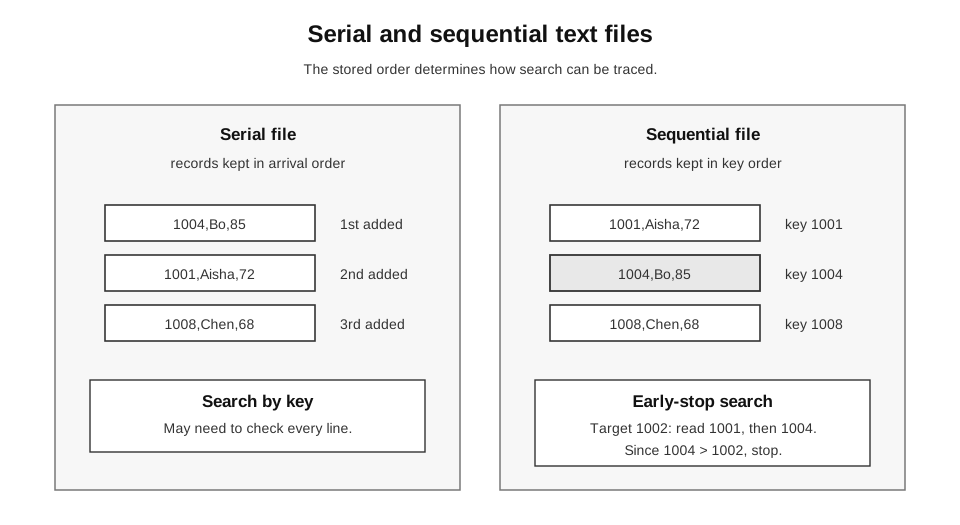
Caption: Serial files preserve arrival order and may require a full scan. Sequential search may stop when the current key passes the target only when the file was sorted using the same key representation and comparison ordering used by the search.
File State Versus Program State
Variables disappear when the program ends. File contents remain on disk.
| State | Example |
|---|---|
| program state | student_id = "1001" while the program runs |
| file state | the line 1001,Aisha,72 stored in a text file |
Implementation questions often ask you to move between these two states:
- read a line from a file into program variables;
- convert text fields into suitable data types;
- search records using a key field;
- write program variables back as a line of text.
A useful beginner pattern is:
file line -> split fields -> convert fields -> process recordand, in the other direction:
program variables -> format as text -> write line to fileFile Modes You Must Recognise
The file mode controls what the program is allowed to do and what happens to existing contents.
| Mode | Meaning | What happens to existing contents? | Common use |
|---|---|---|---|
"r" | read | contents must already exist | search or load records |
"w" | write | old contents are replaced | rewrite a whole file |
"a" | append | old contents are preserved | add a new serial record at the end |
Beginner warning:
"w"does not mean “write one more record”. It means “open for writing from the beginning”, so the old file contents are overwritten.
Use with open(...) so that Python closes the file automatically after the block finishes.
def count_lines(path):
    count = 0
    with open(path, "r", encoding="utf-8") as file:
        for line in file:
            count = count + 1
    return count
Records and Key Fields
A text file record is often stored as one line.
1001,Aisha,72
1004,Bo,85
1008,Chen,68
Here:
1001is the key field;Aishais a name field;72is a mark field.
The key field is the field used to identify or order records. In this example, student_id is the key.
When reading a line, split it into fields and convert numeric fields.
def parse_record(line):
    fields = [field.strip() for field in line.strip().split(",")]
    if len(fields) != 3 or not fields[0] or not fields[1]:
        raise ValueError("record must contain id,name,mark")
    mark = int(fields[2])
    if not 0 <= mark <= 100:
        raise ValueError("mark must be in 0..100")
    return fields[0], fields[1], mark

def validate_record(student_id, name, mark):
    if not isinstance(student_id, str) or not student_id.strip():
        raise ValueError("student_id must be non-empty text")
    if not isinstance(name, str) or not name.strip():
        raise ValueError("name must be non-empty text")
    if any(character in student_id or character in name
           for character in (",", "\n", "\r")):
        raise ValueError("text fields cannot contain commas or newlines")
    if type(mark) is not int or not 0 <= mark <= 100:
        raise ValueError("mark must be an integer in 0..100")
    return student_id.strip(), name.strip(), mark
Trace:
| Expression | Value |
|---|---|
line.strip() | "1001,Aisha,72" |
.split(",") | ["1001", "Aisha", "72"] |
int(mark_text) | 72 |
The .strip() call removes the newline character "\n" at the end of the line. Without it, the last field may contain an extra newline.
This note uses simple comma-separated records for syllabus-level examples. Real CSV files can be more complicated, especially when fields may contain commas inside quoted text.
Contract: blank lines, wrong field counts, empty identifiers/names, non-integer marks, and marks outside 0..100 are rejected with ValueError. Test 0, 50, and 100 plus each invalid category.
Serial File
A serial file stores records in the order they are added. This is also called arrival order.
For example, if records are appended in this order:
1004,Bo,85
1001,Aisha,72
1008,Chen,68
then the file keeps that order. It does not automatically sort itself.
Appending to a Serial File
To add a new record to the end of a serial file, use append mode "a".
def append_record(path, student_id, name, mark):
    student_id, name, mark = validate_record(student_id, name, mark)
    needs_separator = False
    try:
        with open(path, "rb") as existing:
            existing.seek(0, 2)
            if existing.tell() > 0:
                existing.seek(-1, 2)
                needs_separator = existing.read(1) != b"\n"
    except FileNotFoundError:
        pass
    with open(path, "a", encoding="utf-8") as file:
        if needs_separator:
            file.write("\n")
        file.write(f"{student_id},{name},{mark}\n")
Mini-trace:
Before append:
1001,Aisha,72

After append 1004,Bo,85:
1001,Aisha,72
1004,Bo,85
The function checks whether a non-empty existing file lacks a final newline and inserts a separator before the new record. Test missing, empty, newline-terminated, and unterminated files.
It validates the complete record before opening the file for writing. Therefore a blank field, comma/newline inside a field, non-integer mark, or mark outside 0..100 raises ValueError and leaves an existing file unchanged.
Searching a Serial File
Searching a serial file may require checking every line, because the records are not ordered by key.
def find_record(path, target_id):
    with open(path, "r", encoding="utf-8") as file:
        for line in file:
            student_id, name, mark = parse_record(line)
            if student_id == target_id:
                return student_id, name, mark
    return None
Serial search trace for target 1008:
| Line read | Key | Action |
|---|---|---|
1004,Bo,85 | 1004 | keep searching |
1001,Aisha,72 | 1001 | keep searching |
1008,Chen,68 | 1008 | return record |
If there are records, a serial search may need to inspect up to records.
Code Reading
| Code part | Purpose |
|---|---|
with open(path, "r", encoding="utf-8") | open the file for reading |
for line in file | read one record line at a time |
parse_record(line) | convert one line into fields |
if student_id == target_id | check whether this is the wanted record |
return None | report that the target was not found |
Sequential File
A sequential file stores records in order by a key field.
For example, if records are sorted by student_id, the file may look like this:
1001,Aisha,72
1004,Bo,85
1008,Chen,68
The important point is not that the records are stored in a file. The important point is that they are stored in key order.
If records are sorted by student_id, a search can stop early when the current key is greater than the target key.
def find_record_sequential(path, target_id):
    with open(path, "r", encoding="utf-8") as file:
        for line in file:
            student_id, name, mark = parse_record(line)
            if student_id == target_id:
                return student_id, name, mark
            if student_id > target_id:
                return None
    return None
This early stop is only valid if the file is truly sorted by the key.
Sequential search trace for target 1002:
| Line read | Key | Action |
|---|---|---|
1001,Aisha,72 | 1001 | keep searching |
1004,Bo,85 | 1004 | stop; 1002 cannot appear later |
Why the early stop works:
The file is sorted by key.
Once the current key has passed the target key,
all later keys must be even larger.
Therefore the target cannot be later in the file.
Serial Search Versus Sequential Search
| Feature | Serial file | Sequential file |
|---|---|---|
| Record order | arrival order | key-field order |
| Append new record | simple: add at end | may break sorted order |
| Search strategy | usually check until found or end | may stop early when key is passed |
| Main risk | slow search for large files | early stop is wrong if file is not sorted |
A sequential file does not mean “the file is read line by line”. Both serial and sequential text files are normally read line by line. The difference is the stored order of the records.
Writing a Sequential File
One simple approach for small syllabus examples is:
- read all records;
- add the new record;
- sort by key;
- rewrite the file.
def write_records_sequential(path, records):
    import os
    import tempfile

    validated = [validate_record(*record) for record in records]
    identifiers = [record[0] for record in validated]
    if len(set(identifiers)) != len(identifiers):
        raise ValueError("student_id must be unique")
    records = sorted(validated, key=lambda record: record[0])
    folder = os.path.dirname(os.path.abspath(path))
    descriptor, temporary_path = tempfile.mkstemp(dir=folder, text=True)
    try:
        with os.fdopen(descriptor, "w", encoding="utf-8") as file:
            for student_id, name, mark in records:
                file.write(f"{student_id},{name},{mark}\n")
        os.replace(temporary_path, path)
    except Exception:
        if os.path.exists(temporary_path):
            os.remove(temporary_path)
        raise
This approach validates every record and checks that identifiers are unique before creating the temporary file. It then writes a temporary file and replaces the original only after successful output, so malformed or duplicate input—and a later write failure—does not leave a partially truncated canonical file. It is suitable for small examples; very large files need more careful processing.
Read-Add-Sort-Rewrite Trace
Suppose the file currently stores:
1001,Aisha,72
1008,Chen,68
and the new record is:
1004,Bo,85| Step | Program/file state |
|---|---|
| read records | [('1001', 'Aisha', 72), ('1008', 'Chen', 68)] |
| add record | [('1001', 'Aisha', 72), ('1008', 'Chen', 68), ('1004', 'Bo', 85)] |
| sort by key | [('1001', 'Aisha', 72), ('1004', 'Bo', 85), ('1008', 'Chen', 68)] |
| rewrite file | records are written back in key order |
The rewrite step uses "w" because the whole file is being replaced by the newly sorted contents.
Reading All Records
The previous function assumes the records are already stored in a list. A helper function can read the file into a list of tuples.
def read_records(path):
    records = []
    with open(path, "r", encoding="utf-8") as file:
        for line in file:
            records.append(parse_record(line))
    return records
Then a simple insertion workflow is:
def insert_record_sequential(path, student_id, name, mark):
    student_id, name, mark = validate_record(student_id, name, mark)
    records = read_records(path)
    if any(existing_id == student_id for existing_id, _, _ in records):
        raise ValueError("student_id must be unique")
    records.append((student_id, name, mark))
    write_records_sequential(path, records)
This model uses unique text keys. A duplicate is rejected before rewrite, so the original file remains unchanged. It is not the most efficient method, but it is clear for learning the idea.
Writer Contract Tests
The key safety property is that invalid input is rejected before the existing file is changed.
import os
import tempfile

with tempfile.TemporaryDirectory() as folder:
    path = os.path.join(folder, "students.txt")
    write_records_sequential(path, [("1001", "Aisha", 72)])
    original = open(path, encoding="utf-8").read()

    invalid_records = [
        ("", "Bo", 85),
        ("1004", "", 85),
        ("1004", "Bo,Chen", 85),
        ("1004", "Bo\nChen", 85),
        ("1004", "Bo", 101),
    ]
    for record in invalid_records:
        try:
            insert_record_sequential(path, *record)
            assert False
        except ValueError:
            assert open(path, encoding="utf-8").read() == original

    try:
        write_records_sequential(
            path,
            [("1001", "Aisha", 72), ("1001", "Another", 60)],
        )
        assert False
    except ValueError:
        assert open(path, encoding="utf-8").read() == original
Numeric and Text Keys
The examples keep student_id as text because identifiers may have leading zeroes. For example, "0012" and "12" may be different identifiers even though they represent the same integer value.
If a question says the key is numeric and numeric order matters, convert it before comparison:
if int(student_id) > int(target_id):
    return None
The difference matters because text order and numeric order are not always the same.
The same key function must be used for both sorting and early-stop comparison. This note’s executable helpers use text/lexicographic IDs. A numeric-key variant must sort with key=lambda record: int(record[0]) and compare int(student_id) with int(target_id) consistently.
Text order:   "100" < "20"
Numeric order: 100 > 20
Use the representation that matches the meaning of the field.
| Field type | Keep as text? | Convert to number? |
|---|---|---|
| student ID with leading zeroes | yes | no |
| phone number | yes | no |
| mark used for calculation | no | yes |
| numeric product code where numeric order matters | maybe | yes if required |
Tests for File Programs
File programs need tests for normal cases and edge cases. Do not only test a file with several well-formed records and a target in the middle.
Serial File Tests
| Test case | Expected behaviour |
|---|---|
| empty file | search returns None |
| target at first record | return first record |
| target at last record | return last record |
| target absent | return None after checking all records |
| append one record | new record appears at the end |
| append twice | records remain in arrival order |
Sequential File Tests
| Test case | Expected behaviour |
|---|---|
| empty file | search returns None |
| target at first record | return first record |
| target at last record | return last record |
| target absent before first key | stop at first larger key |
| target absent between two keys | stop when current key passes target |
| target absent after last key | reach end and return None |
| numeric key order required | convert keys before comparing |
Example Test Code
def test_parse_record():
    assert parse_record("1001,Aisha,72\n") == ("1001", "Aisha", 72)


def test_find_record_missing(tmp_path):
    path = tmp_path / "students.txt"
    path.write_text("1001,Aisha,72\n1004,Bo,85\n", encoding="utf-8")
    assert find_record(path, "9999") is None
In a simple classroom script, you may not use tmp_path. You can still test the same idea by creating a small text file manually.
Common Mistakes
- Forgetting that fields read from a file are strings.
- Comparing numeric keys as text when numeric ordering is required.
- Using
"w"when the task says to append. - Forgetting
"\n"when writing one record per line. - Using sequential-file early stopping on an unsorted file.
- Not handling an empty file.
- Assuming a file automatically becomes sorted after appending a record.
- Forgetting to convert
mark_textbefore doing calculations.
Debugging Table
| Symptom | Likely cause | Fix |
|---|---|---|
| old records disappear | used "w" instead of "a" for appending | use append mode for serial additions |
| two records appear on one line | forgot newline when writing | write "\n" after each record |
| mark calculation fails | mark is still a string | convert using int(mark_text) |
| numeric order is wrong | compared numeric keys as strings | convert keys before comparing |
| sequential search stops too early | file is not actually sorted by key | sort the file or use serial search |
| search never finds an existing record | key includes extra spaces or newline | use .strip() and compare cleaned fields |
How to Explain This in an Exam
For a serial file, say:
A serial file stores records in the order they are added. To search it, the program reads records one by one until the key is found or the end of file is reached.For a sequential file, say:
A sequential file stores records in key order. During search, if the current key becomes greater than the target key, the search can stop because the target cannot appear later.For parsing, say:
A line read from a text file is a string, so the program must split the line into fields and convert numeric fields before numeric comparison or calculation.Check Your Understanding
- What order does a serial file use?
- What order does a sequential file use?
- Why can sequential search sometimes stop early?
- Why does
parse_record()convertmark_textwithint()? - Why is
"w"dangerous if you only want to add one record? - Why might a student ID be kept as text instead of converted to an integer?
Answers:
- Arrival order.
- Key-field order.
- If the current sorted key has passed the target, the target cannot appear later.
- File data is read as text, but marks should behave like numbers.
- It overwrites the existing file contents.
- An identifier may have leading zeroes or may not be intended for arithmetic.