Integer Conversion Programs
You can read this note directly if you know variables, loops, integer division, strings, and functions.
The syllabus expects programs that convert positive integers between denary, binary, and hexadecimal, and display the results. The important idea is not to memorise a special trick. The program is the manual conversion method written as a loop.
Big Picture
A number can have different written representations.
For example:
45_denary = 101101_binary = 2D_hexThe value is the same. The representation is different.
A conversion program takes one representation and produces another representation. In many beginner programs, the output binary or hexadecimal value is stored as a string, such as "101101" or "2D", because it is a sequence of digits written in another base.
Why the Output Is Usually a String
In Python, the denary integer 101101 is not the same thing as the binary representation 101101_binary.
If a function returns the integer 101101, Python treats it as one hundred and one thousand, one hundred and one in denary. That is not the value forty-five.
Therefore, a conversion function usually returns a string:
"101101"This string is a written representation of the value in binary. It is not meant to be used directly as a denary integer.
The same applies to hexadecimal. A result such as "2F4" must be a string because it contains the symbol F.
What the Program Is Doing
The program version follows the same logic as manual conversion.
| Manual action | Program action |
|---|---|
| divide by the target base | use n // base |
| write down the remainder | use n % base |
| convert the remainder into a digit | use str(remainder) or HEX_DIGITS[remainder] |
| put the newest digit on the left | prepend to the result string |
| stop when the quotient becomes 0 | loop while n > 0 |
The code is not magic. It automates the repeated-division table.
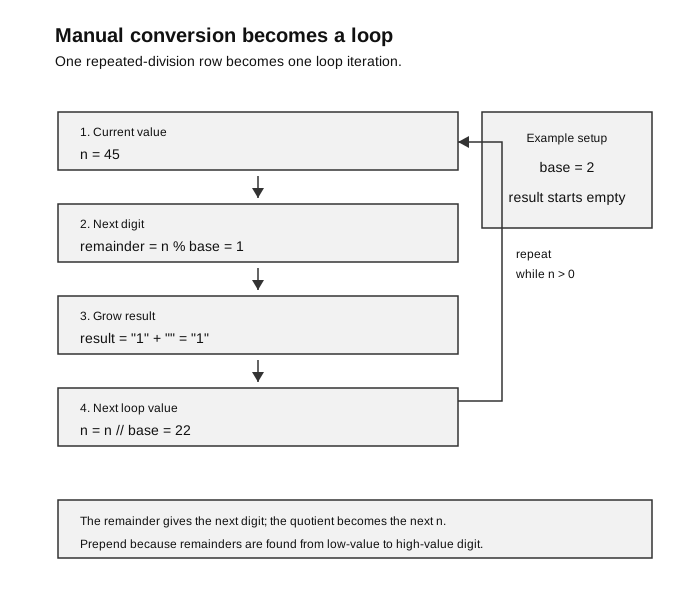
Caption: Initialise the result, handle n = 0 as "0", then repeat while n > 0: % finds the next low-value digit, prepending places it on the left, and // produces the next quotient. The “Yes” branch loops; the “No” branch returns the completed representation.
Key Operators
Python gives two useful integer operators:
| Operator | Meaning | Example |
|---|---|---|
// | integer quotient | 45 // 2 gives 22 |
% | remainder | 45 % 2 gives 1 |
Repeated division uses both. The remainder gives the next digit. The quotient becomes the next number to divide.
For example:
45 // 2 = 22
45 % 2 = 1
This means:
45 = 22 x 2 + 1The remainder 1 is the lowest-value binary digit.
General Pattern: Denary to Another Base
The same algorithm works for converting a non-negative denary integer to binary or hexadecimal.
Pseudocode:
if n is 0:
    return "0"

result <- ""
while n > 0:
    remainder <- n MOD base
    digit <- digit symbol for remainder
    result <- digit + result
    n <- n DIV base

return result
The newest digit is added to the left because repeated division finds the lowest-value digit first.
For binary, the base is 2.
For hexadecimal, the base is 16.
Denary to Binary
The official outcome names positive integers. This teaching function also supports 0 as a useful boundary extension. It accepts an exact non-negative integer, rejects bool and other types with ValueError, and returns a string because binary output is a representation, not a normal denary integer.
def denary_to_binary(n):
    if type(n) is not int or n < 0:
        raise ValueError("n must be a non-negative integer")
    if n == 0:
        return "0"

    bits = ""
    while n > 0:
        remainder = n % 2
        bits = str(remainder) + bits
        n = n // 2
    return bits
Trace for denary_to_binary(45):
n before division | n % 2 | bits after prepending | next n |
|---|---|---|---|
| 45 | 1 | 1 | 22 |
| 22 | 0 | 01 | 11 |
| 11 | 1 | 101 | 5 |
| 5 | 1 | 1101 | 2 |
| 2 | 0 | 01101 | 1 |
| 1 | 1 | 101101 | 0 |
Result:
45_denary = 101101_binaryWhy Prepend Instead of Append?
The first remainder is the ones bit. The next remainder is the twos bit. Then comes the fours bit, and so on.
So the remainders are discovered from right to left, but the final binary representation is written from left to right.
That is why the code uses:
bits = str(remainder) + bitsnot:
bits = bits + str(remainder)If you append instead of prepend, the result will usually be reversed.
Try This
Trace denary_to_binary(13).
Expected result:
13_denary = 1101_binaryGeneral Pattern: Another Base to Denary
To convert a string representation back to denary, process the digits from left to right.
Pseudocode:
total <- 0
for each digit from left to right:
    digit_value <- value of digit
    total <- total * base + digit_value

return total
This works because reading a new digit on the right shifts the previous value one place to the left.
In base 2, shifting one place left means multiplying by 2.
In base 16, shifting one place left means multiplying by 16.
More generally, in base :
Binary to Denary
This version processes the string from left to right.
def binary_to_denary(bits):
    if not isinstance(bits, str) or bits == "" or any(bit not in "01" for bit in bits):
        raise ValueError("bits must be a non-empty binary string")
    total = 0
    for bit in bits:
        total = total * 2 + int(bit)
    return total
Trace for binary_to_denary("101101"):
| Next bit | Calculation | New total |
|---|---|---|
1 | 0 * 2 + 1 | 1 |
0 | 1 * 2 + 0 | 2 |
1 | 2 * 2 + 1 | 5 |
1 | 5 * 2 + 1 | 11 |
0 | 11 * 2 + 0 | 22 |
1 | 22 * 2 + 1 | 45 |
The invariant is:
After each step,
totalis the denary value of the bits processed so far.
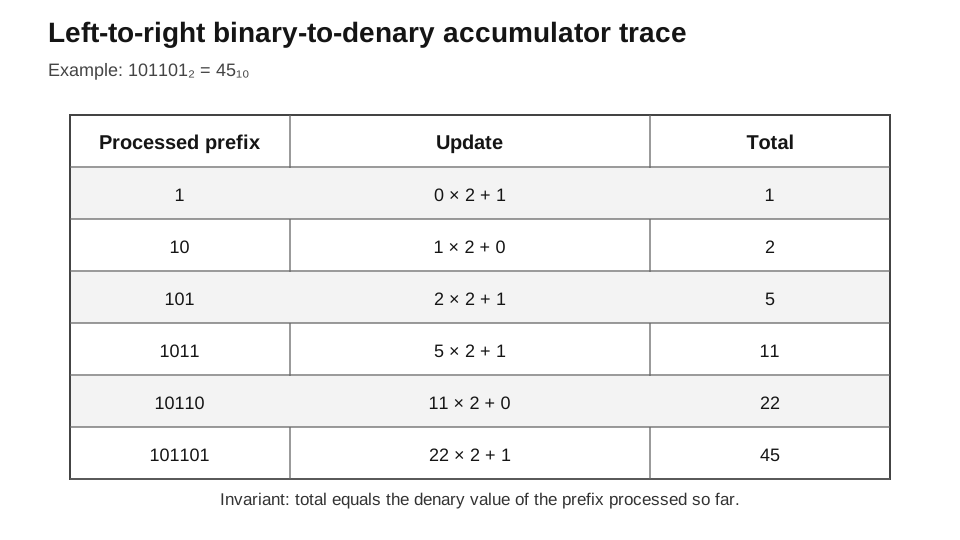
Caption: Each row applies total = total × 2 + next bit. After a row, total equals the denary value of the processed prefix; the same invariant works for hexadecimal when the multiplier is 16 and letters are converted to digit values.
For example, after processing 101, the total is 5 because:
101_binary = 5_denaryWhy This Method Is Useful
This left-to-right method avoids writing powers of 2 explicitly. It is also easy to adapt to hexadecimal by changing the base from 2 to 16.
Try This
Trace binary_to_denary("1101").
Expected result:
13Denary to Hexadecimal
A remainder from 0 to 15 must be converted to a hexadecimal digit.
HEX_DIGITS = "0123456789ABCDEF"


def denary_to_hex(n):
    if type(n) is not int or n < 0:
        raise ValueError("n must be a non-negative integer")
    if n == 0:
        return "0"

    digits = ""
    while n > 0:
        remainder = n % 16
        digits = HEX_DIGITS[remainder] + digits
        n = n // 16
    return digits
The string HEX_DIGITS is used as a lookup table.
| Remainder | Hex digit |
|---|---|
| 0 | 0 |
| 1 | 1 |
| 9 | 9 |
| 10 | A |
| 11 | B |
| 15 | F |
Example:
print(denary_to_hex(756))Output:
2F4Trace for denary_to_hex(756):
n before division | n % 16 | Hex digit | digits after prepending | next n |
|---|---|---|---|---|
| 756 | 4 | 4 | 4 | 47 |
| 47 | 15 | F | F4 | 2 |
| 2 | 2 | 2 | 2F4 | 0 |
Result:
756_denary = 2F4_hexHexadecimal to Denary
HEX_DIGITS = "0123456789ABCDEF"


def hex_to_denary(hex_string):
    if not isinstance(hex_string, str) or hex_string == "":
        raise ValueError("hex_string must be non-empty hexadecimal text")
    if any(digit not in HEX_DIGITS for digit in hex_string.upper()):
        raise ValueError("hex_string contains a non-hexadecimal digit")
    total = 0
    for digit in hex_string.upper():
        value = HEX_DIGITS.index(digit)
        total = total * 16 + value
    return total
Example:
print(hex_to_denary("2F4"))Output:
756Trace for hex_to_denary("2F4"):
| Next digit | Digit value | Calculation | New total |
|---|---|---|---|
2 | 2 | 0 * 16 + 2 | 2 |
F | 15 | 2 * 16 + 15 | 47 |
4 | 4 | 47 * 16 + 4 | 756 |
The call to .upper() makes lowercase input work too:
print(hex_to_denary("2f4"))Output:
756Binary and Hexadecimal Using Denary as a Bridge
Once binary-to-denary and denary-to-hexadecimal are correct, binary-to-hexadecimal can use both:
def binary_to_hex(bits):
    denary = binary_to_denary(bits)
    return denary_to_hex(denary)
Similarly:
def hex_to_binary(hex_string):
    denary = hex_to_denary(hex_string)
    return denary_to_binary(denary)
This is simple and clear. A manual conversion question may expect grouping into four bits, but a program can use correct helper functions if the question allows it.
Program Method Versus Manual Method
There are two common ways to convert between binary and hexadecimal.
| Situation | Suitable method |
|---|---|
| Manual calculation | group binary bits into groups of four |
| Simple beginner program | convert through denary using helper functions |
| More specialised program | process four-bit groups directly |
For exam programs, clarity is important. If helper functions are already correct, using denary as a bridge is often the safest beginner method.
A Small Display Program
This is a complete example that displays all three representations for one positive integer:
def show_representations(n):
    print("Denary:", n)
    print("Binary:", denary_to_binary(n))
    print("Hexadecimal:", denary_to_hex(n))


show_representations(45)
Output:
Denary: 45
Binary: 101101
Hexadecimal: 2D
This style is useful in exam programs because conversion and display are separated: one function calculates a result, and another part of the program prints it.
This makes the code easier to test. For example, you can test denary_to_binary(45) without also testing the display format.
Input Validation
The syllabus focuses on positive integer conversion, but a robust program should still reject invalid input.
def is_binary_string(bits):
    if not isinstance(bits, str) or bits == "":
        return False
    for bit in bits:
        if bit not in "01":
            return False
    return True
A similar check can be used for hexadecimal:
def is_hex_string(hex_string):
    if not isinstance(hex_string, str) or hex_string == "":
        return False
    for digit in hex_string.upper():
        if digit not in "0123456789ABCDEF":
            return False
    return True
Test cases for is_binary_string():
| Input | Expected result | Reason |
|---|---|---|
"101101" | True | all characters are binary digits |
"10201" | False | 2 is not a binary digit |
"" | False | empty input is not a valid representation |
"abc" | False | letters are not binary digits |
Test cases for is_hex_string():
| Input | Expected result | Reason |
|---|---|---|
"2F4" | True | all characters are hexadecimal digits |
"2f4" | True | lowercase is accepted after .upper() |
"G1" | False | G is not a hexadecimal digit |
"" | False | empty input is not a valid representation |
assert is_binary_string("101101") is True
assert is_binary_string("10201") is False
assert is_binary_string("") is False
assert is_binary_string(None) is False
assert is_binary_string(101) is False
assert is_hex_string("2F4") is True
assert is_hex_string("2f4") is True
assert is_hex_string("G1") is False
assert is_hex_string("") is False
assert is_hex_string(None) is False
assert is_hex_string(756) is False
Optional Sentinel-Returning Interface
The public conversion functions above already validate and raise ValueError for invalid input. Sometimes a caller instead wants a sentinel-returning interface. This adapter checks the input first and translates failure into None:
def safe_binary_to_denary(bits):
    if not is_binary_string(bits):
        return None
    return binary_to_denary(bits)
Example and contract tests:
print(safe_binary_to_denary("101101"))
print(safe_binary_to_denary("10201"))

assert safe_binary_to_denary("101101") == 45
assert safe_binary_to_denary("10201") is None
assert safe_binary_to_denary(101) is None
Output:
45
None
The caller must check for None before using the result in arithmetic. Either contract can be valid, but one function should have one clearly documented failure policy rather than sometimes raising and sometimes returning a sentinel.
Test Cases for Conversion Functions
Good programs should be tested with more than one example.
| Function call | Expected result | What it tests |
|---|---|---|
denary_to_binary(0) | "0" | boundary case |
denary_to_binary(45) | "101101" | ordinary binary conversion |
binary_to_denary("101101") | 45 | reverse of previous conversion |
denary_to_hex(756) | "2F4" | hexadecimal digit above 9 |
hex_to_denary("2F4") | 756 | uppercase hex input |
hex_to_denary("2f4") | 756 | lowercase hex input |
binary_to_hex("101101") | "2D" | binary to hexadecimal via denary |
hex_to_binary("2D") | "101101" | hexadecimal to binary via denary |
A useful checking habit is to test conversions in pairs:
n = 45
bits = denary_to_binary(n)
print(binary_to_denary(bits))
The final printed value should be the original n.
Executable contract and round-trip tests:
assert denary_to_binary(0) == "0"       # boundary extension
assert denary_to_binary(45) == "101101"
assert binary_to_denary("000101101") == 45
assert denary_to_hex(756) == "2F4"
assert hex_to_denary("002f4") == 756
assert binary_to_hex("101101") == "2D"
assert hex_to_binary("2D") == "101101"

for n in (0, 1, 15, 16, 45, 756):
    assert binary_to_denary(denary_to_binary(n)) == n
    assert hex_to_denary(denary_to_hex(n)) == n

invalid_denary = (-1, True, 3.5, "45", None)
for value in invalid_denary:
    for function in (denary_to_binary, denary_to_hex):
        try:
            function(value)
            assert False
        except ValueError:
            pass

for function, invalid_values in (
    (binary_to_denary, ("", "102", None, 101)),
    (hex_to_denary, ("", "G1", None, 756)),
):
    for value in invalid_values:
        try:
            function(value)
            assert False
        except ValueError:
            pass
Trace-Table Habit
When checking a conversion program, do not only read the code. Trace the variables.
For repeated division, useful columns are:
| Variable | Meaning |
|---|---|
n before division | current value still to convert |
n % base | next digit value |
| result string | representation built so far |
n // base | next value of n |
For base-to-denary conversion, useful columns are:
| Variable | Meaning |
|---|---|
| next digit | digit currently being processed |
| digit value | denary value of that digit |
| calculation | update rule |
total | denary value of processed prefix |
Tracing is especially useful for finding off-by-one loop errors and reversed-output errors.
Common Mistakes
| Mistake | Why it is wrong | How to fix it |
|---|---|---|
Using / instead of // | / produces a real number, not an integer quotient | use // for quotient |
| Appending remainders to the right | repeated division finds low-value digits first | prepend each new digit |
Forgetting n == 0 | the loop would return an empty string | return "0" as a special case |
| Returning binary as an integer | Python will treat it as a denary integer | return a string such as "101101" |
| Accepting invalid binary strings | strings such as "1021" are not binary | validate before converting |
| Treating hex input as case-sensitive | a and A usually mean the same hex digit | call .upper() |
| Forgetting to convert hex letters | F cannot be used directly in arithmetic | use HEX_DIGITS.index(digit) |
Enrichment: One Function for Bases up to 16
The binary and hexadecimal functions are very similar. This suggests a more general function.
DIGITS = "0123456789ABCDEF"


def denary_to_base(n, base):
    if type(n) is not int or n < 0:
        raise ValueError("n must be a non-negative integer")
    if type(base) is not int or not 2 <= base <= 16:
        raise ValueError("base must be an integer in 2..16")

    if n == 0:
        return "0"

    result = ""
    while n > 0:
        remainder = n % base
        result = DIGITS[remainder] + result
        n = n // base
    return result
Examples:
print(denary_to_base(45, 2))
print(denary_to_base(756, 16))
Output:
101101
2F4
This is enrichment. For the core syllabus, it is enough to understand the binary and hexadecimal versions clearly.
assert denary_to_base(0, 2) == "0"
assert denary_to_base(45, 2) == "101101"
assert denary_to_base(756, 16) == "2F4"
for args in ((-1, 2), (True, 2), (3.5, 2), (10, True), (10, 1), (10, 17), (10, 2.5)):
    try:
        denary_to_base(*args)
        assert False
    except ValueError:
        pass
Check Your Understanding
- Why does
denary_to_binary()return a string instead of an integer? - Why does
denary_to_binary()prepend the new bit? - What does
n % 16represent in denary-to-hexadecimal conversion? - What invariant is used by
binary_to_denary()? - Why should
hex_to_denary()call.upper()on the input string? - What is the output of
denary_to_binary(13)? - What is the output of
hex_to_denary("2F4")? - Why is input validation useful before calling
binary_to_denary(bits)?
Answers:
- Because binary output such as
"101101"is a representation. If it were returned as the integer101101, Python would treat it as a denary integer. - Repeated division finds the low-value digit first, so new remainders must be placed on the left of the existing result.
- The next hexadecimal digit value.
totalis the denary value of the processed prefix.- So lowercase and uppercase hexadecimal letters are handled consistently.
"1101".756.- It prevents invalid inputs such as
"1021"from being treated as if they were valid binary representations.