Network Security
Network security protects computers, data, and services when they are connected to other devices. A network is useful because it allows communication. The same connection also creates risk: an attacker, infected device, careless user, or overloaded service can affect systems that were previously isolated.
This topic is not about becoming a cybersecurity specialist. For H2 Computing, the goal is to explain common network threats and match them to suitable security controls.
Beginner Mental Model
Security questions usually start with two parts:
- What can go wrong?
- Which control reduces that risk?
Example:
Problem: attacker floods a server with requests
Effect: legitimate users cannot use the service
Main harmed goal: availability
Suitable controls: filtering, rate limiting, IDS/IPS alerts or blocking, resilient design
Do not answer security questions by naming a control without explaining the problem it solves.
A useful habit is to read every security scenario in this order:
asset -> threat -> vulnerability -> risk -> harmed security goal -> control -> residual riskFor example, if the asset is an online results system and the threat is a traffic flood, the main goal harmed is availability. Encryption may still be useful elsewhere, but it is not the main answer to the flood.
For a complete beginner, it helps to separate five words that are often mixed together.
| Word | Meaning in this topic | Simple example |
|---|---|---|
| asset | something worth protecting | student records, a website, a password |
| threat | something that can cause harm | malware, DoS, unauthorised access |
| vulnerability | a weakness that makes harm easier | weak password, unpatched software, open service |
| risk | likelihood and impact of a threat exploiting a vulnerability and harming an asset | weak passwords make account compromise more likely and potentially expose records |
| control | a measure that reduces risk | firewall, authentication, encryption |
Example sentence:
The student database is an asset.
A credential-stealing attack is a threat to it.
A weak password policy is a vulnerability.
The risk is unauthorised access to records, with likelihood and impact determined by the scenario.
Two-factor authentication is a control that reduces, but does not remove, that risk.
Learning Goals
By the end of this topic, you should be able to:
- explain confidentiality, integrity, and availability as security goals;
- describe malware and common malware categories;
- explain denial of service and distributed denial of service;
- explain what a firewall does and what it cannot do;
- distinguish IDS from IPS;
- explain encryption as protection for data confidentiality;
- distinguish symmetric and asymmetric key ideas at a high level;
- explain how a digital signature supports integrity and sender authenticity;
- explain authentication and common authentication factors;
- choose suitable controls for short security scenarios.
Scope Boundary
This topic follows H2 Computing 9569 section 4.3.
Core content:
- malware, including worms and viruses;
- denial of service and distributed denial of service;
- firewalls and filtering;
- intrusion detection systems;
- intrusion prevention systems;
- encryption;
- digital signatures;
- authentication.
Not core here:
- detailed cryptographic mathematics;
- certificate-authority infrastructure;
- current cyberattack campaigns;
- professional security operations;
- penetration testing;
- enterprise firewall configuration syntax.
Optional enrichment:
- Real-World Deployment Map shows where real-world controls such as HTTPS, DNS proxying, DDoS filtering, access control, and secret management appear in deployments. This is useful context, not required exam-core content.
- Browser Security Real-World Enrichment explains how browsers such as Chrome and Safari reduce phishing, malware-download, HTTPS, permission, sandboxing, and privacy risks. This is useful context, not required exam-core content.
- Authentication in the Real World explains passwords, password managers, 2FA/MFA, passkeys, and external sign-in as real-world extensions of H2 authentication concepts. This is useful context, not required exam-core content.
- Incident Response for Beginners explains what to do after account compromise, suspected malware, data leaks, or website defacement. This is useful context, not required exam-core content.
Security Goals
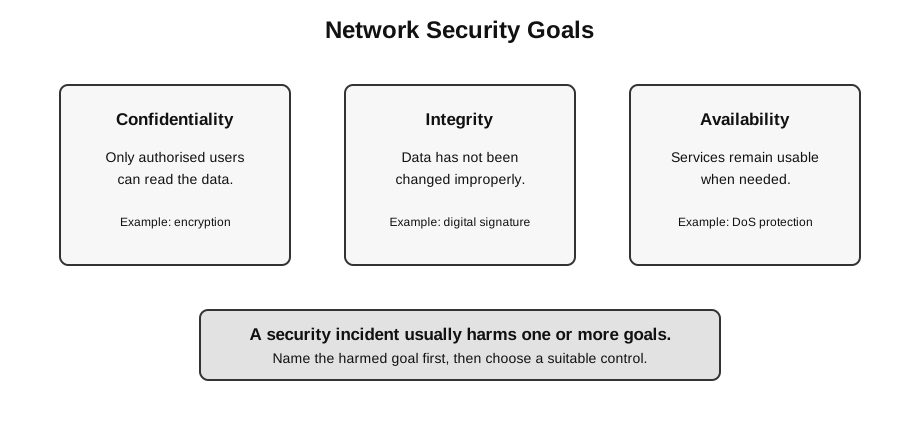
Caption: Read the three goals separately. Encryption can contribute to confidentiality; signatures can help a verifier check integrity and origin; filtering, capacity and redundancy can improve availability. None of these examples guarantees its goal. In a scenario, identify the harmed goal, explain the control’s mechanism, then state residual risk.
The three common security goals are confidentiality, integrity, and availability.
| Goal | Meaning | Example risk | Example control |
|---|---|---|---|
| confidentiality | data is only readable by authorised parties | a packet sniffer reads login data | encryption |
| integrity | data remains accurate and complete and unauthorised change can be detected | a message is altered in transit | digital signature; a plain hash only if the expected digest arrives through a trusted path |
| availability | authorised users can access data or service when needed | a server is flooded with traffic | filtering/rate limiting, upstream mitigation, capacity or redundancy; monitoring mainly detects and alerts |
This model helps students avoid vague answers. If a question describes a threat, ask which goal is being harmed.
Threats and Controls
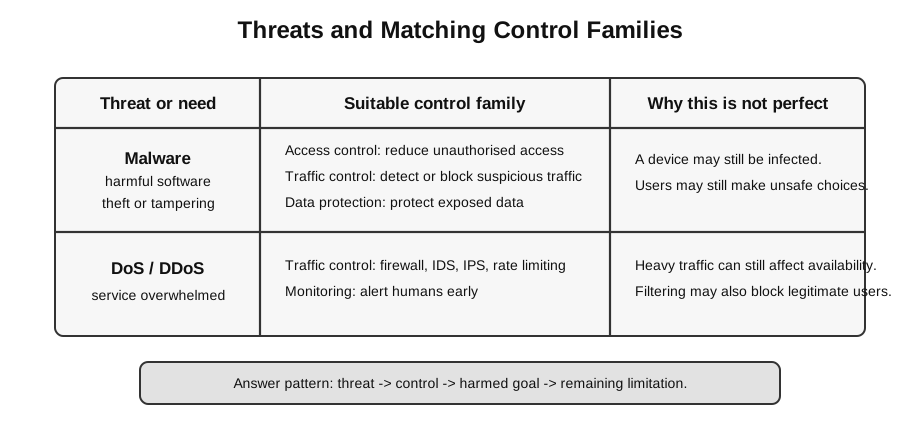
Caption: Match controls to the threat mechanism. Patching, anti-malware, restricted privileges and safe download practice address malware risk; monitoring detects suspicious activity; filtering, rate limits and upstream mitigation address DoS. Encryption protects data content but does not stop infection or traffic overload.
The important skill is not memorising a long list of tools. It is matching the control to the correct type of harm. A control that protects one security goal may do little for another.
Security controls do not make a system perfectly safe. They reduce particular risks.
| Threat or need | What is happening | Suitable control family |
|---|---|---|
| malware infection | harmful software runs on a device | safe software practices, filtering, monitoring, anti-malware tools |
| DoS or DDoS | a service is overwhelmed | traffic filtering, detection, prevention, capacity planning |
| unauthorised access | the wrong person tries to log in | authentication and access control |
| eavesdropping | someone can observe transmitted data | encryption |
| message tampering | a message may be changed or forged | digital signatures and integrity checks |
The exam skill is to match the control to the risk. For example, encryption protects the content of data, but it does not automatically stop a server from being flooded by requests.
How to Build Scenario Answers
Most short-answer questions can be handled with a compact explanation:
The threat is ...
This mainly affects confidentiality / integrity / availability because ...
A suitable control is ... because ...
However, this does not completely solve ...
This structure prevents vague answers such as “use security” or “install a firewall” without reasoning. It also makes it easier to earn marks for both the security goal and the control.
Worked Beginner Scenario
Scenario:
A school hosts a web application for checking CCA attendance.
Students log in from home.
An attacker tries three things:
1. sends many requests until the site becomes slow;
2. sends a fake login page to steal passwords;
3. captures network traffic on public Wi-Fi.
Reasoning:
| Part of scenario | What can go wrong? | Main security goal | Suitable control idea |
|---|---|---|---|
| many requests make the site slow | service becomes unavailable | availability | filtering, IDS/IPS monitoring or blocking, capacity planning |
| fake login page steals passwords | credential confidentiality is lost and the attacker may gain unauthorised access | confidentiality; integrity is also harmed if the account is used to alter records | phishing-resistant practice, user education and multi-factor authentication |
| traffic is captured on public Wi-Fi | data may be read by outsiders | confidentiality | encryption |
This is how to build a clear exam answer:
Name the risk -> name the harmed goal -> choose a matching control -> explain why.Branch Notes
Malware in One Page
Malware is malicious software designed to disrupt, damage, steal, spy, or gain unauthorised access.
Common categories:
| Malware type | Beginner explanation | Main risk |
|---|---|---|
| virus | attaches to files or programs and spreads when they run | infection and damage |
| worm | spreads across networks without needing to attach to another file | rapid network spread |
| trojan horse | pretends to be useful or harmless software | hidden malicious action |
| ransomware | blocks access to files or systems until payment is demanded | loss of access |
| spyware | secretly collects information | confidentiality loss |
| keylogger | records keystrokes | password or account theft |
The important exam distinction is not the brand name of malware. It is the behavior: spreading, hiding, spying, blocking access, or damaging data.
DoS and DDoS
A denial-of-service attack tries to make a service unavailable.
Normal case:
many users -> server handles requests -> users receive service

DoS case:
attacker floods server -> server resources are consumed -> real users are delayed or rejected
A distributed denial-of-service attack uses many attacking devices. These devices may be compromised computers or internet-connected devices controlled as a group. DDoS is harder to block than a single-source DoS because the traffic arrives from many places.
Firewalls, IDS, and IPS
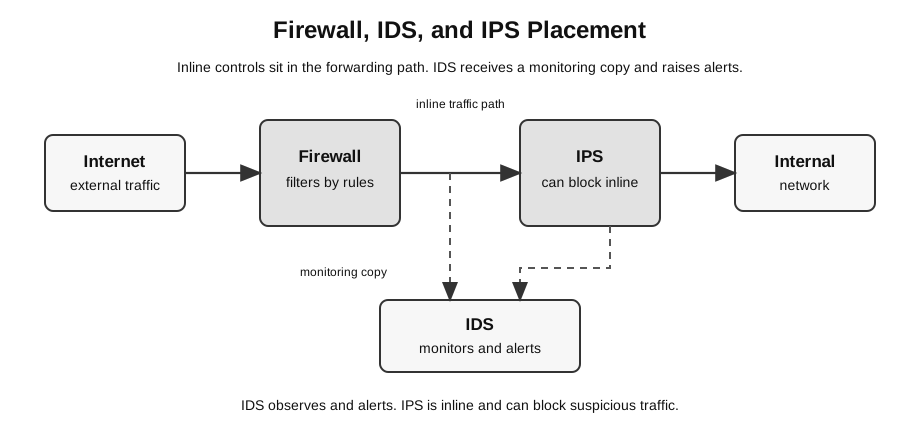
Caption: This is one network-based deployment. Firewall and IPS are inline because they may allow or block forwarded traffic. The IDS receives a mirrored copy and alerts without being the forwarding device. Host-based alternatives also exist, and encrypted, internal, allowed or misclassified traffic remains a limitation.
These controls all deal with network traffic, but they have different jobs.
| Control | Main job | Simple description |
|---|---|---|
| firewall | filter traffic | allows or blocks traffic according to rules |
| IDS | detect suspicious activity | observes traffic and raises alerts |
| IPS | prevent suspicious activity | sits inline and can block traffic |
A firewall is not a complete security solution. It cannot stop every attack, especially if the user allows unsafe traffic, the attack starts inside the network, or the traffic appears to be legitimate.
Encryption, Signatures, and Authentication
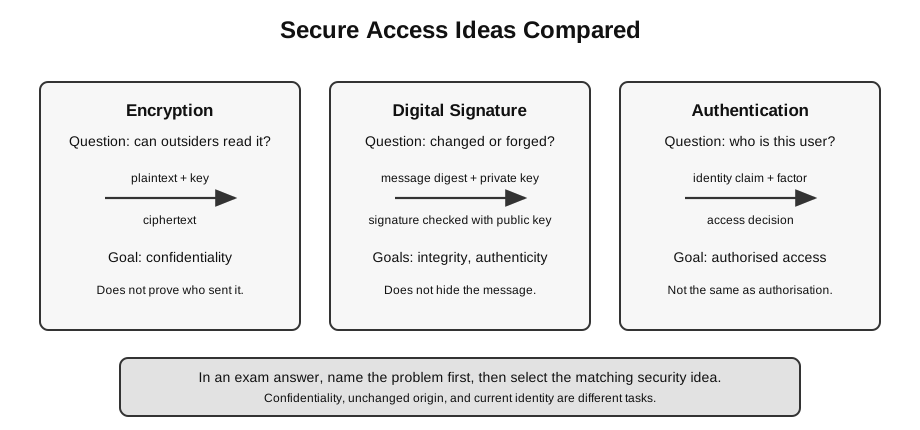
These ideas are often mixed up by beginners.
| Idea | Question it answers | Main goal |
|---|---|---|
| encryption | Can an unauthorised person read the data? | confidentiality |
| digital signature | Was this content signed by the matching private key and unchanged since signing? | authenticated integrity; claimed identity also requires a trusted public-key binding |
| authentication | Is this user or system really who it claims to be now? | identity assurance before a separate authorisation decision |
Symmetric encryption uses the same secret key to encrypt and decrypt. It is efficient, but the key must be shared securely.
Asymmetric encryption uses a public key and a private key. For confidentiality, a sender encrypts using the recipient’s public key, and only the recipient’s private key decrypts. Digital signing is a different operation using the signer’s private key and a verifier’s trusted copy of the corresponding public key.
Digital Signature Flow
A digital signature is not just an image of a handwritten signature. It is a cryptographic proof attached to a message or document.
Conceptual flow:
Sender:
message -> hash algorithm -> message digest
message digest + sender private key -> digital signature
send message and signature

Receiver:
received message -> same hash algorithm -> new digest
trusted claimed-sender public key + signature + new digest -> verify: accept or reject
Successful verification gives evidence that the signed content was not changed and that the matching private key produced the signature. Connecting that key to a named sender also requires a trustworthy public-key binding and an uncompromised private key.
Authentication
Authentication is the process of proving identity.
Common authentication factors:
| Factor | Meaning | Example |
|---|---|---|
| something you know | secret knowledge | password or PIN |
| something you have | physical or digital item | security token or authenticator app |
| something you are | biological feature | fingerprint or face recognition |
Two-factor authentication is stronger than using only a password because an attacker needs evidence from more than one category.
Mini Decision Table
| Clue in the question | First concept to consider | Why |
|---|---|---|
| service is slow or unreachable | availability, DoS/DDoS | the problem is access to the service |
| data is captured while travelling over a network | confidentiality, encryption | the problem is readability of transmitted data |
| a message may have been changed maliciously | integrity, digital signature | an unprotected plain hash can be replaced together with the message |
| the system must know who is logging in | authentication | the problem is identity proof |
| suspicious packets must be reported | IDS | the problem asks for detection and alerting |
| suspicious packets must be stopped automatically | IPS | the problem asks for inline blocking |
Common Exam Mistakes
- Writing “security” without naming confidentiality, integrity, or availability.
- Saying a firewall prevents all attacks.
- Confusing IDS and IPS: IDS detects and alerts; IPS can block.
- Saying encryption proves who sent a message. Encryption protects readability; authentication and signatures address identity and trust.
- Saying a digital signature hides the message. A signature proves integrity and sender authenticity; encryption hides content.
- Treating DoS as data theft. DoS mainly harms availability.
- Describing malware only as “a virus”. Virus is one malware type, not the whole category.
One-Minute Comparison Table
| If the problem is… | Do not jump to… | Better first thought |
|---|---|---|
| service unavailable | encryption | availability, DoS, filtering or prevention |
| message can be read | firewall only | confidentiality, encryption |
| message may be forged or changed | password only | integrity and authenticity, digital signature |
| user identity is uncertain | encryption only | authentication |
| suspicious traffic is seen | ”the firewall solves all” | decide whether detection, alerting, or blocking is needed |
Revision Checklist
You should be able to:
- identify whether a scenario harms confidentiality, integrity, or availability;
- explain malware, virus, worm, trojan, ransomware, spyware, and keylogger in plain language;
- distinguish DoS from DDoS;
- explain why firewall rules can block some traffic but not all attacks;
- distinguish IDS from IPS;
- explain symmetric and asymmetric encryption without doing cryptographic mathematics;
- trace a digital signature at a conceptual level;
- choose suitable authentication factors for a scenario.