Real-World Deployment Map
This is optional enrichment. It is useful for understanding real deployments such as school wikis, project websites, and hosted web apps. It is not required for H2 exam answers unless a question explicitly gives a deployment scenario.
The goal is not to learn Cloudflare, AWS, GitHub, or any other vendor platform in detail. The goal is to see how real tools connect to syllabus ideas such as files, web apps, DNS, servers, databases, security, testing, and responsible handling of data.
Important exam-safe rule:
Explain the computing concept first.
Mention a real service only as an example.
For example, in an exam answer, it is usually better to say:
DNS maps a domain name to the server or service that handles the website.than to say only:
Use Cloudflare.The first answer explains the concept. The second answer only names a tool.
Beginner Mental Model
When a project works on your own computer, it is not automatically public on the internet.
There are several separate questions:
Where is the source code?
Where is the built site or running app?
Where is the domain name pointing?
Where is the data stored?
What security controls protect the system?
A useful mental model is:
source files -> build or app server -> hosting -> domain name -> DNS -> HTTPS -> browser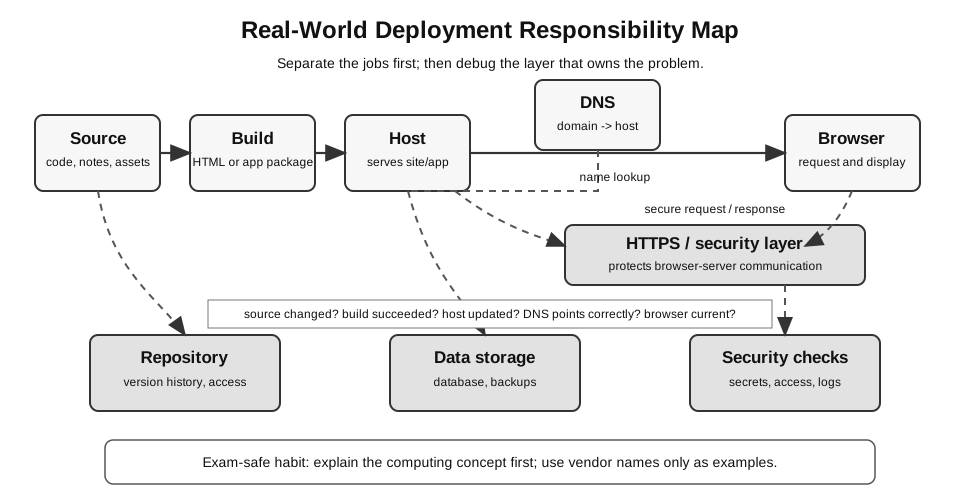
Figure: A real deployment has separate responsibilities: source, build, host, DNS, browser, data, and security. DNS maps the domain to the host, while HTTPS protects browser-server communication.
For a beginner, the most important idea is that each layer has a different job. A mistake in one layer may look like a mistake in another layer.
Example:
The browser shows an old page.Possible causes include:
- the source file was not changed;
- the site was not rebuilt;
- the deployment failed;
- the browser or CDN is showing cached content;
- the domain points to the wrong host.
Do not randomly edit the code until you know which layer is failing.
Local, School, and Public Versions
A program can exist at different levels of visibility.
| Stage | Who can access it? | Example | Main beginner risk |
|---|---|---|---|
| local file | only the local machine user | opening an HTML file directly | links or paths work only on one computer |
| local server | usually only your own machine | Flask on localhost | app works locally but is not deployed |
| school or lab environment | exam/class machine or local network | Paper 2 task folder | missing required files at submission |
| public static site | internet users can read generated pages | hosted wiki | stale build, broken links, DNS/cache issue |
| public dynamic web app | internet users interact with server-side code | hosted Flask-like app | server error, database, authentication, security |
In Paper 2, students normally work with local files, local servers, and submitted soft copies. Public deployment is enrichment unless the question gives a deployment scenario.
Big Picture
When a wiki or web app is published online, several jobs must be handled.
code and content -> hosting -> domain name -> DNS -> HTTPS -> browserIn real projects, different services often handle different jobs.
| Job | Beginner meaning | Example service |
|---|---|---|
| code/content storage | keeps the project files and history | GitHub |
| hosting | serves the site or runs the app | GitHub Pages, AWS, other hosts |
| DNS | maps a domain name to the right service | Cloudflare, registrar DNS |
| HTTPS/TLS | protects browser-server communication | Cloudflare, hosting provider |
| security/filtering | reduces some network and web risks | Cloudflare, AWS security controls |
| database/storage | stores app data beyond static files | SQLite locally, managed cloud database |
| monitoring/logging | records what happened when something fails | hosting logs, cloud logs |
One service can do more than one job, but it helps beginners to separate the jobs first.
How This Connects To H2 Topics
| Real-world tool | H2 topic connection | What to understand |
|---|---|---|
| GitHub | lab/project skills, web applications, ethics/security | files, version history, collaboration, public/private access, accidental secret exposure |
| Cloudflare | computer networks, network security, web applications | DNS, domain names, HTTPS, CDN/reverse proxy idea, caching, DDoS protection |
| AWS | web applications, databases, networks, security, ethics | cloud servers, storage, managed databases, access permissions, availability, cost/risk trade-offs |
| domain registrar | computer networks | owns/renews the domain name; may also provide DNS |
| local development server | web applications, lab skills | tests the app on your own machine before internet deployment |
| database host | databases, security, ethics | stores persistent app data and needs access control and backups |
Do not memorise service names as exam answers. Use them as examples that make abstract ideas visible.
GitHub
GitHub is often used to store a project repository.
For a wiki or website, it may store:
- Markdown notes;
- images and generated diagrams;
- configuration files;
- source code;
- build scripts;
- version history.
Relevant syllabus ideas:
- file management;
- project organisation;
- testing changes before final submission;
- data privacy and access control;
- security risk from accidentally publishing secrets or private data.
Typical beginner confusion:
"My files are on GitHub, so why is my website not working?"GitHub may store the files, but a website also needs to be built and hosted. If GitHub Pages is used, GitHub may also host the static site. If another host is used, GitHub may only be the source repository.
A useful separation is:
| Question | GitHub may help with it? | Explanation |
|---|---|---|
| Where are the source files? | yes | repository stores project files |
| What changed last week? | yes | commit history records changes |
| Is the public website updated? | maybe | only if deployment/build succeeded |
| Is the database backed up? | usually no | app data often needs separate backup |
| Are passwords safe? | only if handled correctly | secrets should not be committed |
Important:
A repository is not automatically the same as a working website.Cloudflare
Cloudflare is often placed in front of a website.
It can help with jobs such as:
- DNS records for a domain;
- routing a domain name to the website host;
- HTTPS/TLS certificate handling;
- caching static content;
- reducing some DDoS and web traffic risks.
Relevant syllabus ideas:
- DNS maps human-readable names to network destinations;
- HTTPS protects communication between browser and server;
- caching can reduce repeated network/server work;
- DDoS affects availability;
- security controls reduce specific risks but do not make a system perfectly safe.
Typical beginner confusion:
"Cloudflare says DNS is set, but the website still does not show the new page."Possible causes include DNS propagation delay, cached content, wrong build output, wrong host target, or the site build failing before Cloudflare receives the updated content.
A better debugging question is:
Does the domain point to the correct host, and does that host contain the correct current site?Cloudflare may help traffic reach the host, but it does not automatically fix wrong code, a failed build, or a missing database.
AWS and Other Cloud Platforms
AWS is a large cloud platform. Other cloud platforms provide similar categories of services. The vendor name is less important than the job being done.
For beginner understanding, group cloud services by job:
| Job | Beginner description | H2 connection |
|---|---|---|
| compute | a machine or service runs code | client-server architecture |
| storage | files or objects are stored | file storage, backups |
| database | structured app data is stored and queried | SQL/NoSQL, persistence |
| networking | traffic reaches the service | IP, ports, DNS, routing |
| identity and access | permissions control who can do what | authentication, authorisation |
| monitoring | logs and metrics show what happened | debugging and system reliability |
| backup/recovery | data can be restored after failure | data integrity and continuity |
Relevant syllabus ideas:
- client-server architecture;
- databases and backups;
- network addressing and ports;
- access control and authentication;
- availability and cost trade-offs;
- ethical handling of user data in hosted systems.
Avoid turning this into an AWS course. The exam-relevant idea is usually the system concept, not the cloud product name.
Domain Registrar, DNS, and Hosting
A public website often involves at least three separate roles.
| Role | Job | Beginner question |
|---|---|---|
| domain registrar | manages ownership of the domain name | Who owns or renews the domain? |
| DNS provider | stores records that point the name to a destination | Where does the domain point? |
| host | serves the site or runs the app | What content or app is actually running? |
Sometimes one company does all three jobs. Sometimes different services are used.
Example:
A domain is bought from one registrar.
DNS records are managed through Cloudflare.
The site is hosted somewhere else.
If the website fails, changing the source code may not help if the real problem is a wrong DNS record. Changing DNS may not help if the host has not received the latest build.
Static Wiki Versus Dynamic Web App
A static wiki and a dynamic web app feel similar in a browser, but they are different systems.
| Feature | Static wiki/site | Dynamic web app |
|---|---|---|
| server-side code while user browses | usually none | yes |
| database updates from user actions | usually none | often yes |
| example | generated notes site | Flask app with forms and SQLite |
| common host | static hosting, GitHub Pages-style hosting | app server or cloud service |
| common risk | broken links, stale build, wrong DNS/cache | server error, database path, invalid input, authentication/security issues |
This distinction matters when debugging deployment.
Static wiki problem: "Did the build produce the right HTML files?"
Dynamic app problem: "Is the server code running and can it access the database?"
Example: Static Wiki Deployment
A static wiki usually works like this:
Markdown notes -> build process -> generated HTML/CSS/assets -> static host -> browserThe student or reader sees a website, but the site may not be running Python or SQL whenever a page is opened. The pages may already have been generated.
Typical static wiki problems:
| Symptom | Likely layer to check |
|---|---|
| new note does not appear | build output, navigation, deployment step |
| diagram is missing | asset path or missing image file |
| old page still appears | cache or old deployment |
| internal link is broken | note path, filename, generated route |
| site works locally but not online | build command, deployment configuration, host path |
Useful evidence:
Can the site build locally?
Does the generated output contain the expected page?
Did the host receive the new generated files?
Does the browser still show cached content?
Example: Dynamic Flask App Deployment
A dynamic web app usually works like this:
browser request -> web server/app host -> Flask route -> database/file/storage -> response -> browserThe server runs code when users interact with the app. If users submit a form, the server may validate input, write to a database, and return a new page.
Typical dynamic app problems:
| Symptom | Likely layer to check |
|---|---|
| app works locally but not online | host setup, port, dependencies, environment variables |
| form submission fails | route method, form field names, validation, server error |
| database is empty after deployment | wrong path, temporary filesystem, missing persistent storage |
| uploaded files disappear | host storage is not persistent or path is wrong |
| login/API call fails | secret key, environment variable, access control |
| app crashes after a request | server logs, route code, database connection |
Useful evidence:
Does the server start?
What do the logs say?
Which database is the app using?
Are required environment variables set?
Can one simple route return a response?
Local Testing Before Deployment
Before putting a project online, test it locally in layers.
| Layer | Local check |
|---|---|
| source files | required files and folders are present |
| build or server start | build command succeeds, or Flask starts |
| route/page | one simple page loads |
| static assets | CSS/images load correctly |
| form | submitted values reach the route |
| database | insert/select works and uses the expected path |
| security | no secrets are hard-coded or committed |
| final output | user sees the expected result |
This is similar to lab-exam discipline: make the evidence visible before moving to the next layer.
Deployment Troubleshooting Map
Use this map when a deployed site does not behave as expected.
| Symptom | Likely layer to check |
|---|---|
| domain does not resolve | DNS record, registrar, Cloudflare DNS |
| browser warns about security | HTTPS/TLS certificate or domain mismatch |
| old page still appears | cache, build output, deployment target |
| site builds locally but not online | build command, dependency version, deployment logs |
| Flask works locally but not deployed | host configuration, environment variables, port, database path |
| static files missing | folder path, build output, static-file route |
| database data disappears | local file database on temporary host, wrong path, missing persistent storage |
| login/API key leaked | GitHub visibility, committed secrets, access control |
| site slow or unavailable | host capacity, network issue, DDoS/rate limits, caching |
The practical habit is to identify which layer owns the problem before changing code.
browser -> DNS -> proxy/CDN -> host -> app/build -> files/databaseEvidence-Based Debugging
For deployment problems, avoid this pattern:
The site is broken, so I will edit random code and redeploy.Use this pattern instead:
1. State the symptom clearly.
2. Identify the likely layer.
3. Find evidence from that layer.
4. Change one thing.
5. Retest the same symptom.
Examples:
| Symptom | Evidence to collect before changing code |
|---|---|
| domain gives an error | DNS record, host target, HTTPS status |
| new page missing | build log, generated output folder, deployment timestamp |
| database row missing | database path, insert result, selected rows, persistence setting |
| CSS missing | generated asset path, browser source, static-file route |
| login fails | environment variable, access control setting, server log |
This habit connects deployment back to testing and debugging.
Security and Responsibility
Deployment makes mistakes more serious because the project may become visible to other people.
Check carefully before publishing:
| Risk | Safer habit |
|---|---|
| password or API key committed | use environment variables and rotate exposed secrets |
| private data in repository | remove or anonymise data before publishing |
| public access too broad | check repository and database permissions |
| no backup of important data | create backup/export before risky changes |
| invalid input reaches database | validate server-side, not only in the browser |
| user data transmitted insecurely | use HTTPS where appropriate |
Security controls reduce risk. They do not make a system perfectly safe.
What Is Exam-Core And What Is Enrichment?
Exam-core ideas:
- DNS maps names to IP addresses;
- HTTP/HTTPS supports web request-response;
- client-server roles;
- local Flask development and testing;
- SQLite/database storage;
- security controls such as firewalls, encryption, authentication, IDS/IPS;
- privacy, consent, and responsible data handling.
Optional enrichment:
- GitHub repository workflows;
- Cloudflare dashboard configuration;
- AWS service names and cloud architecture;
- production deployment pipelines;
- CDN cache purging;
- domain registrar management;
- cloud pricing and vendor lock-in.
Use enrichment to understand real projects. Do not use vendor details as default exam answers unless the question itself gives those details.
Related deployment walkthrough: From Local Flask to Public Website explains the same ideas as a practical layer-by-layer path from local testing to a public site.
Exam Answer Guidance
If an exam question asks about a web system, answer with syllabus concepts first.
| If the question asks about… | Use this kind of answer first | Vendor example only if useful |
|---|---|---|
| human-readable website names | DNS maps domain names to IP addresses or host targets | Cloudflare, registrar DNS |
| secure browser communication | HTTPS/TLS encrypts communication | hosting provider certificate |
| public access to a web app | client-server architecture and hosting | cloud host |
| lost database data | backup, restore, persistent storage | managed database backup |
| leaked credentials | access control, secret management, rotation | repository settings |
| high traffic | availability, caching, scaling, DDoS protection | CDN/cloud service |
Weak answer:
Use AWS and Cloudflare.Stronger answer:
Host the server-side application on a reliable server, configure DNS so the domain points to it, use HTTPS to protect browser-server communication, and store persistent data in a database with backups and access control.The stronger answer shows understanding even if no vendor name is mentioned.
Safe Beginner Rule
When confused, ask:
Where is the code?
Where is the built site or running app?
Where is the domain pointing?
Where is the data stored?
What security control is protecting which risk?
What evidence proves this layer works?
These questions connect real deployment problems back to syllabus concepts.
Final Takeaway
Real-world deployment is not one magic step called “put it online”.
It is a chain of responsibilities:
source files -> build or app server -> hosting -> DNS -> HTTPS -> browser -> data storageFor H2 Computing, the main learning value is not memorising service dashboards. The main learning value is understanding how web, network, database, testing, and security concepts fit together in a real system.