From Local Flask to Public Website
This is optional enrichment. It helps connect the syllabus concept to real systems, but it is outside H2 exam-core scope unless a question explicitly gives this context.
It explains what changes when a local Flask project, static wiki, or school web application is made available on the public internet.
The goal is not to memorise Cloudflare, AWS, GitHub Pages, or any hosting dashboard. The goal is to separate the layers: code, build, host, domain, DNS, HTTPS, database, environment variables, and logs.
Beginner Mental Model
Running locally means the app is available only on your own machine, usually at an address such as:
http://127.0.0.1:5000
http://localhost:5000
Deploying means other people can reach the site from their browsers using a public address such as:
https://example.comThose two situations look similar in the browser, but the system behind them is different.
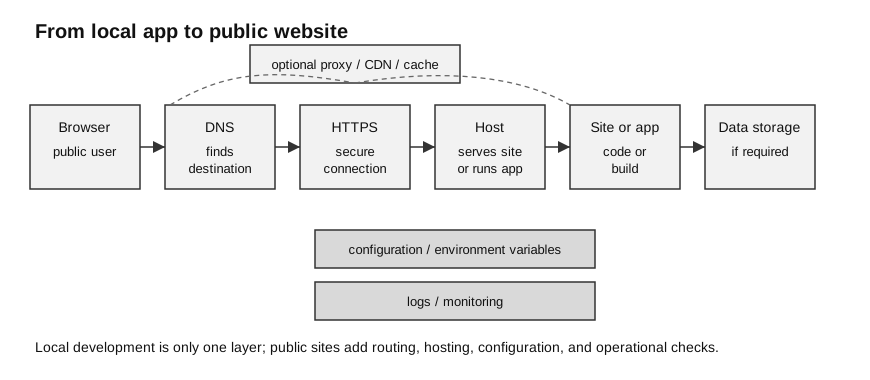
Caption: This is enrichment. DNS first resolves a destination; the browser then establishes a TCP/TLS-protected HTTPS connection to the host or an optional edge/proxy. Hosting either serves a static build or runs a Flask application. Persistent storage is a dependency of the runtime, configuration feeds it, and logs observe the system—HTTPS and storage are not sequential machines in one pipeline.
Local Flask App Versus Deployed App
| Part | Local development | Public deployment |
|---|---|---|
| address | localhost or 127.0.0.1 | domain name such as example.com |
| server | Flask development server | production WSGI server or hosting platform |
| audience | developer on one machine | users across the internet |
| debug mode | useful locally | should not be exposed publicly |
| database | often a local SQLite file | needs deliberate persistent storage appropriate to the host |
| secrets | often in local .env or config | should be set as protected environment variables |
| errors | visible in terminal | checked through host logs |
The built-in Flask development server is intended for local development and testing. A public deployment normally uses a production-capable server or hosting platform.
Static Wiki Versus Dynamic Flask App
This distinction matters a lot when deploying course wikis.
| Question | Static wiki/site | Dynamic Flask app |
|---|---|---|
| Does server-side Python run for each visitor? | usually no | yes |
| Does the visitor change database data? | usually no | often yes |
| What is deployed? | generated HTML/CSS/JS/assets | running Python app plus templates/static files |
| Common host | static host, GitHub Pages-style host, Cloudflare Pages-style host | app host, server, container, cloud app platform |
| Common failure | old build, broken link, wrong asset path, cache | server crash, missing dependency, wrong environment variable, database path |
For a static wiki, the key question is:
Did the build generate the correct public files, and is the host serving that build?For a Flask app, the key question is:
Is the application process running, configured correctly, and connected to its data?The Public Website Chain
A public request passes through several layers.
browser
-> DNS lookup
-> proxy/CDN or direct host
-> HTTPS/TLS handling
-> hosting platform or server
-> app/build output
-> database or storage, if needed
Each layer has a different job.
| Layer | Job | Beginner check |
|---|---|---|
| browser | sends request and displays response | does the same URL fail in another browser or private window? |
| DNS | maps domain name to the right destination | does the domain point to the correct host? |
| proxy/CDN | may route, cache, filter, or protect traffic | is traffic proxied or DNS-only? is old content cached? |
| HTTPS/TLS | encrypts browser-server communication | is the certificate valid for this domain? |
| host | serves static files or runs the app | did the latest deployment succeed? |
| app/build | contains the code or generated site output | did the build command produce the expected files? |
| database/storage | stores persistent data | is the app using the correct database and path? |
| environment variables | store deployment-specific settings | are secret keys, database URLs, and modes configured? |
Do not debug every layer at once. Identify the first layer that is failing.
DNS and Domain Names
DNS connects a human-readable domain to the destination that should receive traffic.
Common DNS records:
| Record | Beginner meaning |
|---|---|
A | points a name to an IPv4 address |
AAAA | points a name to an IPv6 address |
CNAME | points a name to another name |
TXT | stores verification or policy text |
Some DNS-provider dashboards ask whether a record should be proxied. If proxied, traffic passes through the provider before reaching the origin. If DNS-only, the provider answers DNS while the browser connects more directly to the target.
Important beginner point:
DNS does not build the website.
DNS only helps the browser find where to send the request.
If the wrong files were built, fixing DNS will not fix the page. If the domain points to the wrong host, fixing Flask code will not fix the domain.
HTTPS Certificates
HTTPS protects communication between the browser and the server. It uses TLS certificates so the browser can establish an encrypted connection for the domain.
What HTTPS helps with:
- protects data in transit from being read easily by outsiders;
- helps detect tampering during transmission;
- gives the browser a way to check that the certificate matches the domain.
What HTTPS does not guarantee:
- the app code is correct;
- the database is secure;
- the website owner is honest;
- the latest deployment is being served;
- the page is free from bugs.
If a browser says the certificate is invalid, the problem is usually at the domain, certificate, proxy, or host configuration layer, not inside the HTML page content.
Environment Variables
Environment variables are values supplied by the operating system or hosting platform when the app runs.
They are often used for configuration that changes between local development and deployment.
Examples:
| Value | Why it should not be hard-coded |
|---|---|
SECRET_KEY | should not be committed to a public repository |
DATABASE_URL | local and deployed databases may be different |
| API key | leaking it can allow misuse or cost |
| project-defined app mode | local debug behaviour should differ from public behaviour; the older FLASK_ENV setting is obsolete |
| upload folder path | deployed file system may differ from local machine |
Good habit:
Code defines what the app does.
Environment variables define where and how this deployment runs.
Bad habit:
Commit passwords, API keys, or production secrets into GitHub.Database and File Storage
A local Flask app may use a SQLite file in the project folder.
That can work well for learning and exams, but deployment changes the assumptions:
- the deployed file system may be temporary;
- multiple app instances may not share the same local file;
- the database path may be different from the local path;
- uploaded files may need persistent storage outside the app process;
- backups and access control become important.
Example confusion:
The app works locally and stores rows in app.db.
After deployment, submitted data disappears.
Possible causes:
- the app is writing to a temporary file system;
- the app is using a different database path;
- the database file was not included or initialised;
- the host restarts the app and removes local changes;
- a managed database URL was not set correctly.
Exam-safe connection:
SQLite is useful for local learning and simple projects.
A public deployed app may need explicit persistent storage, backups, and access control.
DNS, Proxy, Cache, and Hosting Confusions
A provider such as Cloudflare can be involved in several different jobs. Confusion happens when these jobs are treated as one layer.
| Provider-related job | What it means | What it does not mean |
|---|---|---|
| DNS | domain points to a target | the website build succeeded |
| proxy/CDN | traffic may pass through Cloudflare | the origin app is definitely healthy |
| cache | static content may be stored closer to users | new content is always visible immediately |
| HTTPS/TLS | encrypted browser connection is configured | app code and database are correct |
| Pages/static hosting | static files are hosted | a Flask server is running |
| Workers/serverless logic | code runs at edge locations | it is the same as a normal Flask process |
When a wiki deployment is confusing, ask:
Is this a static site or a dynamic app?
Where is the build output?
Which service is hosting the output?
Which DNS record points to it?
Is Cloudflare only doing DNS, or also proxying/caching?
Is the browser seeing cached content?
Troubleshooting Ladder
Use this ladder from outside to inside.
| Symptom | First layer to check | Evidence to collect |
|---|---|---|
| domain does not load | DNS | DNS record target, nameserver status |
| browser shows certificate warning | HTTPS/TLS | certificate domain, host/proxy SSL mode |
| old page appears | cache or build | deployment time, cache status, build output |
| page is blank or assets missing | build output or asset paths | generated file paths, browser console/network panel |
| Flask route gives server error | app host | host logs, stack trace, missing dependency |
| app works locally but not online | environment | variables, port, working directory, file paths |
| database data disappears | persistence layer | database URL/path, host storage rules |
| upload works locally but not online | file storage | upload folder, permissions, persistent storage |
Good debugging question:
What evidence proves this layer is working?Avoid random fixes. A DNS problem, cache problem, build problem, app problem, and database problem require different evidence.
Worked Example: Wiki Deployed Through Cloudflare
Scenario:
A student builds a Markdown wiki into HTML files.
The files are deployed to a static host.
The custom domain is managed through Cloudflare.
The browser still shows an old page after a new note is added.
Reasoning:
| Check | Why |
|---|---|
| Did the local build include the new note? | if not, deployment cannot show it |
| Did the host receive the new build? | if not, Cloudflare has no new content to serve |
| Is the domain pointing to the correct host? | wrong DNS target can show a different site |
| Is Cloudflare or the browser caching old content? | cache can hide a successful deployment |
| Are links generated correctly? | a note may exist but be unreachable |
Good conclusion:
Cloudflare may be involved in DNS, proxying, HTTPS, and caching, but it is not always the layer that builds the wiki.
First confirm the generated output and host deployment, then check DNS and cache behaviour.
Worked Example: Flask App Deployed Publicly
Scenario:
A Flask app works at http://localhost:5000.
After deployment, the home page loads but form submission gives an error.
The app stores submissions in SQLite locally.
Reasoning:
| Check | Why |
|---|---|
| host logs | server-side error may not be visible in the browser |
| form route and method | deployed app may be receiving a different request path |
| database path | local relative path may point somewhere else online |
| write permission | deployed file system may not allow writing there |
| persistent storage | local SQLite file may not survive redeployment or restart |
| environment variables | deployed database URL may be missing |
Good conclusion:
Local success proves the Flask logic can work on the developer machine.
It does not prove that the deployed environment has the same file paths, permissions, database, or configuration.
How to Use This in Exam Answers
For H2 exam answers, stay with core concepts unless the scenario gives deployment details.
Exam-core terms:
- client-server architecture;
- HTTP request and response;
- DNS and domain names;
- local server testing;
- database storage and retrieval;
- encryption through HTTPS;
- authentication and access control;
- validation, testing, and debugging.
Optional enrichment terms:
- WSGI server;
- reverse proxy;
- CDN;
- static host;
- environment variable;
- deployment log;
- managed database;
- cache invalidation;
- Cloudflare, AWS, GitHub Pages, or other vendor names.
Do not use vendor names as default exam answers. Use them only as examples after the main concept is clear.
Final Takeaway
A public website is not just “my local app on the internet.” It is a chain of layers.
Use this reasoning pattern:
What kind of site is this: static or dynamic?
Where is the code or generated output?
Where is it hosted?
How does the domain reach the host?
How is HTTPS handled?
Where is persistent data stored?
Which environment variables configure this deployment?
What logs or evidence show the failing layer?