Real-World Database Choices
This is optional enrichment. It helps you understand why H2 Computing often uses SQLite for learning and exams, while real deployed web apps may use PostgreSQL, MySQL, or managed cloud databases. It is not required for H2 exam answers unless a question explicitly gives a real deployment scenario.
For exam answers, use syllabus terms first:
- table;
- record;
- field;
- primary key;
- foreign key;
- relationship;
- normalisation;
- SQL;
- SQLite with Python where relevant;
- privacy, integrity, backup, archive, and access control.
The goal is not to memorise database products. The goal is to choose a storage tool that matches the job.
Beginner Mental Model
A database choice depends on how the data will be used.
Ask:
Who needs to read or write the data?
How many users may write at the same time?
Does the data need to survive deployment or restart?
Is the data relational and structured?
How will it be backed up?
Who controls access?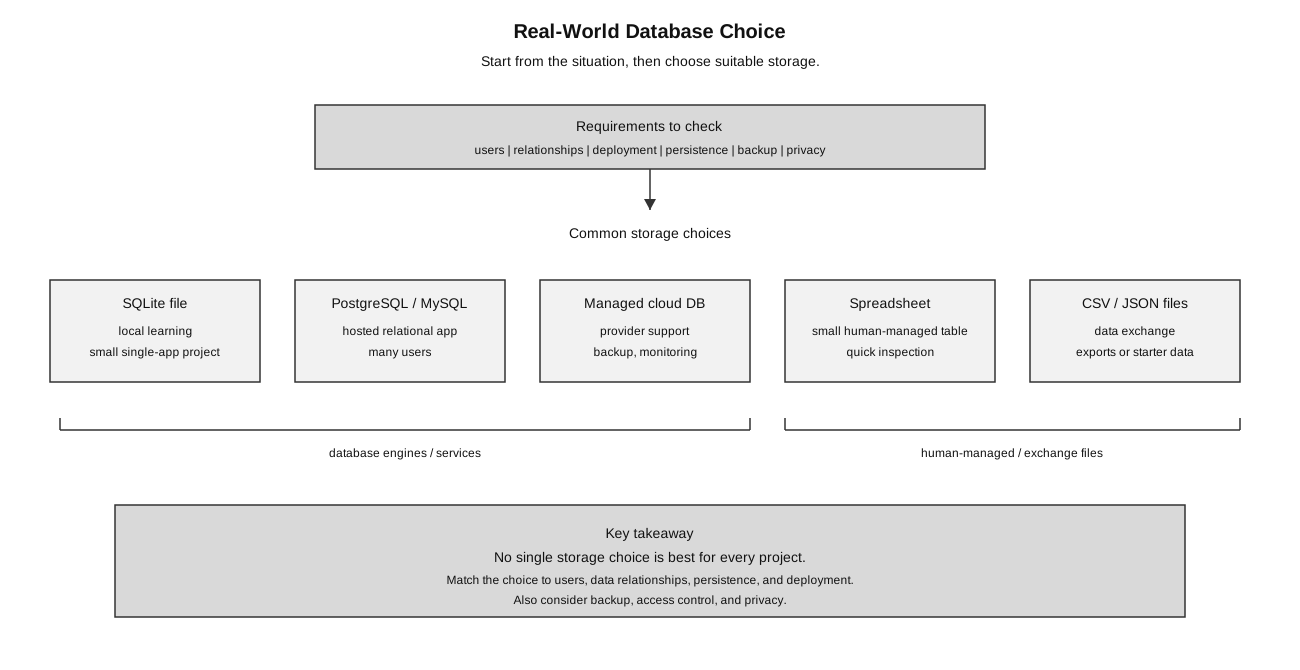
Caption: Real-world storage choice starts from requirements such as users, relationships, deployment, persistence, backup, access control, and privacy; different projects may fit SQLite, a database server, a managed cloud database, a spreadsheet, or exchange files.
A useful beginner distinction is:
| Situation | Main concern |
|---|---|
| local learning task | simple setup and clear SQL practice |
| school project prototype | correctness, persistence, and easy development |
| hosted multi-user app | concurrency, access control, backup, and availability |
| sensitive real data | privacy, permissions, retention, and secure handling |
The same data model may move through these stages. For example, a CCA attendance app may begin as a spreadsheet, become a local SQLite prototype, and later use a hosted relational database if many teachers need to use it.
Quick Decision Framework
Use this framework before naming any database product.
1. What data is stored?
2. Is it naturally tabular, nested, or file-like?
3. Who reads and writes it?
4. How many users may write at the same time?
5. Does the data need strong relationships and constraints?
6. Does it need to survive deployment, restart, or server replacement?
7. How will it be backed up and restored?
8. Who is allowed to access it?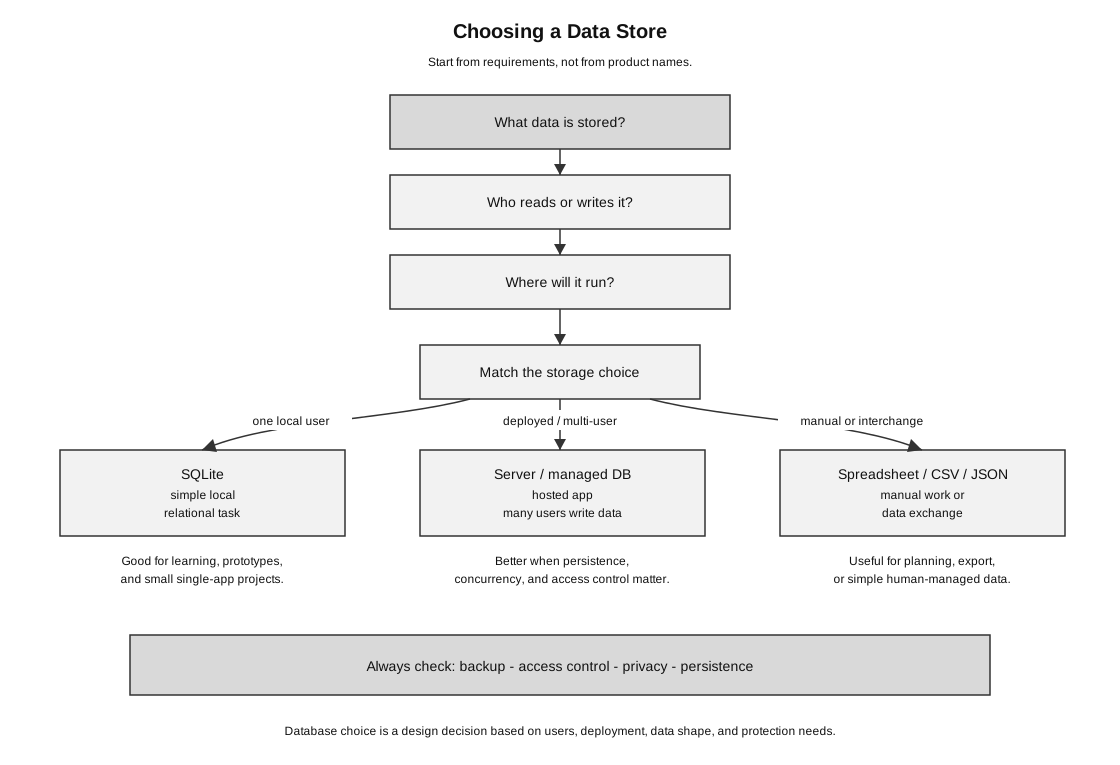
Caption: Choose a data store by checking the data shape, users, deployment setting, persistence, backup, access control, and privacy needs before naming a product.
The decision should be based on requirements, not on product popularity.
SQLite
SQLite is a lightweight relational database stored in a file.
Beginner model:
Python program -> SQLite library -> local .db fileWhy SQLite is useful for H2 Computing:
- easy to set up locally;
- no separate database server needed;
- works well with Python’s
sqlite3module; - good for learning tables, keys, SQL queries,
INSERT,UPDATE,DELETE, andSELECT; - suitable for small local projects and lab-style tasks;
- keeps attention on SQL and program logic instead of server configuration.
SQLite is not a toy. It is a real database engine. The limitation is not that it is “fake”; the limitation is that a single-file database may not fit every hosted, multi-user, high-write web app.
Use SQLite when:
| Requirement | Why SQLite can fit |
|---|---|
| one program uses the database locally | a local .db file is simple |
| setup should be minimal | no database server is required |
| the task is educational | students can focus on SQL and Python |
| the data is structured and relational | tables and keys still apply |
| the project is a small prototype | simple persistence may be enough |
Be careful with SQLite when:
| Requirement | Why it may become limiting |
|---|---|
| many users write at the same time | concurrency becomes more important |
| the app is hosted publicly | local file paths and persistent storage may differ |
| access control must be managed centrally | a server database may offer clearer user and permission management |
| automated backup and monitoring are required | hosted or managed systems may support this more systematically |
Good conclusion:
SQLite is suitable for local development, learning, and small projects.
For a hosted multi-user app, a server-based or managed database may be more appropriate.
Weak conclusion:
SQLite is bad because real apps use PostgreSQL.The weak conclusion is too simplistic. SQLite is useful in the right context.
PostgreSQL and MySQL
PostgreSQL and MySQL are server-based relational database systems commonly used for hosted applications.
Beginner model:
web app -> database connection -> database serverThe app and the database are separate services. The web app sends SQL requests to the database server, and the database server manages the stored data.
Why a hosted app may use a server-based relational database:
- multiple users can connect through the database server;
- the database can run separately from the web app;
- permissions and user accounts can be managed at database level;
- backups, monitoring, and replication can be handled more systematically;
- hosted platforms often support them as managed services;
- the database may continue to exist even if the web app is redeployed.
For H2 exam purposes, you normally do not need product-specific details. The core idea is still relational data:
tables -> records -> fields -> keys -> relationships -> SQL queriesThe main difference is the deployment model, not the basic relational idea.
Managed Cloud Databases
A managed database is operated by a hosting provider. The provider may handle parts of setup, updates, backups, monitoring, scaling, and availability.
Examples of managed-database jobs:
| Job | Beginner meaning |
|---|---|
| provisioning | create a database service |
| connection string | address and credentials used by the app |
| backup | recover data after loss or mistake |
| access control | decide which app or user can connect |
| monitoring | observe errors, load, or storage use |
| scaling | increase capacity when usage grows |
This is useful in real projects, but it adds responsibility:
- credentials must be kept secret;
- costs may increase with usage;
- data location and privacy rules matter;
- backups must be tested, not just assumed;
- the app must handle connection errors;
- access should be limited to what each app or user actually needs.
A managed database does not remove the need for good database design. Tables, keys, constraints, validation, privacy, and backup reasoning still matter.
Spreadsheets as Weak Databases
Spreadsheets are useful for small human-managed tables, but they are weak databases for serious apps.
Useful spreadsheet cases:
- planning a small data set;
- manually inspecting rows;
- collecting simple tabular information;
- exporting or importing CSV data;
- making a quick prototype before designing tables.
Weaknesses:
- weak control over data types;
- formulas may be accidentally changed;
- concurrent editing can be messy;
- relationships between tables are not enforced;
- validation and access control are limited compared with a database;
- audit and backup practices are often informal;
- repeated data can easily become inconsistent.
Example:
A spreadsheet can list club members.
A database is better if a web app must manage members, payments, events, permissions, and history.
A spreadsheet may be acceptable when people are manually viewing and editing a small amount of data. It becomes risky when the data must be updated by a program, shared by many users, protected carefully, or linked across multiple related tables.
CSV and JSON Files
Simple files are also data stores.
| Format | Good for | Weakness |
|---|---|---|
| CSV | simple tabular data exchange | no enforced types, relationships, or constraints |
| JSON | nested structured data and API exchange | not ideal for complex relational queries |
| plain text | logs or simple notes | little built-in structure |
These formats are useful, but they are not the same as a relational database management system.
Example uses:
| Situation | Possible file choice | Reason |
|---|---|---|
| export student marks for another system | CSV | simple table exchange |
| receive data from a web API | JSON | nested structured data is common in APIs |
| store simple program logs | plain text | easy to append and inspect |
However, if the program needs to search, update, validate, relate, and protect important records, a database is usually more suitable than loose files.
Comparison Table
| Choice | Good for | Less suitable for |
|---|---|---|
| SQLite | local learning, exam tasks, small single-app projects | high-concurrency hosted apps, separate database management |
| PostgreSQL/MySQL | hosted relational apps, multi-user systems, server-based access | simple beginner tasks where setup would distract from learning |
| managed cloud database | deployed apps needing backups, monitoring, availability support | projects where cost, vendor setup, or privacy rules are unclear |
| spreadsheet | human editing, small planning tables, quick inspection | enforcing relationships, reliable app back-end storage |
| CSV/JSON files | data exchange, starter resources, exports | complex queries, constraints, multi-user updates |
The main lesson is not “one database is best.” The main lesson is fitness for purpose.
Local Flask Versus Hosted Flask
In a local Flask app:
Flask route -> sqlite3 -> local app.db fileThis is enough for many H2-style tasks.
In a hosted app:
browser -> web host -> Flask app -> database server or managed databaseThe hosted app may need:
- a database URL stored as an environment variable;
- database credentials;
- network access between the app and database;
- persistent storage;
- backup and restore procedures;
- access control and logging;
- error handling when the database connection fails.
This is why a project can work locally but fail after deployment. The code may be correct, but the data layer may be different.
For example:
Local version:
The database file is stored beside the Python file.

Hosted version:
The app may restart, redeploy, or run in a temporary environment.
Important data should be stored in a persistent database service or persistent storage location.
Worked Scenario 1: CCA Attendance App
Scenario:
A student builds a Flask app for CCA attendance.
Locally, it uses SQLite and works well.
The student now wants teachers from different devices to enter attendance at the same time.
The app will be hosted publicly.
Reasoning:
| Requirement | Database implication |
|---|---|
| works locally for one student | SQLite is reasonable |
| multiple teachers submit data | concurrency and access control matter more |
| hosted publicly | database should persist outside temporary app storage |
| attendance records are important | backups and restore testing are needed |
| personal data is stored | privacy and access control are required |
Good conclusion:
SQLite is suitable for local development and learning.
For the hosted multi-user version, a server-based or managed relational database may be more appropriate.
The schema and SQL ideas remain similar, but deployment, access control, backup, and persistence requirements change.
Weak conclusion:
SQLite is bad because real apps use PostgreSQL.That is too simplistic. SQLite is useful in the right context.
Worked Scenario 2: Three Storage Choices for the Same Project
Suppose a CCA wants to track attendance.
| Stage | Possible storage choice | Reason |
|---|---|---|
| early planning | spreadsheet | easy for a teacher to type and inspect rows |
| local prototype | SQLite | simple database file, good for Python and SQL practice |
| public school-wide app | server-based or managed relational database | supports hosted access, stronger persistence, backup, and access control |
This does not mean one choice is always superior. It means the requirements changed.
A good answer explains the match:
At the planning stage, a spreadsheet may be enough.
For a local prototype, SQLite is suitable because it is simple and relational.
For a public multi-user system, a server-based or managed relational database may be better because many users need controlled access and the data must persist reliably.
What Not to Say
-
Weak: PostgreSQL is better than SQLite. Better: SQLite is suitable for local single-user use; a hosted multi-user app may need a server-based database for concurrency, access control, and managed backup.
-
Weak: Spreadsheets are databases, so they are enough. Better: Spreadsheets can store tabular data, but they do not enforce relationships, constraints, or robust access control like a database system.
-
Weak: Managed databases solve everything. Better: Managed databases help with operations such as provisioning, backup, and monitoring, but good schema design, access control, and privacy decisions are still needed.
-
Weak: JSON is better because it is flexible. Better: JSON is useful for nested data exchange, but complex relational queries and constraints may be easier in a relational database.
-
Weak: Git is my database backup. Better: Git tracks source-code history; database backup and restore protect stored data and must be handled separately.
How to Use This in Exam Answers
For H2 exam answers, use syllabus terms first:
- table;
- record;
- field;
- primary key;
- foreign key;
- relationship;
- normalisation;
- SQL;
- SQLite with Python where relevant;
- privacy;
- integrity;
- backup;
- archive.
Mention PostgreSQL, MySQL, managed databases, or spreadsheets only if:
- the question gives a real-world deployment scenario;
- you are explaining an enrichment example;
- you are comparing storage choices after giving the syllabus answer.
Avoid:
- saying SQLite is only for practice and not real;
- saying spreadsheets are databases without discussing their limitations;
- assuming a database backup is the same as Git history;
- hard-coding database passwords in source code;
- choosing a complex database before understanding the data model;
- naming a database product without explaining why it fits the requirements.
Useful answer pattern:
For a local H2-style Python program, SQLite is suitable because it is simple, file-based, and supports SQL.
For a hosted multi-user system, a server-based or managed relational database may be more suitable because it can support controlled connections, persistence, backup, and concurrent access more systematically.
Connect Back to Topics
- Databases and Data Management: relational model, SQL, SQLite, privacy, integrity, and backups.
- Web Applications: Flask apps, local server testing, and deployed app persistence.
- From Local Flask to Public Website: hosted app configuration, environment variables, and persistent data.
- Backups, Recovery, and Version Control: database backup and restore are separate from code history.
Final Takeaway
Database choice is a design decision.
Use this reasoning pattern:
What data is stored?
Who reads and writes it?
How many users may write at once?
Does it need relational constraints?
How will it be backed up and restored?
Where will it run: local machine, server, or managed service?
Who is allowed to access it?
Then choose the simplest storage tool that satisfies the requirements.
A beginner-friendly summary is:
Use SQLite to learn and build small local relational apps.
Use a server-based or managed database when deployment, many users, access control, backup, and persistence become important.
Use spreadsheets and files for simple planning, exchange, or inspection, not as a substitute for a reliable database-backed application.