Encryption, Digital Signatures, and Authentication
Encryption, digital signatures, and authentication are secure-access ideas. They are often taught together because they involve trust, keys, or identity. They solve different problems.
Before choosing one, identify the security question being asked. Is the problem that outsiders can read data, that a message may have been altered, or that a system needs to know who is logging in?
| Idea | Main question |
|---|---|
| encryption | Can unauthorised people read the data? |
| digital signature | Can the receiver trust who produced the message and that it was not changed? |
| authentication | Can a user or system prove its identity now? |
Big Picture
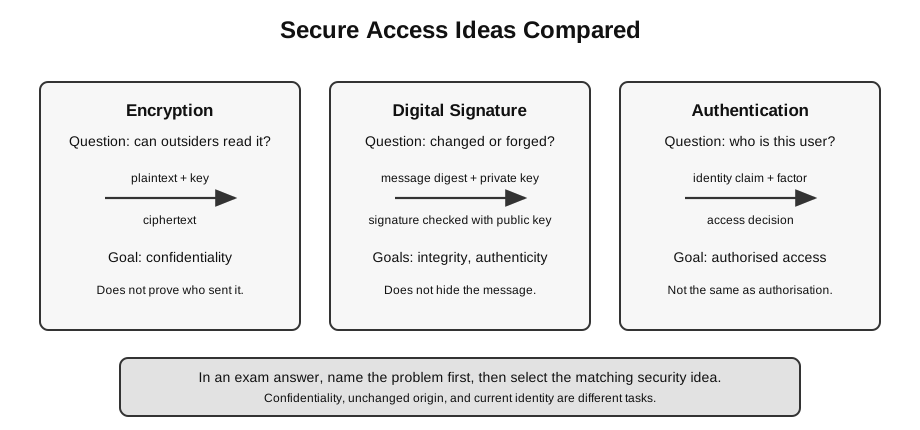
Caption: Begin with the question being answered. Encryption addresses whether content can be read; a digital signature addresses signed-content integrity and matching-private-key origin, provided the public key is trusted; authentication checks evidence for a current identity claim. Authorisation is the later, separate decision about permitted actions.
A common beginner mistake is to say “use encryption” for every security problem. Encryption is important, but it mainly protects confidentiality. It does not automatically prove that a user is allowed to log in, and it does not automatically keep a server available during a DoS attack.
First Decide the Goal
Use this quick distinction before writing an answer:
| Problem in the scenario | Main idea to use | Security goal |
|---|---|---|
| someone may read captured data | encryption | confidentiality |
| someone may change or forge a message | digital signature | integrity and authenticity |
| someone is trying to log in | authentication | identity checking before access |
| someone has logged in but wants to delete records | authorisation | permission after identity is known |
Authorisation is not the main focus of this note, but it is useful because many students mix it up with authentication.
Encryption
Encryption converts plaintext into ciphertext using a key.
plaintext + encryption key -> ciphertext
ciphertext + decryption key -> plaintext- Plaintext is the readable original data.
- Ciphertext is the unreadable encrypted form.
- A key controls the encryption and decryption process.
If an attacker captures ciphertext but does not have the needed key, the message should not be readable.
Tiny Message Example
Suppose the plaintext is:
Meet at 3 pmAfter encryption, the transmitted data may look like unreadable ciphertext:
X9Q-41A-ZT7...The exact symbols are not important here. The key idea is:
without the right key -> captured data should not be understandable
with the right key -> receiver can recover the original message
This protects confidentiality. It does not by itself prove that the sender is honest, that the user is authorised, or that the server will stay available.
A useful exam phrase is:
Encryption protects the readability of data, not every aspect of security.Symmetric Encryption
Symmetric encryption uses the same secret key to encrypt and decrypt.
same shared secret key
sender encrypts -> receiver decrypts
Strength:
- efficient for encrypting data;
- conceptually simple once both parties share the secret key.
Main difficulty:
- the secret key must be delivered to the receiver safely;
- if the key is stolen, anyone with the key can decrypt the messages.
Asymmetric Encryption
Asymmetric encryption uses a pair of keys:
- a public key that can be shared;
- a private key that must be kept secret.
The two keys are mathematically related, but one should not be practically derivable from the other.
High-level idea:
public key: can be distributed
private key: kept by the owner
This helps solve the key-sharing problem because the public key does not need to be kept secret.
For confidentiality, the direction is:
sender encrypts with recipient's public key
recipient decrypts with recipient's private key
The public key must still be obtained with confidence that it belongs to the intended recipient.
When Each Key Idea Is Useful
At H2 level, students do not need to implement algorithms. The useful comparison is practical:
- symmetric encryption is efficient once both sides already share the secret key;
- asymmetric encryption helps when the parties need to communicate without first sharing the same secret key safely;
- digital signatures use the public/private key idea for trust in message origin and integrity.
Symmetric Versus Asymmetric
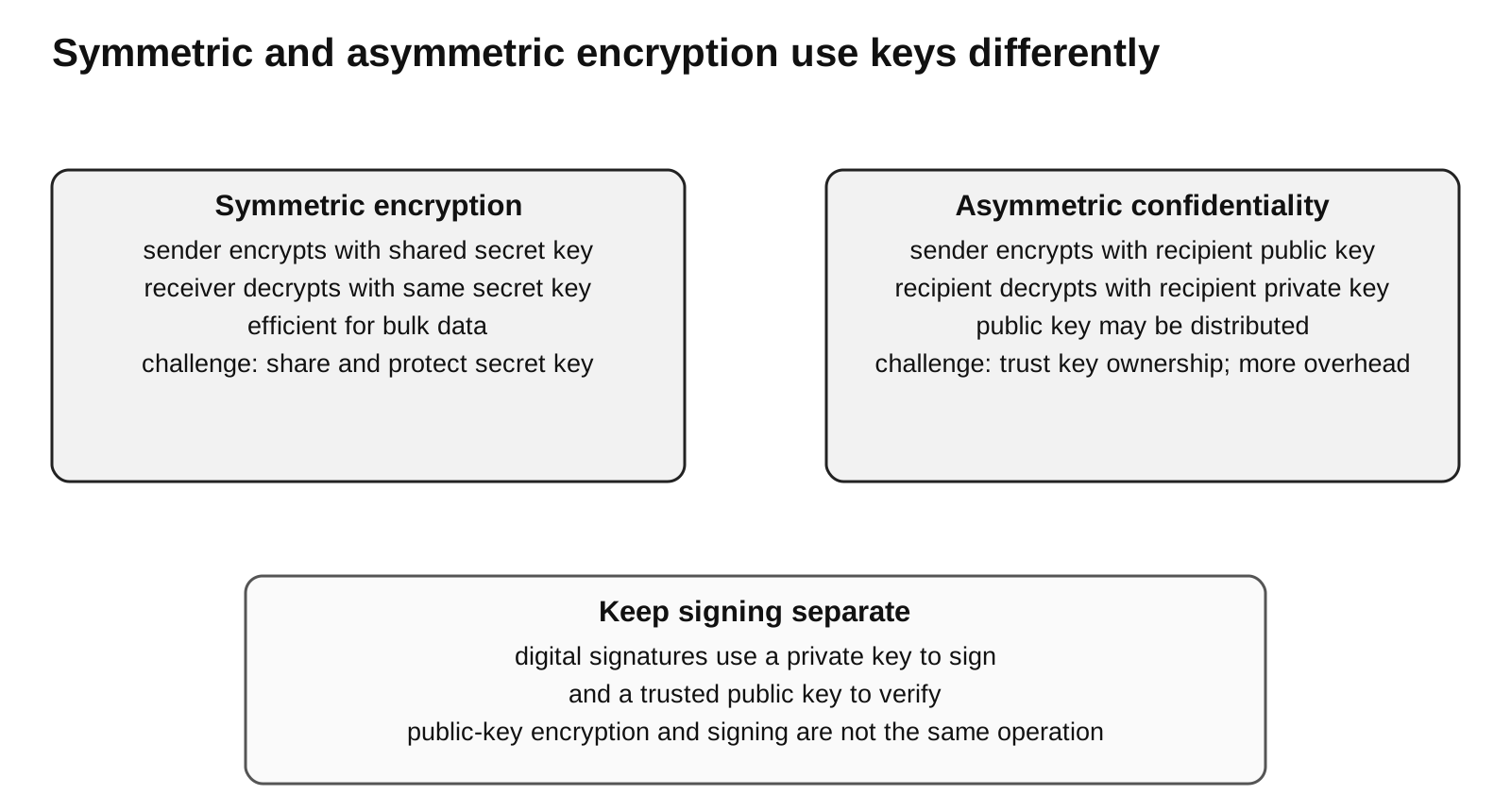
Caption: In symmetric encryption, both parties use the same secret key, so secure key distribution is the central challenge. For asymmetric confidentiality, the sender encrypts with the recipient’s public key and the recipient decrypts with the recipient’s private key. Trusting that a public key belongs to the intended recipient remains necessary. Digital signing uses the key pair differently and is shown separately.
| Feature | Symmetric encryption | Asymmetric encryption |
|---|---|---|
| keys | same shared secret key | public/private key pair |
| main challenge | sharing the secret key safely | managing and trusting public keys |
| typical strength | efficient for bulk data | useful for key exchange and signatures |
| beginner phrase | one shared secret | two related keys |
For H2 Computing, explain the key idea and trade-off. Detailed cryptographic algorithms are outside core scope.
Digital Signature
A digital signature provides evidence that:
- the matching private key produced the signature;
- the message has not been changed after signing.
It supports authenticity and integrity. To associate the matching key with a named sender, the verifier must trust the binding between that identity and public key, and the private key must not be compromised.
A digital signature is not the same as encrypting the whole message. A signed message might still be readable unless it is also encrypted.
Digital Signature Analogy
Think of a digital signature as a tamper-evidence and origin check for a message.
It is not mainly asking:
Can outsiders read this message?It is asking:
Was this message changed?
Was it signed using the sender's private key?
That is why digital signatures are linked to integrity and authenticity, while encryption is linked to confidentiality.
Digital Signature Conceptual Flow
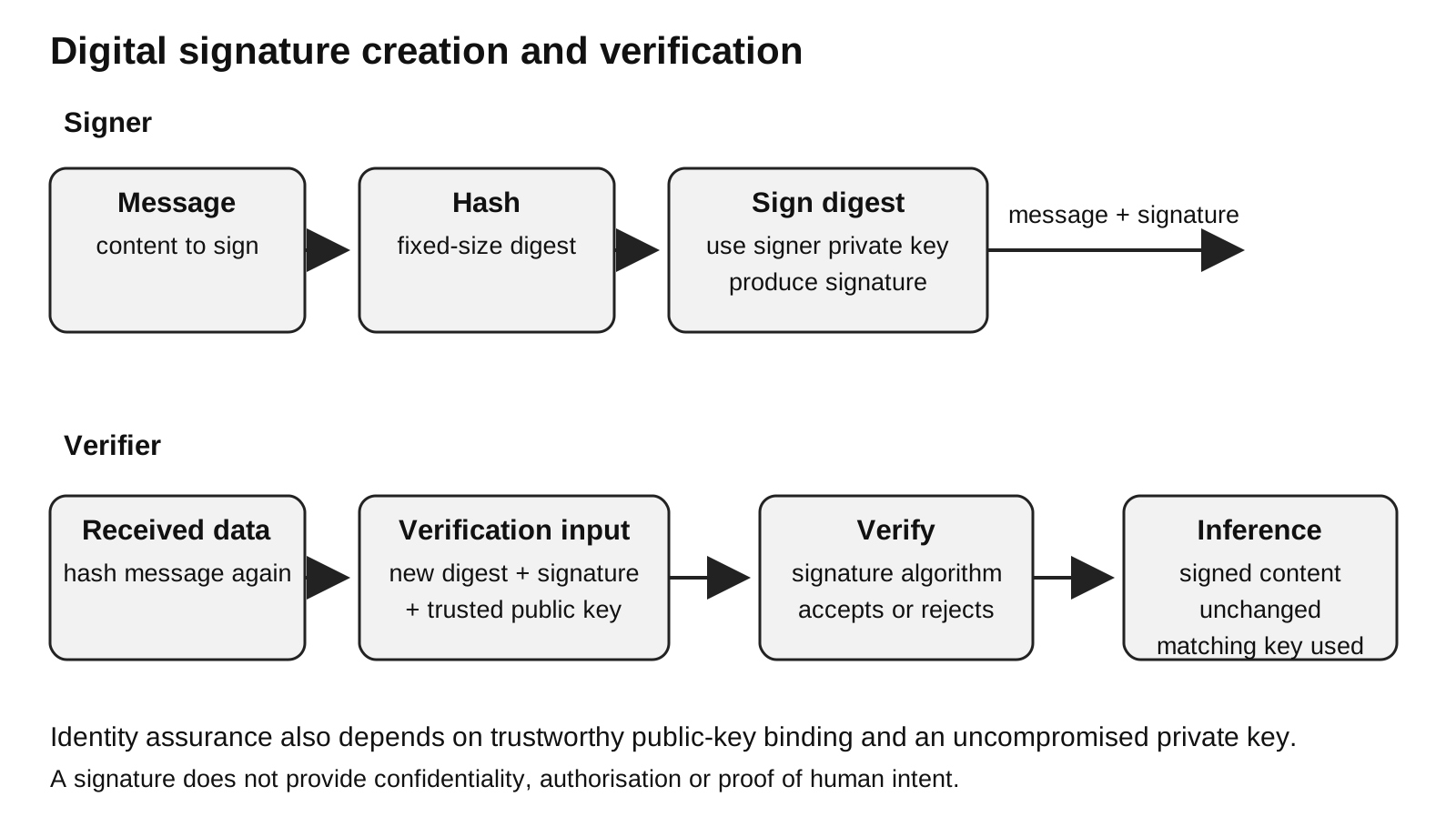
Caption: The signer hashes the message and signs the digest using the private key. The verifier hashes the received message and asks the signature algorithm to verify the signature using a trusted copy of the claimed signer’s public key. Acceptance supports integrity and matching-private-key origin; it does not hide the message or decide authorisation.
Sender:
message -> hash algorithm -> digest
digest + sender's private key -> digital signature
send message and digital signature
Receiver:
received message -> same hash algorithm -> new digest
trusted claimed-sender public key + signature + new digest -> verify: accept or reject
Successful verification gives evidence that the message was not altered and that the matching private key produced the signature. It does not, by itself, prove that the public key belongs to the claimed human or organisation.
Why Hashing Appears in Signatures
A hash algorithm produces a fixed-size digest from a message.
Useful properties at this level:
- the same message gives the same digest;
- collision-resistant design makes it computationally difficult to find two different messages with the same digest; this is a security aim, not an absolute mathematical guarantee;
- the digest has fixed size and is usually much smaller than a long message.
The signature signs the digest rather than the whole message. This gives the signature operation a fixed-size input and lets the verifier detect malicious change. A plain unkeyed hash alone only checks change safely when the expected digest comes through a trusted or protected path; otherwise an attacker could replace both message and hash.
Signature Trace With a Small Message
Conceptual example:
Original message: Pay $20 to vendor A
Hash digest: H1
Digital signature: sender signs H1 with private key
If someone changes the message:
Changed message: Pay $200 to vendor A
Receiver hashes changed message -> H2
Receiver checks signature -> original signed digest H1
H1 and H2 do not match
The mismatch tells the receiver that the message content is not the same as the signed content.
What a Signature Does Not Do
A digital signature does not automatically hide the message. A signed message may still be readable if it is sent as plaintext.
A digital signature also does not decide whether the sender is allowed to perform an action. It gives evidence about message origin and whether the message changed. The receiving system may still need access control rules after that.
Core Limitations and Residual Risk
| Control | Important limitation |
|---|---|
| encryption | depends on strong algorithms and secret keys; does not protect a compromised endpoint or service availability |
| digital signature | does not provide confidentiality or automatically prevent replay; identity claims depend on trusted public-key binding and private-key control |
| password | may be guessed, reused, stolen or phished |
| possession factor | device or token may be lost, stolen or socially engineered |
| biometric factor | can have false accepts/rejects and is difficult to replace if compromised |
| two-factor authentication | reduces account risk but does not eliminate phishing, recovery abuse or authorised-session misuse |
Authentication
Authentication is the process of proving identity.
Example:
user claims: I am Mei
system asks for evidence
user provides password and token code
system checks evidence
system accepts or rejects the claim
Authentication happens before access is granted. It is different from authorisation:
- authentication asks “Who are you?”
- authorisation asks “What are you allowed to do?”
Authorisation is useful context, but the core syllabus item here is authentication.
Authentication Versus Digital Signature
These two ideas both involve identity, but they are used differently.
| Situation | Better term | Why |
|---|---|---|
| user is logging in now | authentication | the system is checking the current user’s identity |
| receiver checks who signed a message earlier | digital signature | the receiver is checking message origin and integrity |
| user has logged in but tries to delete records | authorisation | the system must decide whether this authenticated user has permission |
For this syllabus topic, authentication is core. Authorisation is included here only to prevent confusion.
Authentication Factors
| Factor | Meaning | Example |
|---|---|---|
| knowledge | something the user knows | password, PIN |
| possession | something the user has | security token, phone authenticator app |
| inherence | something the user is | fingerprint, face recognition |
Two-factor authentication uses evidence from two different factor categories. A password plus a one-time token is stronger than a password alone because stealing the password is not enough.
Choosing the Right Idea
| Scenario | Best matching idea | Reason |
|---|---|---|
| a message is intercepted on public Wi-Fi | encryption | hides message contents |
| a document may have been altered after signing | digital signature | detects change and supports sender authenticity |
| a user logs in to an email server | authentication | proves current identity |
| a password is stolen by a keylogger | two-factor authentication | password alone should not be enough |
| a website is overwhelmed by traffic | not encryption | availability problem, not content secrecy problem |
Mini Worked Comparison
Scenario:
A student sends a project file to a teacher.
The file contains private marks.
The teacher also wants to know whether the file was altered after the student sent it.
Reasoning:
| Need | Suitable idea | Why |
|---|---|---|
| prevent outsiders reading the marks | encryption | protects confidentiality during storage or transmission |
| detect malicious alteration and authenticate origin | digital signature | a plain hash is insufficient if an attacker can replace both file and digest |
| check that the student account is logging in | authentication | proves current identity before access |
More than one security idea may be needed in the same real system. The key is not to claim that one idea solves all needs.
Common Mistakes
- Saying encryption proves the sender’s identity.
- Saying a digital signature keeps a message secret.
- Forgetting that symmetric encryption has a key-distribution problem.
- Saying a public key must be kept secret. The private key must be kept secret.
- Mixing up authentication and authorisation.
- Treating two-factor authentication as “two passwords”. Two factors should come from different categories.
Quick Check
| Prompt | Answer |
|---|---|
| Which idea protects data from being read by outsiders? | encryption |
| Which key must be kept secret in asymmetric encryption? | private key |
| Which idea checks that a message was not changed and came from the claimed sender? | digital signature |
| Which process proves a user’s identity before access? | authentication |
| Which factor is a fingerprint? | inherence |
Return to Network Security.