Firewalls, IDS, and IPS
Firewalls, IDS, and IPS are controls for network traffic.
They answer related but different questions. The easiest way to separate them is to ask whether the device is mainly filtering by rules, alerting after detection, or blocking suspicious traffic inline.
They answer related but different questions:
| Control | Question |
|---|---|
| firewall | Should this traffic be allowed through? |
| IDS | Does this traffic look suspicious enough to alert someone? |
| IPS | Does this suspicious traffic need to be blocked now? |
Where These Controls Act
These controls sit near network traffic, not inside a user’s memory or thoughts. They are useful when the risk is connected to packets, connections, suspicious patterns, or access between network areas. They are not the same as password checking, anti-malware scanning, or secure programming.
traffic reaches boundary -> firewall applies rules
traffic is observed -> IDS may alert
traffic passes through inline device -> IPS may block
Firewall
A firewall filters network traffic according to rules.
For a beginner, think of a firewall as a checkpoint between two network areas.
packet arrives
firewall checks rule set
if allowed: forward packet
if blocked: drop packet
The rule may consider information such as:
- source address;
- destination address;
- port number;
- protocol;
- connection state;
- application or service, depending on firewall type.
Simple Firewall Rule Example
Suppose a school web server should accept browser requests from the internet, but the database server should only be reachable from inside the school network.
Example rule table:
| Rule | Traffic | Action | Reason |
|---|---|---|---|
| 1 | internet to web server on HTTPS port 443 | allow | students need to reach the web app |
| 2 | internet to database server on database port | block | outsiders should not connect directly to the database |
| 3 | internal web server to internal database server | allow | the web app needs to read and write data |
| 4 | all other unexpected incoming traffic | block | default-deny reduces exposure |
Beginner reasoning:
The firewall is not deciding whether a password is correct.
It is deciding whether this kind of network traffic should pass.
Host-Based and Network-Based Firewalls
| Type | Where it is used | What it protects |
|---|---|---|
| host-based firewall | installed on one device | that individual device |
| network-based firewall | placed at a network boundary | devices behind that boundary |
Example:
- A laptop’s operating system firewall is host-based.
- A school router or dedicated firewall protecting a school network is network-based.
Hardware and Software Firewalls
| Type | Beginner explanation |
|---|---|
| dedicated firewall appliance | a physical appliance that runs firewall software in the network path |
| software firewall | a program running on a computer or server |
The distinction is mainly deployment. A dedicated appliance still uses software to apply filtering rules.
Default-Deny Reasoning
A common secure design is to allow only traffic that is needed and block unexpected traffic by default. This is called a default-deny mindset.
Example:
Allow HTTPS to the public web server because users need it.
Allow the web server to contact the database server because the app needs it.
Block direct internet traffic to the database server because outsiders do not need it.
Block other unexpected incoming traffic unless there is a clear reason to allow it.
Default-deny does not mean blocking everything. It means every allowed path should have a reason.
Firewall Limitations
A firewall is important, but it is not magic.
It may fail to protect against:
- traffic explicitly allowed by the rule set;
- attacks that start inside the protected network;
- malware that arrives through a permitted channel, such as a downloaded file;
- users who approve unsafe firewall exceptions;
- encrypted payload content that cannot normally be inspected without terminating/decrypting the protected connection, although visible addresses, ports and connection state may still be filtered;
- new attacks that resemble normal traffic.
Good exam answers should say both what a firewall can do and what it cannot guarantee.
Example limitation:
If the firewall allows HTTPS traffic to a web application, an attacker may still send a malicious-looking request through HTTPS.
The firewall has allowed the connection because the web service is meant to be reachable.
Other controls, such as secure application code, IDS/IPS, validation, logging, and authentication, are still needed.
Firewall Does Not Mean Full Security
A firewall decision is usually about whether a connection or packet is allowed by policy. If the allowed service itself has a vulnerability, an attacker may still send harmful input through an allowed route.
For example, a web server must normally accept HTTPS requests. A firewall may allow those requests, but the web application still needs input validation, authentication, logging, and secure code.
Intrusion Detection System
An intrusion detection system monitors activity and raises alerts when it sees suspicious patterns.
IDS behavior:
observe traffic or system activity
compare against known signatures or normal behavior
raise alert if suspicious
administrator or system responds
In the network-based deployment shown here, an IDS usually receives a mirrored/tap copy rather than sitting in the direct forwarding path. Its main job is detection and alerting. Host-based IDS can instead monitor events on one computer.
Intrusion Prevention System
An intrusion prevention system sits inline with traffic and can block suspicious activity.
IPS behavior:
traffic enters IPS
IPS inspects traffic
if acceptable: forward traffic
if suspicious: block, drop, or reset traffic
Because an IPS can block traffic, incorrect decisions can affect legitimate users. This is why false positives matter.
IDS Versus IPS
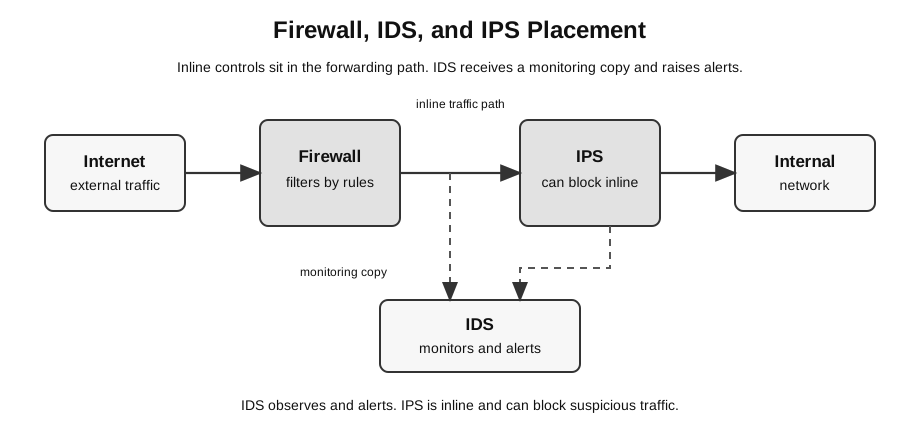
Caption: Follow the solid forwarding path through the rule-filtering firewall and inline IPS. The dashed arrow is a mirrored traffic copy to a network IDS, which detects and alerts rather than forwarding or blocking that packet. This is one possible deployment; host-based controls also exist, and all three require correct configuration and updating.
| Feature | IDS | IPS |
|---|---|---|
| main action | detects and alerts | detects and blocks |
| position | often monitors a copy of traffic | inline with traffic |
| effect on attack | may not stop it immediately | can stop it immediately |
| risk | alert may be missed or too late | false positive may block legitimate traffic |
Memory aid:
IDS = Detection = tells you something may be wrong
IPS = Prevention = tries to stop it
Traffic Story
Use this story to separate the three controls.
1. A packet arrives from the internet.
2. The firewall checks whether the packet is allowed by network rules.
3. The IDS observes traffic patterns and raises an alert if something looks suspicious.
4. The IPS, if placed inline, can block traffic it classifies as malicious.| Stage | What the student should say |
|---|---|
| firewall | allow or block by rule |
| IDS | monitor and alert |
| IPS | inspect and block inline |
If an exam asks for “detect” rather than “prevent”, IDS is usually the better answer. If it asks for stopping suspicious traffic automatically, IPS is usually the better answer.
Signature-Based and Anomaly-Based Detection
IDS and IPS tools may use different detection methods.
| Method | How it works | Strength | Weakness |
|---|---|---|---|
| signature-based | compares traffic with known attack patterns | good for known attacks | may miss new attacks |
| anomaly-based | compares activity with a normal baseline | may notice unusual behavior | may generate more false alarms |
Students do not need to know vendor-specific systems. The key idea is that detection depends on comparing observed behavior with expected or known-bad behavior.
Why IDS and IPS Need Tuning
IDS and IPS decisions are not perfect. If rules are too strict, normal activity may be flagged or blocked. If rules are too loose, real attacks may pass unnoticed. This is why false positives and false negatives are part of security reasoning, not just vocabulary.
False Positives and False Negatives
| Term | Meaning | Example |
|---|---|---|
| false positive | harmless activity is flagged as suspicious | a legitimate file upload is blocked |
| false negative | harmful activity is not detected | a new attack pattern passes through |
These terms matter because security controls involve trade-offs. A very strict IPS may block more attacks but also disrupt legitimate use. A very permissive setup may avoid disruption but miss real attacks.
Worked Scenario
A school hosts an internal results system. It wants to:
- block outside traffic to the database server;
- allow browser traffic to the web server;
- detect repeated suspicious login attempts;
- stop known malicious requests before they reach the web server.
Suitable controls:
| Requirement | Control |
|---|---|
| block outside database access | firewall rule |
| allow browser access to web server | firewall rule allowing HTTP/HTTPS to the web server |
| detect repeated suspicious login attempts | application/authentication logs first; a network IDS may help only when it can observe relevant traffic or metadata |
| stop known malicious requests inline | IPS |
Common Mistakes
- Saying an IDS blocks attacks. IDS mainly detects and alerts.
- Saying an IPS only records attacks. IPS can block traffic.
- Describing a firewall as antivirus software. A firewall filters traffic; antivirus/anti-malware tools inspect software and files.
- Claiming a firewall protects against all internal attacks.
- Ignoring false positives and false negatives when discussing IDS/IPS.
Quick Check
| Prompt | Best answer |
|---|---|
| Which control filters traffic by rule? | firewall |
| Which control raises alerts about suspicious traffic? | IDS |
| Which control can block suspicious traffic inline? | IPS |
| Which security goal is harmed when an IPS wrongly blocks real users? | availability |
Return to Network Security.