Threats: Malware and DoS
This note explains two major threat groups in H2 Computing network security:
- malware, where harmful software runs on a device;
- denial of service, where a service is made unavailable.
Both are security threats, but they harm systems in different ways. Malware usually means harmful software is running somewhere. DoS and DDoS usually mean a service is being overwhelmed, even if no private data is stolen.
A good answer should therefore separate:
method of attack -> behaviour -> security goal harmed -> suitable defenceMalware
Malware means malicious software. It is software designed to do something harmful, such as damaging files, spying on a user, stealing credentials, spreading to other systems, or blocking access to data.
The key question is:
What harmful action does this software perform?Common Malware Types
| Type | What it does | Beginner clue |
|---|---|---|
| virus | attaches to a file or program and spreads when that file or program is run | needs a host file or user action |
| worm | spreads across networks without attaching itself to another program | rapid self-spreading |
| trojan horse | disguises itself as a useful or harmless program | tricks the user into running it |
| ransomware | prevents access to data or a system and demands payment | files locked or encrypted |
| spyware | secretly collects information about the user or system | hidden monitoring |
| keylogger | records keystrokes | passwords and account details at risk |
A beginner-safe way to remember the distinction:
virus: attaches
worm: self-spreads
trojan: disguises
ransomware: blocks access
spyware: observes
keylogger: records typing
Malware Example
Suppose a student downloads a fake “exam timetable viewer” from an unofficial website. The program opens normally, so it looks harmless. In the background, it records typed passwords and sends them to an attacker.
This is best described as:
- malware, because the software is harmful;
- a trojan horse, because it pretends to be useful;
- a keylogger, if its main harmful action is recording keystrokes;
- a confidentiality threat, because private data is exposed.
The same scenario can involve more than one label. In an exam answer, explain the behavior rather than only naming the label.
For example, “trojan horse” explains how the malware deceives the user, while “keylogger” explains what harmful action it performs. Both labels can be valid if the scenario supports both.
Step-by-Step Infection Story
This story is deliberately simple. It is not a guide to attacking a system; it shows how to reason about a security scenario.
1. User receives a message with a link to a fake homework tool.
2. User downloads and runs the tool.
3. The tool appears normal, but it also installs hidden software.
4. The hidden software records typed passwords.
5. The stolen password is used to access an account.
How to classify it:
| Step | Security idea |
|---|---|
| fake homework tool | trojan horse behavior |
| hidden password recording | keylogger or spyware behavior |
| stolen password used later | unauthorised access risk |
| private password exposed | confidentiality harmed |
For beginners, the important point is that the same incident may include a delivery method, malware behavior, and a later consequence.
Delivery, Behaviour, and Impact
Beginners often mix up three different parts of a malware story.
| Part | Question | Example |
|---|---|---|
| delivery | how did it reach the user? | email attachment, fake download, unsafe website |
| behaviour | what does it do after running? | records keystrokes, encrypts files, spreads across a network |
| impact | what security goal is harmed? | confidentiality, integrity, availability |
This matters because the same delivery method can lead to different malware behaviours. An email attachment might install spyware, ransomware, or a worm. The answer should follow the evidence given in the question.
How Malware Spreads
Malware may reach a device through:
- infected attachments;
- unsafe downloads;
- removable storage;
- compromised websites;
- weakly secured network services;
- social engineering, where the user is tricked into doing something unsafe.
The syllabus does not require detailed attack techniques. It does require understanding that connected devices can spread harm through a network.
Denial of Service
The defining feature of denial of service is that legitimate users cannot obtain normal service. Traffic flooding is the common syllabus example, but an attacker may also exhaust another limited resource or exploit a fault that crashes or degrades the service. Source count alone does not define the impact.
A denial-of-service attack tries to stop legitimate users from using a service.
Typical effect:
server has limited CPU, memory, bandwidth, or connection capacity
attacker sends too many requests or expensive requests
server becomes slow or unavailable
legitimate users cannot access the service properly
The main harmed goal is availability.
DoS Trace
Imagine a small web server can comfortably handle 100 requests per second.
| Time | Normal users | Attack requests | Server effect |
|---|---|---|---|
| 09:00 | 40/s | 0/s | service is normal |
| 09:01 | 42/s | 70/s | server is near its limit |
| 09:02 | 39/s | 500/s | requests queue or fail |
| 09:03 | 45/s | 800/s | real users experience timeout |
Nothing in this trace requires the attacker to read private data. The harm is that the service is no longer reliably available.
Distributed Denial of Service
A distributed denial-of-service attack uses many attacking devices.
The devices may be ordinary computers or internet-connected devices that have already been infected. The attacker controls them remotely and commands them to send traffic to the same target.
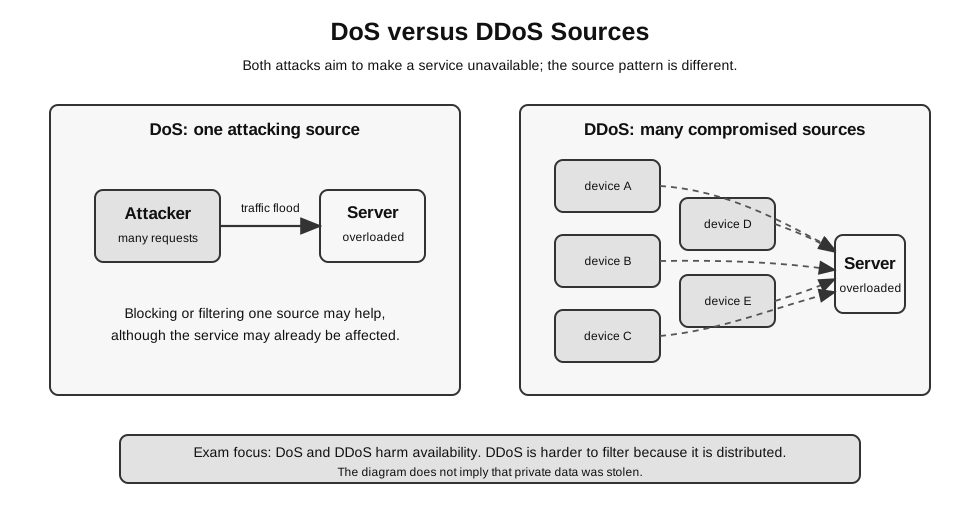
Caption: The source counts are simplified typical patterns: a DoS example uses one attacking source, while DDoS uses many distributed sources, often compromised botnet devices. Both harm availability by degrading service for legitimate users. Distribution makes filtering harder because attack traffic comes from many places and may resemble normal requests; source count is not itself the defining harm.
Figure: A DoS attack may come from one attacking source, while a DDoS attack uses many compromised devices; both aim to overwhelm the same victim service and harm availability.
Why DDoS is harder to handle:
- traffic comes from many source addresses;
- blocking one source is not enough;
- attack traffic can resemble normal user traffic;
- the target may run out of bandwidth before the server can filter requests.
DoS and Malware Can Be Connected
Malware and DoS are separate concepts, but they can appear in the same story.
Example:
malware infects many devices
infected devices become remotely controlled bots
attacker commands bots to flood a website
website becomes unavailable to real users
The malware creates the attacking network. The DDoS is the availability attack carried out using that network.
What DoS Is Not
A DoS attack does not mainly mean that the attacker has read secret files or changed stored records. It mainly means that legitimate users cannot use a service reliably.
This distinction is important:
| Wrong focus | Better focus |
|---|---|
| ”Use encryption to stop DoS.” | DoS is an availability problem, so filtering, rate limiting, monitoring, prevention, and capacity planning are more relevant. |
| ”Use a stronger password to stop DDoS.” | DDoS traffic may come from many infected devices, so login authentication is not the main defence. |
| ”DDoS always steals data.” | DDoS may distract from other attacks, but the direct harm is service unavailability. |
Defensive Ideas
For H2 Computing, focus on matching controls to risk.
| Risk | Suitable defensive idea |
|---|---|
| malware entering a device | careful downloads, anti-malware scanning, software updates, least privilege |
| suspicious network traffic | IDS monitoring and alerts |
| malicious traffic that should be blocked | firewall or IPS rules |
| service flooding | filtering, rate limiting, capacity planning, upstream support |
| password theft by keylogger | two-factor authentication reduces damage if password is stolen |
No single control is complete. A firewall can block some traffic, but it does not guarantee that no malware will run on a user’s device.
Beginner Decision Pattern
When a question gives a threat scenario, use this pattern:
1. Identify whether harmful software is running, traffic is overwhelming a service, or identity/data is at risk.
2. Name the main security goal affected.
3. Choose a control that acts at the right place.
4. State one limitation.
Example:
| Scenario | Answer shape |
|---|---|
| Worm spreads across school computers | malware threat; affects integrity and availability; reduce by patching, anti-malware tools, and traffic monitoring; may still spread if a device is unpatched |
| Website cannot respond because of heavy attack traffic | DoS/DDoS threat; affects availability; reduce by filtering and IPS/rate-limiting; difficult because traffic may come from many sources |
Common Mistakes
- Calling every malware example a virus.
- Forgetting that worms spread without needing to attach to a host file.
- Saying DoS mainly steals data. DoS mainly prevents service use.
- Treating DDoS as merely a “stronger password problem”. DDoS is a traffic and availability problem.
- Saying two-factor authentication removes malware. It reduces account compromise risk if one factor is stolen; it does not remove infected software.
Quick Check
For each scenario, identify the threat and the harmed security goal.
| Scenario | Threat | Main harmed goal |
|---|---|---|
| a program records typed banking passwords | keylogger or spyware | confidentiality |
| a website receives millions of useless requests and becomes unreachable | DoS or DDoS | availability |
| a fake installer secretly gives remote access to an attacker | trojan horse | confidentiality and integrity |
| software copies itself across a network without attaching to files | worm | availability and integrity |
Return to Network Security.