Web, Database, and Local Server Workflow
Many lab tasks combine web forms, Flask routes, templates, files, and databases. The safest way to work is to test each handoff.
This note is for the moment when several parts must work together. If the app fails, the main skill is to locate which layer failed.
A beginner often thinks:
The web app is broken.A stronger way to think is:
Which handoff is broken?
Browser -> route?
Form -> Flask?
Flask -> validation?
Validation -> database?
Database -> query?
Query -> template?
Template -> browser?
Do not rewrite the whole app when only one handoff is failing.
Full Flow
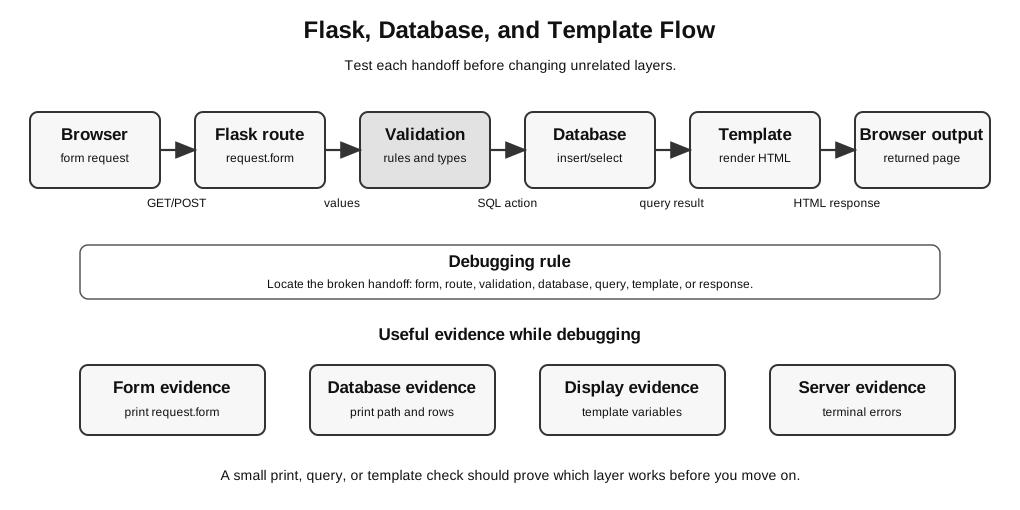
Figure: The Flask route controls the handoffs. It receives a browser request, applies validation, reads or changes the database, and passes explicit context to a template; the rendered HTML returns to the browser. Validation and database operations return control or results to the route rather than sending data directly to the template. Debug by collecting evidence at the earliest broken handoff.
Typical web/database path:
browser form -> Flask route -> validation -> database -> query -> template -> browser outputWhen something fails, locate the broken handoff instead of rewriting every layer.
One Request, Several Handoffs
A single form submission may involve many small transfers of information.
Example: a user enters a book title and clicks Submit.
| Step | Handoff | Evidence that it works |
|---|---|---|
| 1 | browser sends request | the correct route runs |
| 2 | HTML form sends field value | request.form contains the expected key |
| 3 | Flask route reads the value | printed/debugged value is correct |
| 4 | validation accepts or rejects it | blank and valid input behave differently |
| 5 | SQL insert stores it | selecting from the table shows the new row |
| 6 | SQL query retrieves rows | rows is not empty when data exists |
| 7 | template receives rows | Jinja loop uses the same variable name |
| 8 | browser displays output | page shows the expected result |
This table gives a debugging route. Check the earliest broken step first.
Debugging by Layer
Web/database errors often look similar to beginners even when they come from different layers.
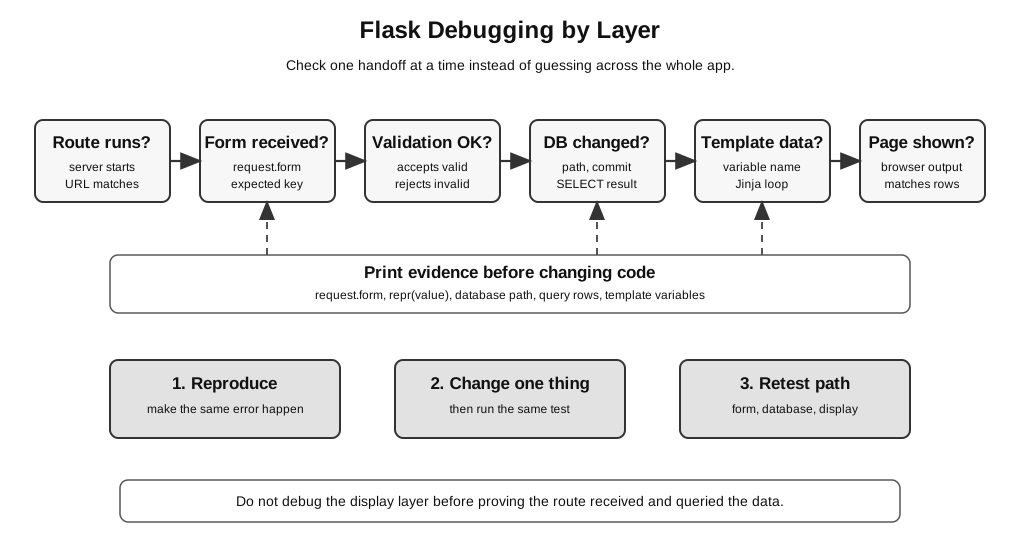
Figure: Diagnose a Flask/database task from left to right: first prove the correct URL reaches the route, then prove form receipt, validation, database result, template context and displayed page. A read-only database task needs the expected query rows; a write task additionally needs evidence of the committed change. Change one thing and retest the same path.
Layer Responsibilities
| Layer | Job | It should not be expected to… |
|---|---|---|
| browser | send form data and display returned HTML | directly write to SQLite |
| HTML form | name the fields users fill in | validate all server-side rules by itself |
| Flask route | receive request, run Python, choose response | magically know a form field with the wrong name |
| validation code | check type, range, length, format, and required values | permanently store data by itself |
| database | store and retrieve records | fix invalid input by itself |
| SQL query | select, insert, update, or delete records | decide how a web page should look |
| Jinja template | display values passed from Flask | query the database directly |
| static files | provide CSS, images, and client-side files | fix route, form, or database errors |
When a beginner knows each layer’s job, debugging becomes more concrete.
Minimal Flask Folder Check
For a Flask task, start with the folder shape.
task_folder/
  app.py
  templates/
    index.html
  static/
    style.css
Flask looks for templates in templates/ by default. If render_template("index.html") fails, check the folder and spelling first.
Common beginner mistake:
task_folder/
  app.py
  index.html
This may look reasonable to a human, but Flask will not find index.html using render_template("index.html") unless it is inside the templates/ folder.
Another common mistake:
task_folder/
  app.py
  template/
    index.html
The folder name must be templates, not template, unless the app has been specially configured.
Route First, Then Template
Start with a route that proves the server runs.
from flask import Flask

app = Flask(__name__)


@app.route("/")
def index():
    return "Server is running"
Run the app and open the page in the browser. This first test proves:
app.pycan start;- Flask is installed and imported;
- the route exists;
- the browser can reach the local server.
Once this works, replace the string with a template.
from flask import Flask, render_template

app = Flask(__name__)


@app.route("/")
def index():
    return render_template("index.html")
If the plain-text route worked but this version fails, the likely issue is the template file or folder, not the whole server.
Useful diagnosis:
| Result | Likely meaning |
|---|---|
| plain text route fails | app start, route, server, or URL problem |
| plain text route works, template fails | template folder or file-name problem |
| template loads but data missing | route variable, query, or Jinja variable problem |
Local URL and Route Check
A route and a browser URL must match.
Example:
@app.route("/books")
def books():
    return "Book list"
The browser should open:
http://127.0.0.1:5000/booksIf the browser opens only:
http://127.0.0.1:5000/then the /books route will not be tested.
A 404 Not Found error usually means the app is running, but the requested route does not exist.
GET and POST in Form Tasks
A route that shows a form and a route that receives a form submission may need different request methods.
A simple form:
<form method="post">
  <input name="title">
  <button type="submit">Add</button>
</form>
The route must allow POST if it receives this form submission:
from flask import Flask, render_template, request

app = Flask(__name__)


@app.route("/", methods=["GET", "POST"])
def index():
    if request.method == "POST":
        title = request.form.get("title", "").strip()
        return render_template("received.html", title=title)
    return render_template("index.html")
Practical rule:
GET usually displays the page or form.
POST usually sends submitted form data to the server.
If a form uses method="post" but the route only accepts GET, the submission will not reach the intended code.
In received.html, display the value as {{ title }}. Jinja autoescapes ordinary template variables; do not build a raw HTML response by interpolating untrusted form text into an f-string.
Form Handoff
The form name attribute must match the Flask code.
HTML:
<input name="title">Flask:
title = request.form.get("title")If the HTML says name="book_title" but Flask asks for "title", Flask will not receive the value you expect.
Use a quick print check:
print(request.form)
print("title:", repr(request.form.get("title")))
If title prints as None, check:
- the HTML
nameattribute; - the route method, such as
POST; - whether the form is submitting to the correct URL;
- whether the input is inside the
<form>...</form>block.
Use repr because it makes hidden cases clearer:
| Printed value | Possible meaning |
|---|---|
None | field name missing or wrong |
'' | field exists but user submitted blank input |
' ' | field contains spaces only |
'Dune' | field value was received correctly |
Validation Before Storage
Validation should happen before inserting data into the database.
Example:
title = request.form.get("title", "").strip()

if title == "":
    error = "Title is required."
    return render_template("index.html", error=error)
This separates two questions:
Did Flask receive the value?
Is the value acceptable?
Do not send invalid data to the database and hope the database or template will fix it later.
For beginner lab tasks, common validation checks include:
| Check | Example |
|---|---|
| required value | title must not be blank |
| type | mark must be an integer |
| range | mark must be from 0 to 100 inclusive |
| length | username must not exceed a given length |
| format | email must contain required parts if specified |
| choice | category must be one of the allowed options |
Database Smoke Test
Before connecting the database to the web form, test the database by itself.
import sqlite3

con = sqlite3.connect(":memory:")
con.execute("CREATE TABLE Book (id INTEGER PRIMARY KEY, title TEXT NOT NULL)")
con.execute("INSERT INTO Book (title) VALUES (?)", ("Algorithms",))
con.commit()
rows = con.execute("SELECT title FROM Book").fetchall()
assert rows == [("Algorithms",)]
con.close()
This proves the SQL idea works. If the web app still fails later, the issue is likely in the form, route, database path, SQL parameters, or template display.
A smoke test does not prove the whole app works. It proves one layer is not the main problem.
Database Path Check
If a database appears empty, the program may be opening a different file from the one you inspected.
from pathlib import Path

DB_PATH = Path("books.db")
print("Using database:", DB_PATH.resolve())
Run this once while debugging to confirm which database file the app is using.
Important trap:
SQLite may create a new empty database file if the path points to a file that does not exist.This can hide a path error. The app seems to have a database, but it may be the wrong empty database.
Safer beginner habit:
from pathlib import Path

DB_PATH = Path("books.db")
print("Using database:", DB_PATH.resolve())
print("Database exists before connect:", DB_PATH.exists())
If the task gives a supplied database, check that the app is using that file, not creating a new one somewhere else.
Insert, Commit, Select
For SQLite tasks, remember the basic sequence:
connect -> execute INSERT/UPDATE/DELETE -> commit -> SELECT to check -> closeExample:
import sqlite3

con = sqlite3.connect("books.db")
con.execute("INSERT INTO Book (title) VALUES (?)", (title,))
con.commit()
rows = con.execute("SELECT title FROM Book").fetchall()
print(rows)
con.close()
If an insert seems to work during one request but disappears later, check whether commit() was called.
For SELECT queries, commit() is not needed because no data is being changed.
Parameter Order in SQL
Use parameterised SQL for values supplied by users.
con.execute("INSERT INTO Book (title, author) VALUES (?, ?)", (title, author))The order of the tuple must match the order of the placeholders.
Wrong example:
con.execute("INSERT INTO Book (title, author) VALUES (?, ?)", (author, title))This may not crash, but it stores the values in the wrong columns. That is a logic error, not a syntax error.
Query Result Shape
SQLite query results often return a list of tuples.
Example:
rows = con.execute("SELECT title FROM Book").fetchall()
print(rows)
Possible output:
[('Dune',), ('Algorithms',)]This means there are two rows, and each row has one selected column.
If the query selects two columns:
rows = con.execute("SELECT title, author FROM Book").fetchall()Possible output:
[('Dune', 'Frank Herbert'), ('Algorithms', 'A. Student')]The template must match the shape of the data being passed to it.
Passing Data to a Template
A route passes variables to a Jinja template.
Flask:
return render_template("books.html", books=rows)Template:
<ul>
  {% for book in books %}
    <li>{{ book[0] }}</li>
  {% endfor %}
</ul>
The name books in the template must match the keyword used in render_template.
Wrong example:
return render_template("books.html", rows=rows){% for book in books %}
<li>{{ book[0] }}</li>
{% endfor %}Here Flask passes rows, but the template tries to use books. The query may be correct, but the display layer is broken.
Static Files and CSS
CSS problems are usually separate from route, form, and database problems.
Typical folder:
task_folder/
  app.py
  templates/
    index.html
  static/
    style.css
Template link:
<link rel="stylesheet" href="{{ url_for('static', filename='style.css') }}">If the app works but the page looks unstyled, check:
- whether the CSS file is inside
static/; - whether the file name is exactly correct;
- whether the template contains the correct
url_for('static', ...)call; - whether the browser is showing a cached old version.
A missing CSS file usually does not mean the database code is wrong.
Small Flask Test-Client Example
Flask’s test client can test a route without opening a browser.
from flask import Flask

app = Flask(__name__)


@app.route("/")
def index():
    return "OK"


client = app.test_client()
response = client.get("/")
assert response.status_code == 200
assert b"OK" in response.data
This is useful when you want to check route behavior quickly. In the actual lab, use whatever method is allowed and practical.
For beginners, the browser and terminal are usually enough. The important habit is still the same:
test one layer before adding the next layerCommon Web/Database Failures
| Symptom | Likely layer | Check |
|---|---|---|
| browser cannot connect | local server | is Flask running, correct port, no crash? |
| terminal shows syntax error | Python code | read the first useful line in your own file |
| route gives 404 | routing | URL path and route decorator |
| method not allowed | route method | does the route allow POST? |
| template not found | template folder | file inside templates/, exact name |
| form value is missing | form handoff | name attribute and request.form.get(...) key |
| blank input accepted | validation | check .strip() and required-field logic |
| insert seems to work but row is missing | database | commit(), database path, table name |
| database appears empty | database path | print resolved path and check file existence |
| page shows no data | query or template | query result and Jinja loop variable |
| CSS not applied | static file | file path and url_for('static', filename=...) |
| works in old folder but not submitted folder | file management | test from the final submitted folder |
Complete Failure Trace 1: Form Submits But No Book Appears
Symptom:
The form submits, but the page still shows no books.Trace the path in order.
| Check | Possible evidence | Meaning |
|---|---|---|
print request.form | ImmutableMultiDict([('title', 'Dune')]) | form sends title correctly |
| print cleaned title | 'Dune' | route reads and strips value correctly |
| print database path | unexpected folder | app may be using the wrong database |
| select rows after insert | [('Dune',)] | database insert works |
| print rows before rendering | [('Dune',)] | route has data before template |
| check template loop | template loops over books, but Flask passed rows | display layer is broken |
Conclusion:
Do not rewrite the form or database if the row reaches the route but the template uses the wrong variable name.Complete Failure Trace 2: Database Looks Empty
Symptom:
The app runs, but the expected existing records from books.db are missing.Possible diagnosis:
| Evidence | Meaning |
|---|---|
print(DB_PATH.resolve()) shows another folder | the app is opening a different database path |
DB_PATH.exists() is False before connecting | SQLite may create a new empty database |
DB Browser shows records in a different books.db | you inspected one file but the app used another |
submitted folder has no .db file | required database may be missing from submission |
Good fix:
Put the required database in the task folder.
Use a clear relative path from app.py.
Print the resolved path once to confirm.
Retest insert and select.
Complete Failure Trace 3: Route Works But POST Fails
Symptom:
The page opens, but submitting the form gives Method Not Allowed.Likely cause:
@app.route("/")
def index():
    ...
This route accepts GET by default, but the form uses method="post".
Fix:
@app.route("/", methods=["GET", "POST"])
def index():
    ...
Then test again with:
- one normal title;
- one blank title if validation is required;
- one refresh or return to the page to check that stored data still displays.
Debugging Order
Use this order for integrated web tasks:
1. Does app.py start?
2. Does the route load?
3. Does the template render?
4. Does the form send the expected values?
5. Does validation accept/reject correctly?
6. Does the database insert/update/select work?
7. Does the template display the query result?
8. Do CSS/images/static files load if required?
9. Are required files saved and included?
Do not debug step 7 before step 4 works.
Local Server Discipline
When testing locally:
- watch the terminal for error messages;
- refresh the browser after saving files;
- restart the server if code changes are not picked up;
- keep the browser URL consistent with the route being tested;
- stop old server processes if a port is already in use;
- do not edit one copy of the project while running another copy;
- test from the final submitted folder, not from an old copy.
Common local-server confusion:
| Situation | What may be happening |
|---|---|
| browser still shows old output | page not refreshed, server not restarted, or browser cache |
| terminal error appears but browser still shows old page | browser may be showing a cached previous response |
| port already in use | another Flask process is still running |
| changes do not appear | you may be editing a different file from the one being run |
A simple check is to add a temporary visible message such as:
return "Version 2 route is running"If the browser does not show it, you are not testing the code you think you are testing.
Final Integrated Test
Before submission, test one complete path from browser to database and back.
Example for a book-recording app:
| Test | Expected result |
|---|---|
open / | form appears |
| submit blank title | error message appears, no blank row stored |
submit Dune | title is accepted |
| inspect/select database | Dune row exists |
| reload list page | Dune still appears |
| restart app and reload | stored row still appears if persistence is required |
This is stronger than only checking that the page opens.
Submission Check for Web/Database Tasks
For a Flask/database task, check that the submitted folder contains all required parts.
Typical structure:
task_folder/
  app.py
  books.db
  templates/
    index.html
    books.html
  static/
    style.css
Ask:
| Check | Question |
|---|---|
| main app | is the required .py file present? |
| templates | are all required templates inside templates/? |
| static files | are CSS/images inside static/ if required? |
| database | is the correct .db file included if required? |
| data files | are supplied .csv, .txt, or .json files included if needed? |
| runnable folder | does the app run from this folder alone? |
| final save | did you save after the last edit? |
A web app may work on your machine because it uses files outside the submitted folder. The marker will only have the submitted files.
When You Are Stuck
Use this short recovery routine:
1. Stop changing many files at once.
2. Identify the symptom exactly.
3. Choose the likely layer: route, form, validation, database, template, or static file.
4. Add one print or one tiny test at that layer.
5. Change one thing.
6. Retest the same action.
7. Once fixed, retest the previous working path.
Examples:
| Symptom | First small check |
|---|---|
| form value missing | print request.form |
| page blank | print rows before render_template |
| database empty | print resolved database path |
| CSS missing | open page source or check static/ path |
| route not found | compare URL with @app.route(...) |
Linking Back to Core Topics
Use the core notes when the issue is conceptual:
- Flask routes and templates: Flask Routes, Templates, and Jinja
- HTML forms: HTML, CSS, and Forms
- SQL and SQLite: SQL CRUD Queries and Joins
- validation and test cases: Test Case Design
Return to Lab Exam and Project Skills.