Test Case Design
Testing is not the same as trying random inputs. A good test case is chosen because it checks a specific requirement or likely failure.
You can read this note directly if you know Boolean functions and basic assertions. The central idea is that expected behaviour should be decided before the program is trusted.
Each test case should state:
- the input data;
- the expected output or behaviour;
- the reason for choosing the case.
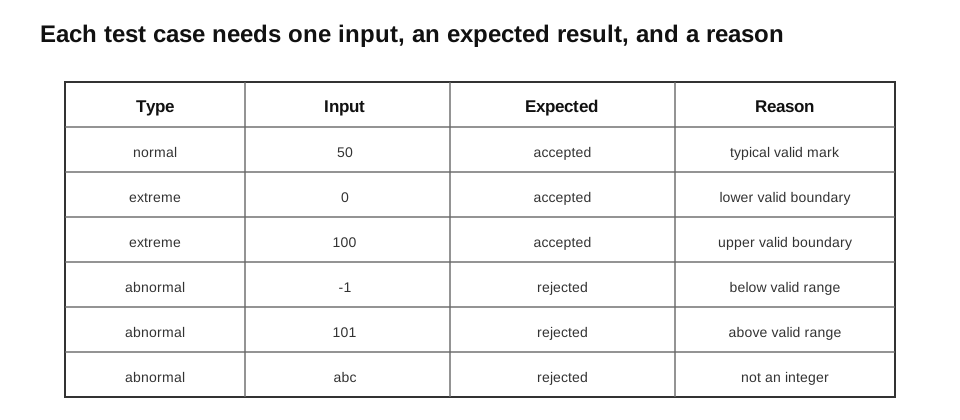
Caption: Plan the expected result before running the program. During execution, record the actual result and compare it with the expected result; only that comparison supports the pass/fail decision.
Test Data Versus Test Case
Test data is only the input. A test case is the complete planned check.
| Item | Example |
|---|---|
| test data | "101" |
| expected result | rejected |
| reason | above the permitted mark range |
A useful test record should also include the requirement or purpose, actual result, and whether the test passed.
| Purpose | Input | Expected | Actual | Pass? |
|---|---|---|---|---|
| reject a value above the upper limit | "101" | rejected with a range message | rejected with a range message | yes |
In exam answers, always include the expected result. Otherwise it is unclear what the test is meant to prove.
Normal Data
Normal data is valid, typical data that should be accepted.
For a mark validator with a valid range from 0 to 100:
50is normal data.
More examples:
| Rule | Normal data |
|---|---|
| mark from 0 to 100 | 50 |
| 8-digit phone number | "81234567" |
| required name | "Aisha" |
A normal case shows that the program handles ordinary valid input.
Extreme Data
Extreme data is valid data at the edge of an allowed range.
If the valid mark range is 0 to 100 inclusive, the extreme values are:
0 and 100Extreme cases are important because boundary conditions are often implemented incorrectly.
| Rule | Extreme valid data | Abnormal data just outside |
|---|---|---|
| 0 to 100 inclusive | 0, 100 | -1, 101 |
| 1 to 10 inclusive | 1, 10 | 0, 11 |
The values just outside the range are useful abnormal cases, but they are not extreme data because they are invalid.
Abnormal Data
Abnormal data is invalid data that should be rejected or handled safely.
Examples for a mark entered as text include:
"-1"
"101"
"abc"
""
"   "
Abnormal input should not be expected to crash a well-designed program. The expected behaviour should state how the program rejects or handles it.
Different abnormal cases test different risks:
| Input | Risk tested |
|---|---|
"-1" | below valid range |
"101" | above valid range |
"abc" | wrong type or format |
"" | missing input |
" " | whitespace-only input |
Worked Example: Mark Validation
Function under test:
def valid_mark_text(text):
    if not isinstance(text, str):
        return False
    text = text.strip()

    if text == "":
        return False

    try:
        mark = int(text)
    except ValueError:
        return False

    return 0 <= mark <= 100
Test table:
| Test type | Input | Expected | Reason |
|---|---|---|---|
| normal | "50" | True | typical valid mark |
| extreme | "0" | True | lower valid boundary |
| extreme | "100" | True | upper valid boundary |
| abnormal | "-1" | False | below valid range |
| abnormal | "101" | False | above valid range |
| abnormal | "abc" | False | cannot be converted to an integer |
| abnormal | "" | False | no input |
| abnormal | " " | False | whitespace-only input |
This parser deliberately uses int() inside try/except so signed integer syntax is handled consistently and one numerical range comparison can reject values such as -1. Under this contract, surrounding spaces and an optional sign are accepted by conversion; non-text input is rejected before string methods are used.
Assertions as Executable Tests
assert valid_mark_text("50") is True
assert valid_mark_text("0") is True
assert valid_mark_text("100") is True
assert valid_mark_text("-1") is False
assert valid_mark_text("101") is False
assert valid_mark_text("abc") is False
assert valid_mark_text("") is False
assert valid_mark_text("   ") is False
assert valid_mark_text(None) is False
Assertions make the expected result explicit. If one fails, Python stops at that line and helps locate which requirement is not satisfied.
Choosing Tests Systematically
For an inclusive numeric range, choose:
- one typical valid value;
- the lower valid boundary;
- the upper valid boundary;
- one value just below the lower boundary;
- one value just above the upper boundary;
- wrong-format or missing input when the input is received as text.
For a format requirement, choose:
- a correctly formatted value;
- too few characters;
- too many characters;
- a wrong separator;
- invalid characters;
- blank input.
Choose cases so that each one has a clear purpose. If one input violates several rules at once, a rejection does not reveal which rule worked. For example, "ABC" is poor evidence for an upper-range check because it fails conversion before a numerical comparison occurs.
For a length requirement, test:
- a typical valid length;
- the minimum valid length;
- the maximum valid length;
- one below the minimum;
- one above the maximum.
Worked Example: Password Length
Rule:
A password must contain from 8 to 12 characters inclusive.| Test type | Input | Expected | Reason |
|---|---|---|---|
| normal | "secure10" | accepted | typical valid length |
| extreme | "12345678" | accepted | minimum valid length |
| extreme | "123456789012" | accepted | maximum valid length |
| abnormal | "1234567" | rejected | one character too short |
| abnormal | "1234567890123" | rejected | one character too long |
| abnormal | "" | rejected | blank input |
Matching function:
def valid_password_length(password):
    return isinstance(password, str) and 8 <= len(password) <= 12
assert valid_password_length("secure10") is True
assert valid_password_length("12345678") is True
assert valid_password_length("123456789012") is True
assert valid_password_length("1234567") is False
assert valid_password_length("1234567890123") is False
assert valid_password_length("") is False
assert valid_password_length(None) is FalseTesting Stateful and Exceptional Behaviour
For a stateful operation, the expected result includes both the returned value or exception and the state after the operation.
def pop_item(stack):
    if stack == []:
        raise IndexError("pop from empty stack")
    return stack.pop()

stack = ["A"]
assert pop_item(stack) == "A"
assert stack == []                 # expected post-state

before = stack[:]
try:
    pop_item(stack)
    assert False
except IndexError:
    assert stack == before         # rejected operation did not change state
For an array-backed stack or queue, also test empty, one-item, exact-full, overflow/underflow, absent-target, and repeated-operation cases when those states apply. The requirement determines the expected return value, exception, and post-state.
From Testing to Debugging
When a test fails:
- compare the actual result with the expected result;
- reproduce the failure consistently;
- trace the relevant variables and conditions;
- correct the cause;
- rerun the failed case and related cases.
A passing test is evidence that the tested case met its stated requirement; a finite selected test set does not prove that no untested defect exists. A failing test is also a tool for locating faults.
After a correction, rerun the failed case and cases that previously passed. The second group checks that the change did not damage existing behaviour.
Exact valid limits are extreme data under the syllabus categories. Choosing those limits and nearby just-outside values is a boundary-focused test-selection strategy; the just-outside values remain abnormal, not a fourth category.
Paper 1 and Paper 2 Emphasis
For written questions, explain why each value is normal, abnormal, or extreme and state the expected result.
For practical work, construct a test table, run the program, record actual results, and investigate failures.
Common Mistakes
- Giving input values without expected results.
- Testing only normal data.
- Treating valid extreme data as invalid.
- Calling values just outside the range “extreme.”
- Forgetting blank or wrong-format input.
- Choosing several test values that all check the same condition.
- Writing tests only after the program appears finished.
Check Your Understanding
- What is normal test data?
- What are the extreme values for a range of 1 to 10 inclusive?
- Is
0normal, abnormal, or extreme for a valid range of 0 to 100? - Why should a test table include expected output?
Answers:
- Valid data typical of ordinary use.
1and10.- Extreme, because it is a valid boundary.
- The expected output provides the standard used to decide whether the program passed the test.