Incremental Testing and Debugging
Incremental development means building one small part, testing it, then adding the next part.
The goal is not to write perfect professional test suites. The goal is simpler and more urgent:
Keep the problem small enough to understand and fix.In a lab task, many students lose control because they write too much code before running anything. When the final program fails, they do not know whether the problem is in the input, the processing, the database, the template, the file path, or the final output.
Incremental testing prevents this. It gives you evidence after each small step.
Beginner Mental Model
A weak workflow looks like this:
read task -> code everything -> run once -> many errors -> panic-editA stronger workflow looks like this:
read task -> build one small part -> test it -> save it -> build the next partThe main idea is:
The newest untested change is the most likely place to look first.If the program worked five minutes ago and now fails, the error is probably in the part you just changed.
Testing Ladder
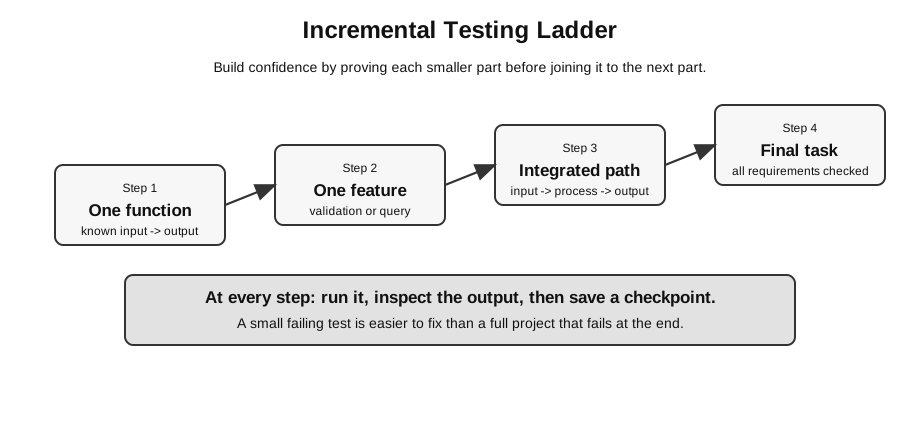
Figure: The testing ladder rises from one function to a final task; each new layer should be run, inspected, and saved before the next layer is added.
Do not jump straight from a blank file to a full solution.
| Level | Example test | What it proves |
|---|---|---|
| one expression | 0 <= mark <= 100 gives the expected result | a condition is correct |
| one function | is_valid_mark(101) should return False | a reusable unit works |
| one feature | invalid form input should show an error | one user-facing behaviour works |
| integrated path | form input should be stored in the database and displayed | several layers work together |
| final task | all required inputs, outputs, files, and edge cases checked | the submitted solution is ready |
The ladder matters because each level gives different evidence. A function test does not prove that the Flask form uses the correct field name. A successful database insert does not prove that the template displays the row.
Why Small Tests Matter
Suppose you write 80 lines before running the program and it fails. The error could be anywhere.
If you run after every small feature, the likely error is in the newest change.
large untested change -> many possible causes
small tested change -> few possible causes
This is the main reason incremental testing saves time.
It also protects confidence. A beginner who sees ten errors at once may feel the whole solution is wrong. A beginner who tests one step at a time can usually say:
The route worked.
The template worked.
The form submission broke after I changed the form method.
That is a much easier problem.
Evidence Before Moving On
Do not move to the next part just because the code “looks right”. Move on when you have evidence.
| Claim | Weak evidence | Better evidence |
|---|---|---|
| the function works | no red underline in editor | small test or assert passes |
| the form works | page displays input box | submitted value appears in Flask |
| validation works | normal input accepted | normal, boundary, and invalid inputs tested |
| database insert works | no crash | inserted row is selected back |
| template works | route returns a page | expected variable appears on the page |
| final solution is ready | it ran once earlier | rerun from the submitted folder and check required output |
This does not mean every step needs a long test script. Under exam conditions, even one print check or one small input-output check is useful.
Normal, Extreme, and Abnormal Tests
Use tests from Test Case Design when practical.
| Test type | Meaning | Example for mark 0-100 |
|---|---|---|
| normal | valid ordinary value | 75 |
| extreme | valid boundary value | 0, 100 |
| abnormal | invalid value | -1, 101, "abc" |
For each test, write the expected result before running it. Otherwise you may accept a wrong result just because it looks plausible.
Example validation rule:
A mark must be an integer from 0 to 100 inclusive.Useful tests:
| Input | Type | Expected result | Why it matters |
|---|---|---|---|
75 | normal | valid | ordinary accepted value |
0 | extreme | valid | lower boundary |
100 | extreme | valid | upper boundary |
-1 | abnormal | invalid | just below lower boundary |
101 | abnormal | invalid | just above upper boundary |
"abc" | abnormal | invalid | wrong data type |
"" | abnormal | invalid | blank input |
Boundary tests are especially important because comparison errors often happen at cutoffs.
Small Python Example
When writing a function, test it immediately.
def grade(mark):
    if type(mark) is not int:
        return "invalid"
    if mark < 0 or mark > 100:
        return "invalid"
    if mark >= 70:
        return "A"
    if mark >= 60:
        return "B"
    return "C"


assert grade(70) == "A"
assert grade(69) == "B"
assert grade(0) == "C"
assert grade(101) == "invalid"
assert grade("abc") == "invalid"
The boundary tests 70 and 69 are important because comparison errors often happen at grade cutoffs.
This small test is not the full solution. It provides evidence for the specified cases before the function is connected to input, files, forms, or databases; it does not prove correctness for every possible input.
Failed-Test Example
Suppose the code accidentally uses > instead of >=:
def grade(mark):
    if mark > 70:
        return "A"
    return "B"
Test:
assert grade(70) == "A"This test fails because 70 > 70 is false.
The important point is not just that the test failed. The useful point is that the test tells you where to look:
| Evidence | Meaning |
|---|---|
grade(71) gives "A" | high marks above 70 work |
grade(70) gives "B" | the boundary value is mishandled |
condition is mark > 70 | comparison should probably include equality |
The fix is small:
if mark >= 70:A good boundary test turns a vague wrong answer into a specific correction.
Do Not Debug by Guessing
When something fails, it is tempting to change many lines and hope the error disappears. This is risky.
Weak debugging:
change condition
rename variable
move file
restart server
change SQL
try again
After this, even if the program works, you may not know which change fixed it. If it still fails, you have created more possible causes.
Stronger debugging:
1. Reproduce the problem.
2. Observe the exact error or wrong output.
3. Identify the smallest likely failing part.
4. Add one print, assertion, query, or route test.
5. Change one thing.
6. Retest.
The rule is:
Change one thing at a time whenever possible.Debugging Process
When something fails, do not rewrite the whole program. Narrow the problem.
1. Reproduce the error.
2. Read the exact error message or wrong output.
3. Identify the smallest part that could cause it.
4. Add a print, assertion, or tiny test.
5. Change one thing.
6. Retest.
7. Check that earlier working parts still work.
The last step is important. A fix for one part can accidentally break another part.
Reading an Error Message
An error message is not just noise. It usually tells you:
| Part | What it tells you |
|---|---|
| error type | syntax, name, type, file, import, database, template, etc. |
| file name | which file was running |
| line number | where Python noticed the problem |
| message | what Python, Flask, SQLite, or another tool could not do |
Start at the first useful error location in your own file. Later lines may show library internals that are less useful for beginners.
Example:
NameError: name 'mark' is not definedPossible reasoning:
| Evidence | Meaning |
|---|---|
error type is NameError | Python cannot find a variable with that name |
message mentions mark | the problem is probably the name mark |
line says grade(mark) | mark is used here |
earlier code uses score | the value may have been stored under a different variable name |
Possible fix:
score = int(input("Enter mark: "))
print(grade(score))
or rename consistently:
mark = int(input("Enter mark: "))
print(grade(mark))
Do not fix this by changing unrelated code.
Error Types in Lab Work
| Error type | Beginner symptom | Example | Useful first check |
|---|---|---|---|
| syntax error | program does not start | missing colon or bracket | line number, nearby punctuation |
| runtime error | program starts but crashes | file not found, wrong type | exact error message and value |
| logic error | program runs but answer is wrong | wrong condition or formula | small input with known expected output |
| integration error | individual parts work but not together | form field name does not match Flask code | handoff between layers |
| file/path error | code works on one machine but not another | wrong relative path | current working folder and submitted folder |
| database error | row missing or query fails | wrong table name, missing commit() | table names, column names, database path |
| template error | route runs but page is wrong | wrong Jinja variable | values passed to render_template |
The fix depends on the type. A logic error will not be solved by repeatedly checking indentation if the condition is wrong.
Debugging by Data Flow
For many practical tasks, trace the data.
Example:
input value -> variable -> validation -> processing -> storage -> outputAt each arrow, ask:
- what value do I expect here?
- what value is actually here?
- is the type correct?
- is the name spelled correctly?
- did this step run?
This is especially useful when there is no obvious error message.
Data-Flow Trace Example: Form to Grade
Task: read a mark from a form and display a grade.
| Stage | Expected value | Possible bug | Quick check |
|---|---|---|---|
| form field | mark input exists | HTML uses name="score" | inspect form or print request.form |
| Flask route | request.form.get("mark") returns text | route handles only GET | check route methods and request method |
| conversion | text becomes integer | blank input causes conversion error | print repr(mark_text) before converting |
| grade function | returns A, B, C, or invalid | boundary comparison is wrong | assert function output for boundary cases |
| template | displays grade variable | Jinja variable name mismatch | print value before render_template |
This table gives you a debugging order.
Do not debug the template before checking that the route has actually received the form value.
Data-Flow Trace Example: Web and Database
Task: add a book title using a Flask form, store it in SQLite, and display all saved books.
Expected path:
"Dune" -> form field -> Flask route -> validation -> INSERT -> SELECT -> Jinja loop -> browser listA useful integrated test:
| Step | Check | Expected evidence |
|---|---|---|
| submit form | enter Dune | route receives Dune |
| validate | title is not blank | no error message |
| insert | SQL INSERT runs | no database error |
| commit | con.commit() called | row persists after request |
| select | query returns rows | Dune appears in result list |
| display | template loops through rows | browser shows Dune |
If the browser does not show Dune, do not immediately rewrite the whole database section. Locate the last step where the evidence was correct.
Print Checks
Print checks are simple but effective under exam pressure.
name = request.form.get("name")
print("DEBUG name:", repr(name))
Use repr when spaces or empty strings matter.
Examples:
| Printed value | Possible meaning |
|---|---|
None | missing key, wrong form name, wrong request method |
'' | input was submitted but blank |
' ' | spaces were entered; use .strip() if appropriate |
'80' | value is text and may need conversion |
Remove noisy debug prints before final submission if they affect required output. In a Flask app, harmless terminal prints are usually less serious than unwanted text in the browser page, but the final solution should still be tidy.
Assertion Checks
Assertions are useful for checking assumptions inside small examples.
total = 35 + 40
assert total == 75
Use assertions for small self-checks while developing:
assert grade(70) == "A"
assert grade(69) == "B"
In a final user-facing program, do not rely only on assertions for validation because users need clear error handling.
For example, a web form should usually show a helpful message instead of crashing with an assertion error.
SQL Debugging Checks
When SQL output is wrong, isolate the query.
rows = con.execute(
    "SELECT title FROM Book WHERE title LIKE ?",
    ("%network%",)
).fetchall()
print(rows)
Check:
- table name;
- column names;
- parameter order;
- placeholder count;
- whether
commit()was called after inserts or updates; - whether the program is opening the database file you think it is opening.
A common mistake is to test the wrong database file. Add a temporary path check if needed:
from pathlib import Path

DB_PATH = Path("books.db")
print("Using database:", DB_PATH.resolve())
If the path is not the database you expected, the SQL may be correct but the file path is wrong.
Debugging Wrong Output With No Error
A program can run without crashing and still be wrong.
Example rule:
A mark of 70 or above should receive A.Wrong code:
if mark > 70:
    return "A"
There is no syntax error and no runtime error. The logic is wrong only at the boundary.
Test:
assert grade(70) == "A"This catches the error.
When the output is wrong but there is no error message, use known input-output pairs:
| Known input | Expected output | Why useful |
|---|---|---|
| simple normal case | obvious result | catches basic formula or condition error |
| boundary case | exact cutoff behaviour | catches <, <=, >, >= mistakes |
| invalid case | rejection or error message | catches missing validation |
Regression Check
After fixing an error, retest earlier features.
Example:
Fix: changed validation for blank title.
Retest:
- blank title rejected
- normal title accepted
- saved title still appears in list
- database still contains expected row
A fix for one feature can break another. Regression testing catches that.
For a small lab task, regression testing does not need to be long. It can be a short checklist:
After each fix:
1. Test the failing case again.
2. Test one normal case that worked before.
3. Check the required output still appears.
When You Are Stuck
Use this sequence if you have been stuck for several minutes.
1. Stop changing code randomly.
2. State the symptom in one sentence.
3. Identify the layer: input, processing, file, database, route, template, or output.
4. Create the smallest test for that layer.
5. Check the evidence.
6. Fix only the most likely cause.
7. Retest.
Examples:
| Symptom | Better first question |
|---|---|
| page is blank | did the route return data to the template? |
| form value is missing | does the HTML name match request.form.get(...)? |
| database row missing | did the insert run, commit, and use the right database path? |
| file not found | what is the working folder and relative path? |
| output is off by one | which boundary value fails? |
A precise symptom is easier to debug than a general feeling that “the program is broken”.
Tiny Tests for Common Lab Layers
| Layer | Tiny test |
|---|---|
| Python function | call it with one normal and one boundary input |
| file reading | print the first line or first record |
| CSV processing | print the header and one parsed row |
| JSON processing | print the top-level type and one key |
| SQLite table | run one SELECT and print rows |
| Flask route | return plain text first |
| HTML form | print request.form after submission |
| Jinja template | pass one simple variable and display it |
Tiny tests are not a waste of time. They prevent larger debugging later.
Common Mistakes
- Testing only the happy path.
- Writing the full solution before running anything.
- Changing many parts before retesting.
- Ignoring the exact line number in an error message.
- Looking only at the last line of a long traceback and missing the useful line in your own file.
- Assuming a database insert worked without checking the database.
- Debugging the template when the route never passed the variable.
- Debugging SQL when the real problem is the HTML form field name.
- Keeping old test data that hides a bug.
- Forgetting to retest earlier features after a fix.
Final Takeaway
Incremental testing is not about writing more code. It is about staying in control.
Use this reasoning pattern:
What should happen?
What actually happened?
Where is the first point where the two differ?
What is the smallest test that proves this?
What is the smallest change that could fix it?
Did the fix break anything else?
Return to Lab Exam and Project Skills.