SQL CRUD, Queries, and Joins
You can read this note directly if you know tables, records, fields, and keys. SQL is the language used to work with relational databases.
SQL lets us describe what data we want to create, read, update, or delete. The database management system then carries out the operation on the stored tables.
The main beginner skill is not memorising isolated commands. It is learning how to read a query carefully:
Which table or tables are used?
Which rows are selected?
Which fields are returned?
Are rows grouped, joined, sorted, updated, or deleted?
How to Read SQL
SQL is usually read as a request to the database.
SELECT title
FROM Book
WHERE available = 1;
Read it as:
From the Book table, return the title field for rows where available is 1.For records (rows), CRUD means:
| Letter | Operation | SQL idea |
|---|---|---|
| C | create a record | INSERT |
| R | read | SELECT |
| U | update | UPDATE |
| D | delete | DELETE |
CREATE TABLE is different: it defines a database structure. It does not create a row. Keeping schema definition separate from record-level CRUD prevents the word “create” from hiding two different operations.
Example Schema
We will use a small library database throughout this note.
CREATE TABLE Student (
    student_id INTEGER PRIMARY KEY,
    name TEXT NOT NULL,
    class_id TEXT NOT NULL
);

CREATE TABLE Book (
    book_id INTEGER PRIMARY KEY,
    title TEXT NOT NULL,
    author TEXT NOT NULL,
    available INTEGER NOT NULL CHECK (available IN (0, 1))
);

CREATE TABLE Loan (
    loan_id INTEGER PRIMARY KEY,
    student_id INTEGER NOT NULL,
    book_id INTEGER NOT NULL,
    loan_date TEXT NOT NULL,
    FOREIGN KEY (student_id) REFERENCES Student(student_id),
    FOREIGN KEY (book_id) REFERENCES Book(book_id)
);
In SQLite, execute PRAGMA foreign_keys = ON; immediately after opening each connection. Declaring a foreign key describes the constraint; enabling the pragma makes SQLite reject an orphan Loan whose student or book does not exist.
This schema has three tables:
| Table | Stores | Primary key |
|---|---|---|
Student | student records | student_id |
Book | book records | book_id |
Loan | borrowing records | loan_id |
The Loan table also contains foreign keys:
| Foreign key | References | Purpose |
|---|---|---|
Loan.student_id | Student.student_id | identifies the student who borrowed a book |
Loan.book_id | Book.book_id | identifies the book that was borrowed |
For this syllabus’s SQLite work, the main data types are INTEGER, TEXT, and REAL. Common constraints include NOT NULL, UNIQUE, PRIMARY KEY, and FOREIGN KEY. INTEGER PRIMARY KEY AUTOINCREMENT is the valid SQLite pattern when a generated increasing identifier is genuinely required; do not attach AUTOINCREMENT to an arbitrary type. CREATE TABLE IF NOT EXISTS ... avoids an error when an existing compatible table should be retained.
Sample Data Used in This Note
The examples below use this small dataset.
Student
| student_id | name | class_id |
|---|---|---|
| 101 | Aisha | 24S01 |
| 102 | Ben | 24S01 |
| 103 | Chen | 24S02 |
| 104 | Devi | 24S03 |
Book
| book_id | title | author | available |
|---|---|---|---|
| 1 | Data Trails | M Tan | 1 |
| 2 | Networks First | A Lee | 0 |
| 3 | Python Basics | S Kumar | 1 |
Loan
| loan_id | student_id | book_id | loan_date |
|---|---|---|---|
| 501 | 101 | 2 | 2026-07-08 |
| 502 | 102 | 1 | 2026-07-08 |
| 503 | 101 | 3 | 2026-07-09 |
Notice that Chen and Devi have no loan records in this sample data. This will be useful when we discuss LEFT JOIN.
Runnable setup for every query in this note
Run the schema above in a fresh SQLite database, then seed it once with named columns:
PRAGMA foreign_keys = ON;

INSERT INTO Student (student_id, name, class_id) VALUES
    (101, 'Aisha', '24S01'),
    (102, 'Ben',   '24S01'),
    (103, 'Chen',  '24S02'),
    (104, 'Devi',  '24S03');

INSERT INTO Book (book_id, title, author, available) VALUES
    (1, 'Data Trails',    'M Tan',   1),
    (2, 'Networks First', 'A Lee',   0),
    (3, 'Python Basics',  'S Kumar', 1);

INSERT INTO Loan (loan_id, student_id, book_id, loan_date) VALUES
    (501, 101, 2, '2026-07-08'),
    (502, 102, 1, '2026-07-08'),
    (503, 101, 3, '2026-07-09');
Unless a subsection says otherwise, treat each later modifying example as an independent experiment starting from this fresh dataset. This prevents an earlier UPDATE or DELETE from silently changing the expected result of a later example.
SQL Clause Order and Thinking Order
SQL has a usual written order:
SELECT ...
FROM ...
WHERE ...
GROUP BY ...
ORDER BY ...;
A beginner can think through it in this order:
| Step | Question to ask | SQL clause |
|---|---|---|
| 1 | Which table or tables are used? | FROM, JOIN |
| 2 | Which rows should remain? | WHERE |
| 3 | Should rows be grouped? | GROUP BY |
| 4 | What should be shown in the output? | SELECT |
| 5 | How should the output be sorted? | ORDER BY |
This thinking order helps avoid a common mistake: writing SQL by guessing the syntax without understanding what the database is being asked to do.
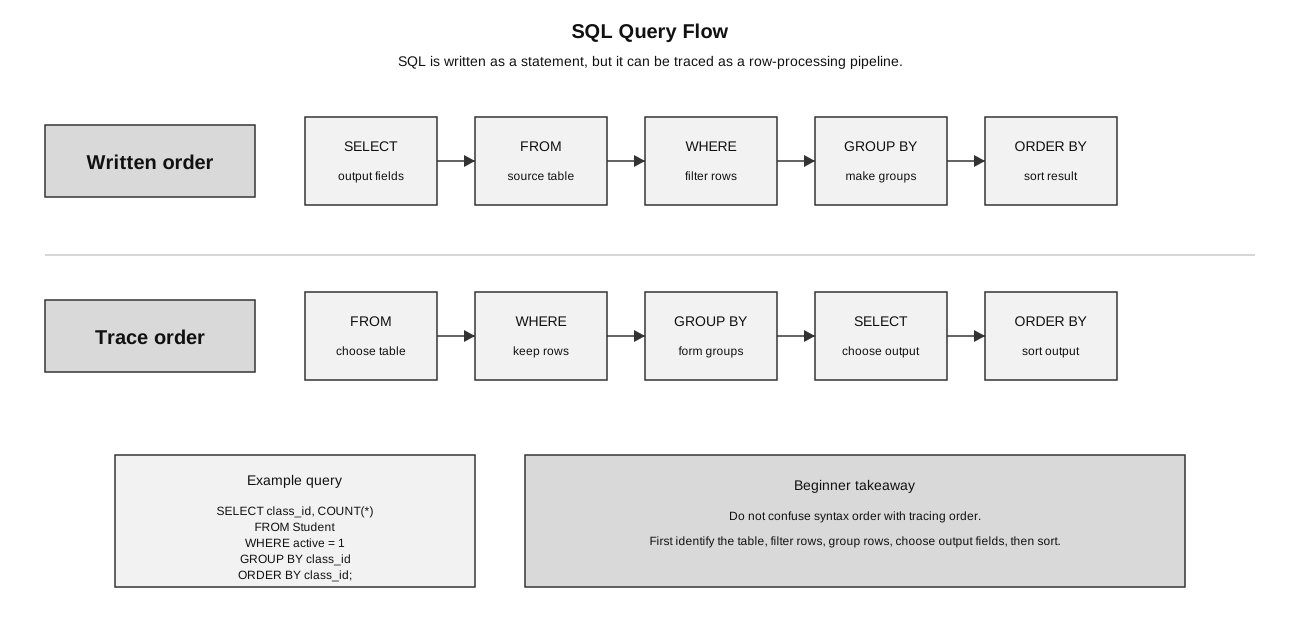
Caption: SQL written order starts with SELECT, but a useful beginner logical reasoning order starts with FROM: identify sources, match joins, filter rows, form groups, choose output fields, then sort. This is a reasoning model, not a promise about a database engine’s physical execution plan.
Insert Records
INSERT adds new rows to a table.
INSERT INTO Student (student_id, name, class_id)
VALUES (105, 'Ethan', '24S02');
INSERT INTO Book (book_id, title, author, available)
VALUES (4, 'Algorithms Clearly', 'R Ong', 1);
Use quotes for text values. Do not quote numeric values unless the field is meant to store text.
After these inserts, the tables contain:
Student
105 | Ethan | 24S02

Book
4 | Algorithms Clearly | R Ong | 1
A more explicit form names the fields being inserted:
INSERT INTO Student (student_id, name, class_id)
VALUES (106, 'Farah', '24S03');
This is often clearer because the reader can see which value belongs to which field.
Select Records
SELECT reads data and returns selected fields from matching rows.
SELECT title, author
FROM Book;
Possible result:
| title | author |
|---|---|
| Data Trails | M Tan |
| Networks First | A Lee |
| Python Basics | S Kumar |
To filter rows, use WHERE:
SELECT title
FROM Book
WHERE available = 1;
Possible result:
| title |
|---|
| Data Trails |
| Python Basics |
Here, the database reads the Book table, keeps only rows where available is 1, and returns only the title field.
Common Comparison Operators
WHERE conditions often use comparison operators.
| Operator | Meaning | Example |
|---|---|---|
= | equals | available = 1 |
<> | not equal | class_id <> '24S01' |
!= | not equal (alternative SQLite form) | class_id != '24S01' |
> | greater than | book_id > 1 |
< | less than | book_id < 3 |
>= | greater than or equal to | book_id >= 2 |
<= | less than or equal to | book_id <= 2 |
Example with text:
SELECT title
FROM Book
WHERE author = 'M Tan';
Text values such as 'M Tan' must be quoted.
Example with a number:
SELECT title
FROM Book
WHERE book_id > 1;
Numeric values such as 1 usually do not need quotes.
Combine conditions with AND and OR, using parentheses when grouping would otherwise be unclear. Test missing values with IS NULL or IS NOT NULL; field = NULL is not the correct SQL null test.
Compact operator reference:
| Purpose | Forms |
|---|---|
| arithmetic | +, -, *, /, % |
| logical | AND, OR, NOT |
| wildcard matching | LIKE, with % for any sequence of characters |
| SQLite text concatenation | ` |
Sorting Results
ORDER BY sorts the output.
SELECT title, author
FROM Book
ORDER BY title ASC;
ASC means ascending order. DESC means descending order.
SELECT title, author
FROM Book
ORDER BY title DESC;
ORDER BY changes the order of the displayed result. It does not change the stored order of rows in the table.
Update and Delete
UPDATE changes existing rows.
UPDATE Book
SET available = 0
WHERE book_id = 1;
This changes only the book whose book_id is 1.
DELETE removes existing rows.
DELETE FROM Loan
WHERE loan_id = 501;
In the sample data, this removes Aisha’s loan of book 2, Networks First. A syntactically valid DELETE can also affect zero rows if no record matches, so a program may inspect the cursor’s rowcount when that distinction matters.
Always check the WHERE condition. Without WHERE, an UPDATE or DELETE may affect every row in the table.
Dangerous example:
UPDATE Book
SET available = 0;
This sets every book as unavailable.
Dangerous example:
DELETE FROM Loan;This deletes every loan record.
A good habit is to test the matching rows with SELECT first:
SELECT *
FROM Book
WHERE book_id = 1;
Then, if the selected row is correct, run the UPDATE.
Aggregate Functions and Grouping
Aggregate functions calculate a value from multiple rows.
| Function | Meaning |
|---|---|
COUNT() | count rows |
SUM() | add values |
AVG() | average values |
MIN() | smallest value |
MAX() | largest value |
Example:
SELECT class_id, COUNT(*) AS number_of_students
FROM Student
GROUP BY class_id;
GROUP BY forms groups first. COUNT(*) counts rows inside each group.
Using the sample Student table, the output is:
| class_id | number_of_students |
|---|---|
| 24S01 | 2 |
| 24S02 | 1 |
| 24S03 | 1 |
Beginner trace:
| class_id group | rows in group | COUNT(*) |
|---|---|---|
| 24S01 | Aisha, Ben | 2 |
| 24S02 | Chen | 1 |
| 24S03 | Devi | 1 |
AS number_of_students gives the output column a clearer name.
Filtering Before Grouping
WHERE filters rows before grouping.
SELECT class_id, COUNT(*) AS number_of_students
FROM Student
WHERE class_id <> '24S03'
GROUP BY class_id;
This excludes students from 24S03 before counting the remaining groups.
Joins
A join combines related rows from two or more tables.
Example: show which student borrowed which book.
SELECT Student.name, Book.title, Loan.loan_date
FROM Loan
INNER JOIN Student ON Loan.student_id = Student.student_id
INNER JOIN Book ON Loan.book_id = Book.book_id;
The join conditions matter:
Loan.student_id = Student.student_id
Loan.book_id = Book.book_id
Without meaningful join conditions, the result may pair unrelated rows.
Beginner trace:
| Loan field | Matching table | Why |
|---|---|---|
Loan.student_id | Student.student_id | find the student name |
Loan.book_id | Book.book_id | find the book title |
The join does not invent new data. It reconnects rows that were deliberately split into separate tables.
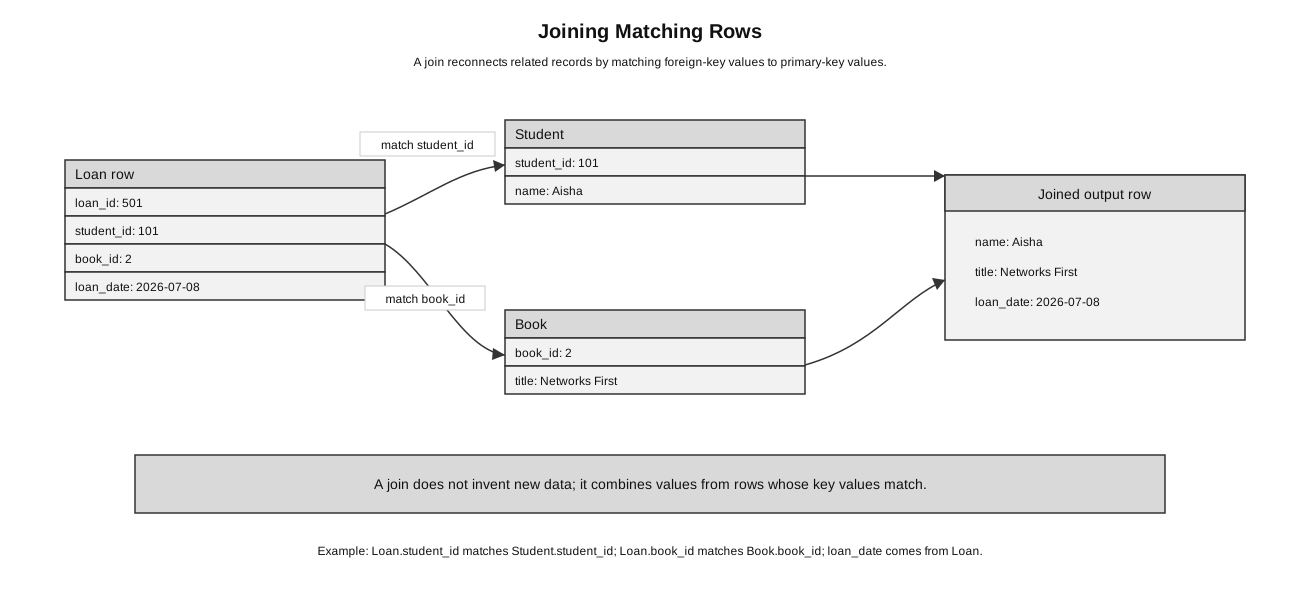
Caption: A join matches Loan.student_id to Student.student_id and Loan.book_id to Book.book_id, then combines fields from the matched rows.
Why Field Qualification Matters
In a join, different tables may contain fields with similar or identical names. It is often clearer to write the table name before the field name.
SELECT Student.name, Book.title
FROM Loan
INNER JOIN Student ON Loan.student_id = Student.student_id
INNER JOIN Book ON Loan.book_id = Book.book_id;
Student.name means the name field from the Student table.
Book.title means the title field from the Book table.
This makes the query easier to read and prevents confusion when more than one table has a field with the same name.
Wrong Join Versus Correct Join
Wrong or weak query:
SELECT Student.name, Book.title
FROM Student, Book;
This does not say how a student is related to a book. It may produce unrelated combinations, such as pairing every student with every book.
Better query:
SELECT Student.name, Book.title
FROM Loan
INNER JOIN Student ON Loan.student_id = Student.student_id
INNER JOIN Book ON Loan.book_id = Book.book_id;
This uses the Loan table to connect the correct student to the correct borrowed book.
Inner Join and Left Join
A CROSS JOIN forms the Cartesian product: every row of the first table is paired with every row of the second. If one table has 4 rows and the other has 3, the cross join has rows before filtering. It is occasionally intentional, but an omitted matching condition can create this large, mostly meaningless result accidentally.
An INNER JOIN ... ON ... instead keeps only pairs satisfying the stated match. A LEFT JOIN keeps every left-side row and fills unmatched right-side fields with NULL.
An inner join returns only matching rows.
Example:
SELECT Student.name, Loan.loan_date
FROM Student
INNER JOIN Loan ON Student.student_id = Loan.student_id;
This shows students who have matching loan records. A student with no loans will not appear.
A left join keeps every row from the left table, even if there is no matching row on the right.
Example:
SELECT Student.name, Loan.loan_date
FROM Student
LEFT JOIN Loan ON Student.student_id = Loan.student_id
ORDER BY Student.name, Loan.loan_date;
This can show students even if they have no loans.
Using the sample data, Chen and Devi have no loan records, but they can still appear in the output of the LEFT JOIN. Their right-table loan_date value is SQL NULL, meaning that no matching value exists. A user interface may render that NULL as a blank cell, but an empty string and SQL NULL are not the same stored value.
| name | loan_date |
|---|---|
| Aisha | 2026-07-08 |
| Aisha | 2026-07-09 |
| Ben | 2026-07-08 |
| Chen | NULL |
| Devi | NULL |
Beginner model:
| Join type | What appears? |
|---|---|
INNER JOIN | only rows with matches on both sides |
LEFT JOIN | all rows from the left table, with matching right-side data where available |
Use LEFT JOIN when the question asks for all records from one table, including those without matching records in another table.
Aliases
Aliases give shorter temporary names to tables or output fields.
SELECT S.name, B.title, L.loan_date
FROM Loan AS L
INNER JOIN Student AS S ON L.student_id = S.student_id
INNER JOIN Book AS B ON L.book_id = B.book_id;
Here:
| Alias | Table |
|---|---|
S | Student |
B | Book |
L | Loan |
Aliases are useful in longer queries, but beginners should first understand the full table names.
How to Answer SQL Questions in Exams
When given an SQL question, use this pattern:
- Identify the table or tables needed.
- Identify the fields required in the output.
- Identify the condition for filtering rows.
- Decide whether a join is needed.
- Decide whether grouping, counting, or sorting is needed.
- Write the query and check the clause order.
Example question:
Show the names of students in class 24S01.Reasoning:
| Step | Decision |
|---|---|
| Table | Student |
| Output field | name |
| Condition | class_id = '24S01' |
| Join needed? | no |
| Grouping needed? | no |
Query:
SELECT name
FROM Student
WHERE class_id = '24S01';
Example question:
Show the names of students and titles of books they borrowed.Reasoning:
| Step | Decision |
|---|---|
| Tables | Student, Book, Loan |
| Output fields | Student.name, Book.title |
| Join needed? | yes, through Loan |
| Conditions | match student IDs and book IDs |
Query:
SELECT Student.name, Book.title
FROM Loan
INNER JOIN Student ON Loan.student_id = Student.student_id
INNER JOIN Book ON Loan.book_id = Book.book_id;
DB Browser for SQLite: Practical Context
In a lab, DB Browser can execute SQL, inspect schemas and rows, and import or export data. Write Changes commits pending changes; Revert Changes rolls them back to the last committed state. After importing CSV or text data, inspect column types and constraints instead of assuming every imported field has the intended type. GUI actions and typed SQL modify the same database, so verify the resulting rows and schema rather than relying only on the absence of an error message.
Common Mistakes
- Forgetting the semicolon when a tool expects it.
- Writing
WHEREafterORDER BY; filtering should appear before sorting. - Using
=with text but forgetting quotes around the text value. - Running
UPDATEorDELETEwithout aWHEREclause. - Joining tables without a correct relationship condition.
- Selecting a field name that appears in multiple tables without qualifying it.
- Using
GROUP BYwithout understanding what rows are being grouped. - Confusing
INNER JOINandLEFT JOIN. - Thinking that
ORDER BYchanges the stored data. It only sorts the output. - Writing a query from memory without checking which tables contain the needed fields.
Quick Reference
| Task | SQL pattern |
|---|---|
| show all rows from a table | SELECT * FROM TableName; |
| show selected fields | SELECT field1, field2 FROM TableName; |
| filter rows | WHERE condition |
| sort output | ORDER BY field ASC or ORDER BY field DESC |
| count rows in each group | COUNT(*) with GROUP BY |
| change rows | UPDATE ... SET ... WHERE ... |
| delete rows | DELETE FROM ... WHERE ... |
| combine related tables | JOIN ... ON key_field = matching_key_field |
Check Your Understanding
- What does
SELECTdo? - Why is
WHEREimportant inUPDATE? - What does
GROUP BY class_iddo? - Why does a join need an
ONcondition? - What is the difference between
INNER JOINandLEFT JOIN? - Why might
Student.namebe clearer than justnamein a join query?
Answers:
- It reads data and returns selected columns from matching rows.
- It limits which rows are changed.
- It groups rows with the same
class_id. - It tells the database how records in the two tables are related.
- An inner join returns only matching rows; a left join keeps all rows from the left table and adds matching right-side data where available.
- It shows exactly which table the field comes from, which is useful when a query uses multiple tables.