Flask Routes, Templates, and Jinja
You can read this note directly if you know Python functions and basic HTML. Flask connects incoming web requests to Python functions. Jinja lets those functions generate HTML containing dynamic values.
Beginner Mental Model
A Flask application waits for requests.
request method + URL path
-> matching Flask route
-> Python processing
-> response
Example:
GET /greet -> run greet() -> return HTML responseA route is not the same as a file path. It is a URL pattern connected to a Python function.
Project Structure
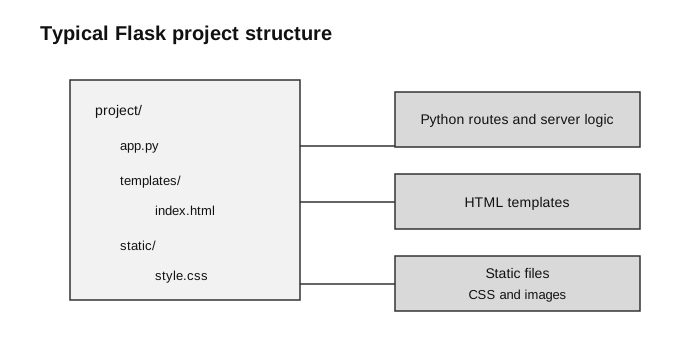
Caption: app.py contains route and server logic; Jinja reads files from templates/ to generate response HTML; browser requests fetch CSS and images from static/ through their URLs. Folder location therefore determines how Flask treats each file.
Typical structure:
project/
  app.py
  templates/
    index.html
    result.html
  static/
style.css| Location | Main purpose |
|---|---|
app.py | Flask application, routes, and Python processing |
templates/ | HTML files rendered through Jinja |
static/ | CSS and fixed assets such as images |
Minimal Flask App
from flask import Flask

app = Flask(__name__)


@app.route("/")
def index():
    return "Hello from Flask"


if __name__ == "__main__":
    app.run()
@app.route("/") maps the root URL to index(). The function’s return value becomes the response.
app.run() starts Flask’s local development server. It is suitable for local learning and testing, not public production deployment.
Rendering a Template
from flask import Flask, render_template

app = Flask(__name__)


@app.route("/")
def index():
return render_template("index.html", name="Aisha")templates/index.html:
<h1>Hello, {{ name }}</h1>render_template():
- loads the template from
templates/; - makes the supplied values available to Jinja;
- renders final HTML;
- returns that HTML string from the view function, after which Flask constructs the HTTP response.
The browser receives:
<h1>Hello, Aisha</h1>It does not receive the original {{ name }} expression.
Route Parameters
A route may capture part of the URL:
@app.route("/student/<name>")
def student(name):
    return render_template("student.html", name=name)
A request to /student/Aisha assigns "Aisha" to the Python parameter name.
GET and POST
GET commonly retrieves a page or search result. POST commonly submits data for processing.
from flask import Flask, render_template, request

app = Flask(__name__)


@app.route("/greet", methods=["GET", "POST"])
def greet():
    if request.method == "POST":
        name = request.form["name"]
        return render_template("greet.html", name=name)

return render_template("form.html")templates/form.html:
<form method="post" action="{{ url_for('greet') }}">
  <label for="name">Name</label>
  <input id="name" type="text" name="name">
  <button type="submit">Greet</button>
</form>
Trace:
| Step | Value |
|---|---|
| HTML input key | name="name" |
| user types | Aisha |
| Flask reads | request.form["name"] |
| Python variable | name = "Aisha" |
| template receives | name="Aisha" |
| browser displays | Hello, Aisha |
The HTML name attribute and the key used in request.form[...] must match.
Jinja Syntax
Jinja distinguishes output from control logic.
| Purpose | Syntax |
|---|---|
| output a value | {{ value }} |
| control structure | {% ... %} |
| template comment | {# ... #} |
Variables
<p>{{ title }}</p>Conditional Statements
{% if score >= 50 %}
  <p>Pass</p>
{% else %}
  <p>Try again</p>
{% endif %}
Jinja uses explicit closing tags such as {% endif %}. Python-style colons are not used inside Jinja tags.
Loops
<ul>
{% for title in titles %}
  <li>{{ title }}</li>
{% endfor %}
</ul>
To display dictionary values clearly:
<table>
{% for subject, score in results.items() %}
  <tr>
    <td>{{ subject }}</td>
    <td>{{ score }}</td>
  </tr>
{% endfor %}
</table>
Filters
A filter transforms a displayed value:
{{ name|upper }}
{{ title|length }}
Jinja normally escapes HTML-like text for safety. Avoid using |safe on user-supplied content because it can allow injected markup or scripts to be interpreted.
url_for()
url_for() builds a URL from a Flask endpoint name.
Route link:
<a href="{{ url_for('greet') }}">Greeting form</a>Static stylesheet:
<link rel="stylesheet"
      href="{{ url_for('static', filename='style.css') }}">
For a route function called student with a parameter:
<a href="{{ url_for('student', name='Aisha') }}">Aisha</a>Using url_for() avoids scattering hard-coded route paths through templates.
Template Inheritance
A base template stores shared page structure.
templates/layout.html:
<!doctype html>
<html>
  <head>
    <meta charset="utf-8">
    <title>{% block title %}Web App{% endblock %}</title>
  </head>
  <body>
    {% block body %}{% endblock %}
  </body>
</html>
Child template:
{% extends "layout.html" %}

{% block title %}Home{% endblock %}

{% block body %}
  <h1>Home</h1>
{% endblock %}
This reduces duplication and improves consistency across pages.
Debugging by Layer
| Symptom | First check |
|---|---|
| 404 Not Found | route path and requested URL |
| 405 Method Not Allowed | form method and route methods=[...] |
| form key missing | input name and request.form[...] |
| template not found | filename and templates/ folder |
| Jinja variable blank | value passed by render_template() |
| CSS missing | static/ folder and url_for('static', ...) |
| loop shows nothing | collection passed to the template |
Common Mistakes
- Forgetting to import
requestbefore reading form data. - Using
request.form["name"]when the input has a differentname. - Forgetting to allow POST on a route receiving a POST form.
- Placing templates outside
templates/. - Writing Jinja syntax in a file served as plain static HTML.
- Confusing a URL route with a template filename.
- Hard-coding URLs when
url_for()would be clearer. - Using
|safewith untrusted user input.
Paper 1 and Paper 2 Emphasis
Paper 1-style reasoning: explain request-response flow, distinguish GET from POST, trace values from form to route to template, and identify errors in a short code fragment.
Paper 2-style practical work: create routes, match input names to request.form, render templates, use Jinja loops or conditionals, and test the app on a local server.
Check Your Understanding
- What does a Flask route connect?
- What does
render_template()produce? - What is the difference between
{{ ... }}and{% ... %}? - Why use
url_for()? - Why might a route return 405 instead of 404?
Answers:
- A URL pattern and HTTP method to a Python function.
- Final HTML generated from a template and supplied values.
{{ ... }}outputs a value;{% ... %}controls template logic.- It generates URLs from endpoint or static-file names without hard-coding paths.
- The route exists, but it does not allow the request method used.