Validation and Verification
Data validation and data verification both improve data quality, but they answer different questions.
You can read this note directly if you know basic Python functions, strings, and Boolean expressions.
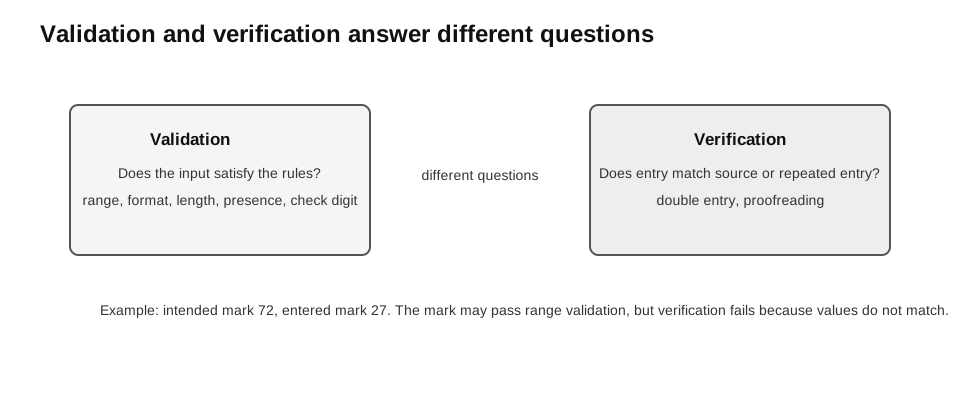
Caption: Validation compares input with stated acceptance rules; verification compares it with a source or repeated entry. A value can therefore be valid but mistyped, or accurately copied from a source that is itself wrong.
The Core Distinction
- Validation: Is the data acceptable according to predefined rules?
- Verification: Was the data entered or transferred accurately?
A value can pass validation and still be wrong.
Example:
| Intended mark | Entered mark | Range validation | Verification |
|---|---|---|---|
72 | 72 | passes | matches |
72 | 27 | passes | does not match |
Both 72 and 27 are valid marks, but only one is the intended value.
Errors During Data Entry
- A transcription error replaces, omits, or adds a character while copying, such as entering
449036instead of449035. - A transposition error swaps the order of characters, such as entering
54where the source shows45.
Verification is designed specifically to detect disagreement with the source or repeated entry. Validation may also detect an entry error if it breaks a rule, but it cannot detect a mistyped value that remains within the allowed set. Depending on its algorithm, a check-digit scheme may detect some transcription and transposition errors in coded identifiers; the exact detection ability is scheme-specific.
Validation
Validation checks whether input satisfies rules such as permitted range, pattern, length, or presence.
For a mark that must be an integer from 0 to 100:
| Input | Result | Reason |
|---|---|---|
72 | valid | within range |
101 | invalid | above range |
"abc" | invalid | not an integer |
Validation reduces unsuitable input. It does not guarantee factual accuracy.
Verification
Verification checks whether data has been copied or entered correctly.
Common methods include:
- double entry: enter the data twice and compare the two entries;
- proofreading or visual checking: compare the entered data with the original source.
Example:
| Original phone number | Entered value | Format validation | Verification |
|---|---|---|---|
91234567 | 91234567 | valid | matches |
91234567 | 91234568 | valid | does not match |
Verification also cannot prove that the original source itself is factually correct. It checks agreement with that source or intended entry.
Validation Checks
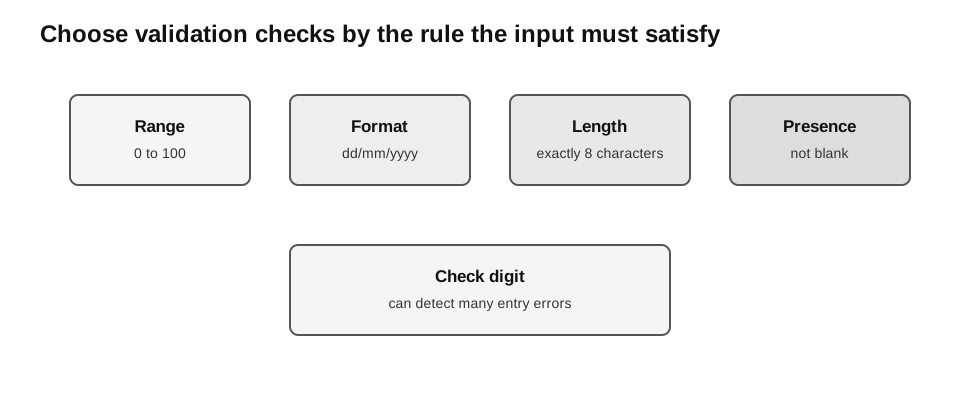
Caption: Start from the field requirement, then select the matching check. Presence asks whether anything was entered; length counts characters; format checks pattern or character type; range compares numerical limits; a check digit recalculates a value from the rest of a code.
Presence Check
A presence check ensures that a required field is not empty.
def has_presence(text):
    return isinstance(text, str) and text.strip() != ""
Examples:
assert has_presence("Aisha") is True
assert has_presence("   ") is False
assert has_presence("") is False
assert has_presence(None) is False
A presence check does not check whether the content is meaningful.
Range Check
A range check ensures that a numeric value lies within specified limits.
def valid_mark(mark):
    return type(mark) is int and 0 <= mark <= 100
Examples:
assert valid_mark(0) is True
assert valid_mark(100) is True
assert valid_mark(101) is False
assert valid_mark(True) is False
assert valid_mark(50.5) is False
assert valid_mark("50") is False
assert valid_mark(None) is False
State whether the endpoints are included. Here, both 0 and 100 are valid.
Length Check
A length check ensures that data has an allowed number of characters.
def has_eight_characters(text):
    return isinstance(text, str) and len(text) == 8
A length check alone does not ensure that all characters are digits.
assert has_eight_characters("12345678") is True
assert has_eight_characters("1234567") is False
assert has_eight_characters(12345678) is False
Format Check
A format check ensures that data follows a required pattern.
def valid_eight_digit_phone_format(text):
    return isinstance(text, str) and len(text) == 8 and text.isdigit()
This combines a length check with a deliberately simple digit-only format requirement. It does not establish that a number is an allocated or currently valid Singapore telephone number; a question would need to supply any permitted-prefix or allocation rule separately.
For a date format such as dd/mm/yyyy, a beginner-readable check can inspect separators and component lengths:
def has_date_format(text):
    if not isinstance(text, str):
        return False
    parts = text.split("/")

    if len(parts) != 3:
        return False

    day, month, year = parts

    return (
        len(day) == 2
        and len(month) == 2
        and len(year) == 4
        and day.isdigit()
        and month.isdigit()
        and year.isdigit()
    )
This checks the shape of the input, not whether it represents a real calendar date. For example, "31/02/2026" has the required format but is not a valid calendar date.
assert has_date_format("06/08/2026") is True
assert has_date_format("31/02/2026") is True  # right shape; calendar truth not checked
assert has_date_format("6/8/2026") is False
assert has_date_format("06-08-2026") is False
assert has_date_format(None) is False
Check Digit
A check digit is calculated from the other digits or characters in a code and stored with it. When the code is entered, the system recalculates the check digit and compares the result with the supplied one.
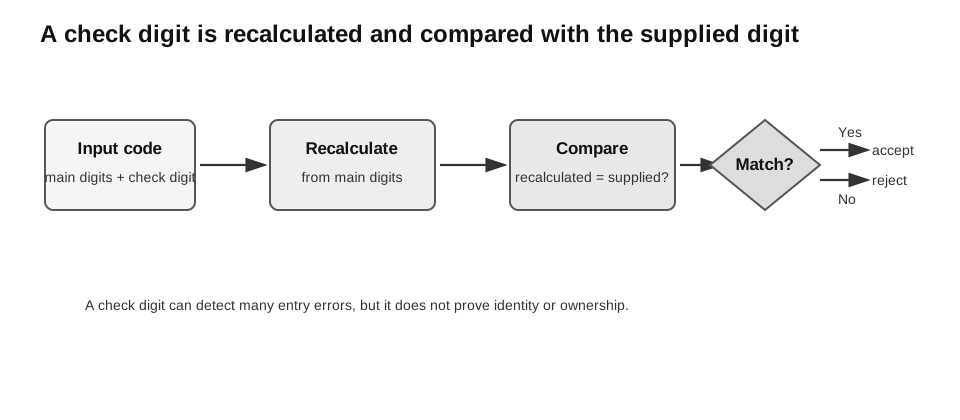
Caption: Separate the data part from the supplied check digit, recalculate the expected digit from the data, and compare the two. A match makes the code internally consistent; it does not prove that the code belongs to the intended person or item.
Simple teaching example:
def calculate_check_digit(digits):
    if not isinstance(digits, str) or not digits or not digits.isdigit():
        raise ValueError("digits must be a non-empty digit string")
    total = 0

    for digit in digits:
        total = total + int(digit)

    return str(total % 10)


def has_valid_check_digit(code):
    if not isinstance(code, str) or len(code) < 2 or not code.isdigit():
        return False
    data = code[:-1]
    supplied = code[-1]
    expected = calculate_check_digit(data)

    return supplied == expected
Trace for code = "123455":
| Step | Value |
|---|---|
| data digits | "12345" |
| sum | 1 + 2 + 3 + 4 + 5 = 15 |
| calculated check digit | "5" |
| supplied check digit | "5" |
| result | accepted |
This is an original teaching algorithm, not an ISBN, banking, or identity-card algorithm. Real systems use different weighted calculations.
Check-digit schemes differ. This unweighted sum-mod-10 example detects a change to one digit when that change alters the sum modulo 10, but it cannot detect a transposition: swapping two digits leaves their sum unchanged. No check-digit scheme catches every possible error.
Boundary and malformed-input checks:
assert has_valid_check_digit("123455") is True
assert has_valid_check_digit("123454") is False
assert has_valid_check_digit("") is False
assert has_valid_check_digit("5") is False
assert has_valid_check_digit("12A5") is False
assert has_valid_check_digit("213455") is True  # transposition is missed by this scheme
assert has_valid_check_digit(None) is False
assert has_valid_check_digit(123455) is False

try:
    calculate_check_digit(12345)
    assert False
except ValueError:
    pass
Combining Checks
Real validation often uses more than one check.
Example rule:
A phone number must be present, contain exactly 8 characters, and contain digits only.def valid_phone(text):
return (
isinstance(text, str)
and text.strip() != ""
and len(text) == 8
and text.isdigit()
)assert valid_phone("81234567") is True
assert valid_phone("8123456") is False
assert valid_phone("8123456A") is False
assert valid_phone(" ") is False
assert valid_phone(None) is FalseThe checks should be applied before the data is stored or processed.
Validate, Explain, and Re-enter
Interactive validation normally forms a loop:
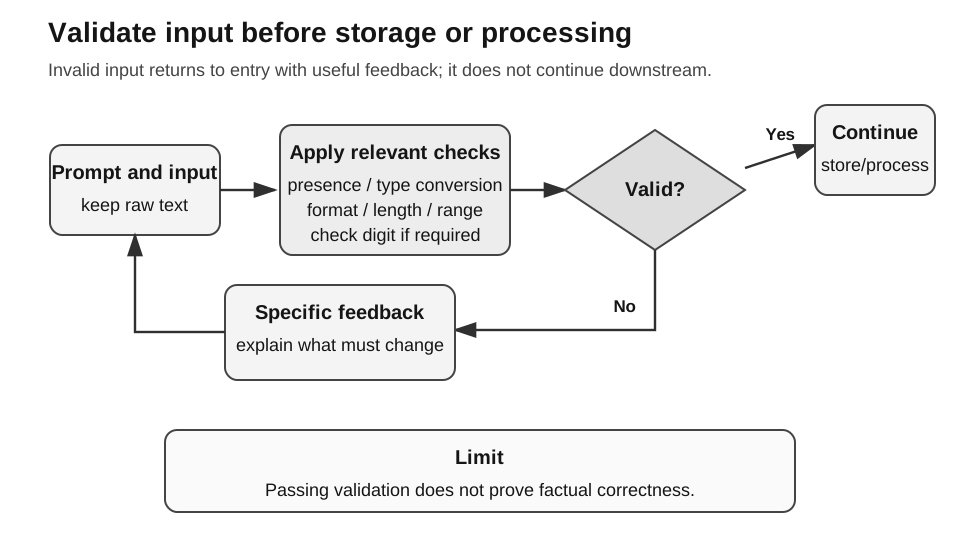
Caption: Read the diagram clockwise from input. Apply only the checks required by the field; invalid input follows the “No” branch to a specific message and re-entry, while valid input alone may continue to storage or processing. Passing this loop shows rule compliance, not factual truth.
- request the input;
- attempt any required type conversion;
- apply the stated validation rules;
- if invalid, display a specific message and request re-entry;
- continue only after valid input is obtained.
def read_valid_mark(input_function=input):
    while True:
        text = input_function("Enter a mark from 0 to 100: ").strip()
        try:
            mark = int(text)
        except ValueError:
            print("Enter a whole number.")
            continue
        if 0 <= mark <= 100:
            return mark
        print("The mark must be from 0 to 100 inclusive.")
The injected input_function makes the loop testable without keyboard input. Type conversion is handled before the range comparison because a range check cannot meaningfully compare non-numeric text.
responses = iter(["", "abc", "101", "50"])
assert read_valid_mark(lambda _prompt: next(responses)) == 50
Paper 1 and Paper 2 Emphasis
For written questions, be ready to:
- distinguish validation from verification;
- name and explain an appropriate validation check;
- explain why validation does not guarantee correctness.
For practical work, be ready to:
- implement short validation functions;
- display a useful error message;
- request re-entry until valid input is supplied;
- test normal, abnormal, and extreme cases.
Common Mistakes
- Saying validation guarantees that data is correct.
- Saying verification checks whether data is sensible.
- Confusing a presence check with a format check.
- Treating
len(text) == 8as sufficient for an 8-digit number. - Assuming a correctly formatted date must be a real date.
- Assuming a check digit catches every possible error.
Check Your Understanding
- Why can a valid email address still be wrong?
- Which check rejects an empty required field?
- Which check rejects a mark of
-1when the valid range begins at 0? - What is compared when a check digit is verified?
Answers:
- It may satisfy the format rule but differ from the intended address.
- Presence check.
- Range check.
- The supplied check digit is compared with the recalculated check digit.