Data Privacy, Integrity, and Management
You can read this note directly if you understand that organisations collect and store data. Data management is about keeping data useful, protected, accurate, and properly handled throughout its life.
A database may have correct tables, keys, and SQL queries, but still be badly managed. For example, a school database may store students correctly, but if the file is lost, leaked, overwritten, or kept forever without a valid reason, the database is still poorly managed.
This note focuses on the practical question:
How can data remain accurate, protected, recoverable, and responsibly handled over time?Beginner Problem
A database can be technically correct but still fail in real use.
Example:
| Situation | Main issue |
|---|---|
| marks are accidentally changed | integrity |
| student addresses are sent to the wrong group chat | privacy |
| the only copy of a database is lost | availability and recovery |
| old personal data is kept forever without reason | privacy and governance |
| two users edit different versions of the same file | version control |
| a teacher cannot restore a deleted record | backup and recovery |
Data management is about preventing these failures, not just fixing them after they happen.
A good beginner habit is to ask two questions:
- What could go wrong with this data?
- Which protection method actually reduces that risk?
Weak answer:
Use encryption.Better answer:
If the risk is unauthorised access to stored personal data, encryption can help protect the data if the storage device or file is stolen. However, encryption does not prevent wrong data entry, accidental deletion, or poor file naming.Data Lifecycle
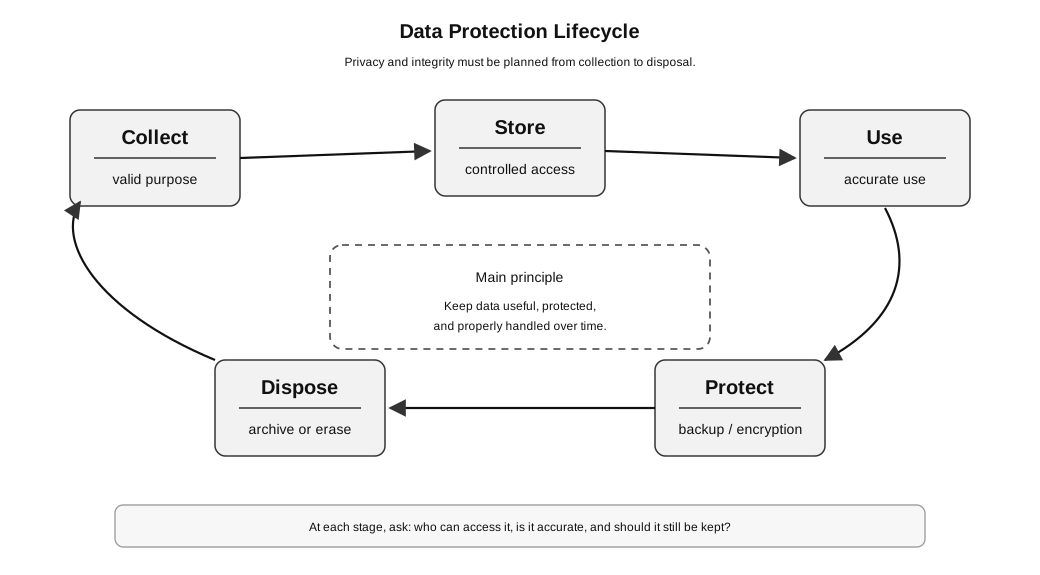
Caption: Collection, storage, use/share, retention/archive, and secure disposal are lifecycle stages. Privacy and integrity controls apply across all stages. Archiving retains selected data under a policy; disposal occurs only when the retention purpose has ended.
Common lifecycle stages:
| Stage | Question to ask | Example |
|---|---|---|
| collect | Is there a valid purpose for collecting this data? | Should a club collect phone numbers, or is class ID enough? |
| store | Who can access it? | Should all members see the full contact list? |
| use | Is it accurate and used appropriately? | Are attendance records updated by authorised people only? |
| protect | Is there backup, access control, and encryption where needed? | Can the database be restored after accidental deletion? |
| retain or archive | Is the data still required, and under what retention/access policy? | Must selected records be retained for a stated purpose? |
| dispose | Has the retention purpose ended, so the data should be securely erased? | Should expired member records now be made unrecoverable? |
An archive is retained data, not disposed data. Archived records still require access control, integrity protection, a retention period, and eventual secure disposal. Data protection is therefore considered throughout the lifecycle, not as one action at the end.
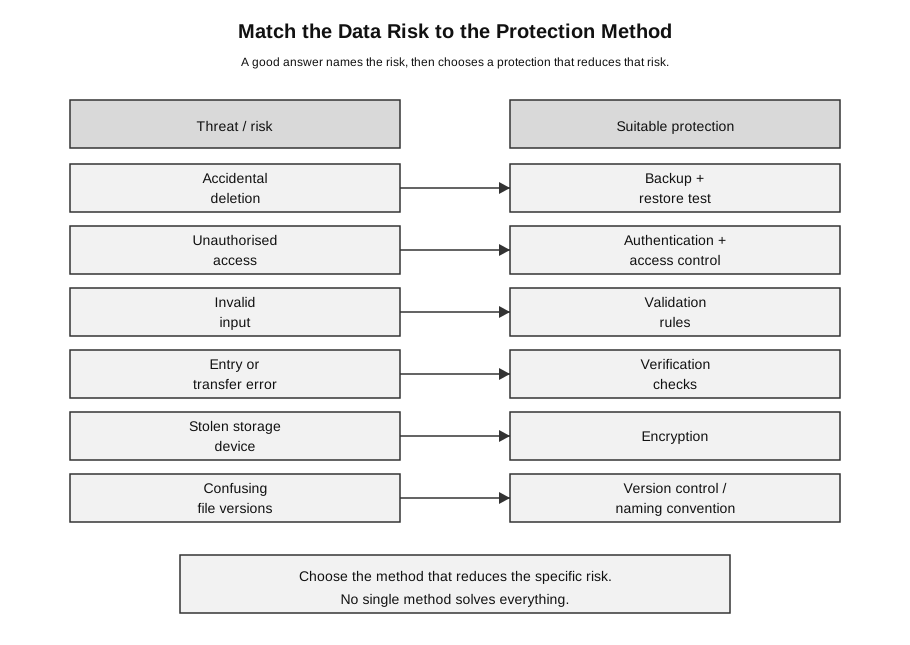
Caption: Match the specific data risk to a protection method that reduces that risk; no single method solves every data-management problem.
Privacy and Integrity
Data privacy means data is accessed or disclosed only by authorised people for appropriate purposes.
Data integrity means data is accurate, complete, consistent, and not improperly altered.
Example:
- privacy problem: a student list is shared with people who should not see it;
- integrity problem: a student’s mark is accidentally changed from 78 to 87.
These are different ideas.
| Concept | Main question | Example failure |
|---|---|---|
| privacy | Who can see or receive the data? | student phone numbers are shared with unauthorised people |
| integrity | Is the data correct and trustworthy? | a mark is entered wrongly or overwritten |
| availability | Can authorised users access it when needed? | the only copy of the database is lost |
A single incident can affect more than one area. For example, malware may leak personal data, damage records, and make the database unavailable.
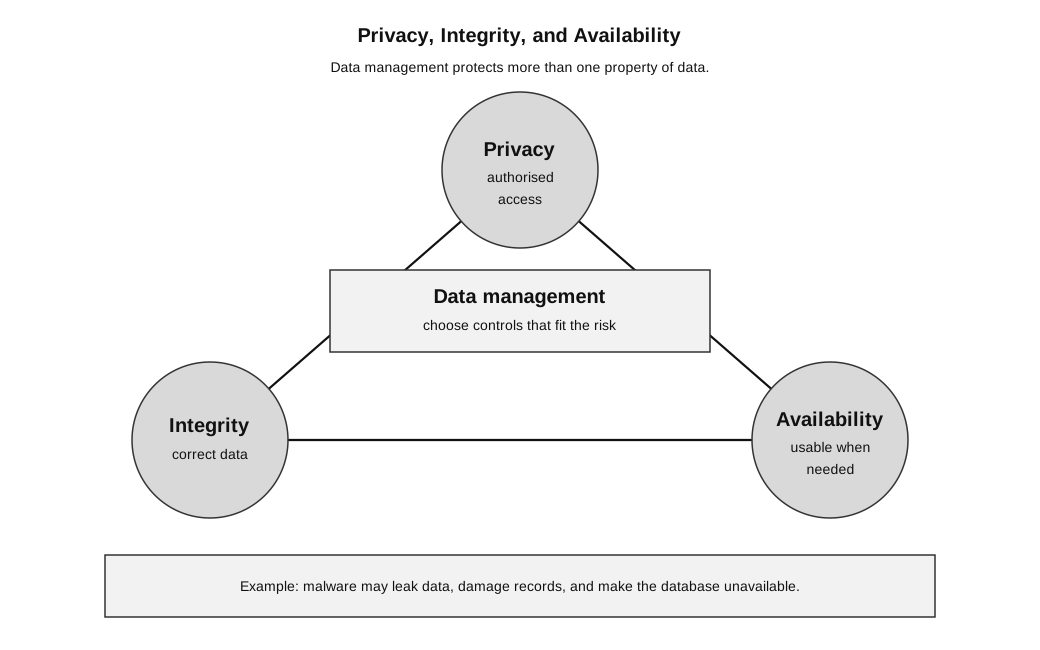
Caption: Data management chooses controls that protect privacy, integrity, and availability according to the risk.
Threats to Data
Threats include:
- accidental deletion;
- hardware failure;
- malware;
- unauthorised access;
- human error;
- operating-procedure errors, such as running an update twice;
- program errors that corrupt or overwrite records;
- transmission errors or interception while data is transferred;
- natural disasters;
- outdated or conflicting file versions;
- invalid or incomplete input;
- accidental disclosure;
- keeping data longer than necessary.
The protection method should match the threat.
Match examples:
| Threat | Suitable protection | Why it helps |
|---|---|---|
| accidental deletion | backup | allows data to be restored |
| unauthorised access | authentication and access control | limits access to authorised users |
| invalid input | validation | rejects data that does not meet rules |
| accidental change during transfer | verification | checks that copied or transferred data matches the original |
| stolen storage device | encryption | makes data harder to read without the key |
| confusing file versions | version control and naming convention | makes the latest and previous versions clear |
| old personal data no longer needed | retention policy and secure erasure | reduces unnecessary privacy risk |
| incorrect update to important records | audit trail and restricted editing rights | helps trace changes and limits who can change data |
Disaster Recovery Is More Than Backup
A backup is a recoverable copy of data. A disaster-recovery plan is the wider tested plan for restoring an operational service after a serious incident. It identifies responsibilities, recovery priorities, backup or replicated systems (preferably at a separate location), restoration/failover procedures, and tests that show the procedures work.
Example: after a server-room fire, possessing a backup is useful only if the organisation also has compatible replacement infrastructure, access to the copy, people authorised to restore it, and a tested sequence for bringing the service back safely.
Match the Protection to the Problem
Students often give protection methods that sound good but do not solve the stated problem.
| Problem | Weak answer | Better answer |
|---|---|---|
| student data is leaked to outsiders | make a backup | use access control, authentication, appropriate sharing rules, and encryption where suitable |
| wrong marks are entered | encrypt the database | use validation, verification, restricted editing rights, and checking procedures |
| file is accidentally deleted | use a password | keep backups and test that restoration works |
| old records are kept forever | use version control | set a retention policy, archive if justified, or securely erase when no longer needed |
| many people edit different file copies | use encryption | use version control or a clear naming convention |
| a laptop containing personal data is stolen | use a better filename | encrypt sensitive data and require authentication |
The key is not to name a security method randomly. The key is to explain how the method reduces the specific risk.
Validation Versus Verification
Validation checks whether input is reasonable or follows required rules.
Verification checks whether data has been copied, transferred, or entered accurately.
| Method | Main idea | Example |
|---|---|---|
| validation | Is the data acceptable? | reject a date of birth in the future |
| verification | Was the data copied or entered correctly? | compare a retyped email address with the original |
Example:
A student enters a phone number as 91234567.A validation check may test whether the phone number has the correct number of digits.
A verification check may ask the student to enter the phone number twice and compare the two entries.
Validation reduces invalid data. Verification reduces copying or entry errors. Neither automatically guarantees that the information is true.
Authentication, Authorisation, and Access Control
These terms are related but not identical.
| Term | Meaning | Example |
|---|---|---|
| authentication | checks who the user is | logging in with an account and password |
| authorisation | decides what the identified user may do | a teacher may edit marks; a student may only view their own data |
| access control | the overall system that limits access | different roles have different permissions |
Example:
A teacher logs in successfully.Authentication answers:
Is this really the teacher's account?Authorisation answers:
What is this teacher allowed to read, add, edit, or delete?A system can authenticate a user but still give them the wrong permissions. That would be an access-control problem.
Backup Versus Archive
| Idea | Purpose | Typical use |
|---|---|---|
| backup | restore data after loss or damage | recover from accidental deletion |
| archive | keep older data for long-term reference or compliance | store past records no longer used daily |
A backup is for recovery. An archive is for long-term retention.
Example:
A teacher accidentally deletes the current attendance database.A backup helps restore the lost data.
Example:
The school keeps attendance records from previous years for reference.An archive stores records that are no longer used every day but may still need to be kept for a valid reason.
A backup should not be treated as a general archive. A backup may be overwritten according to a backup schedule. An archive should follow a retention decision.
Backup Is Not the Same as Version Control
Backup and version control both help with recovery, but they are not the same.
| Idea | Best for | Example |
|---|---|---|
| backup | recovering data after loss, deletion, or damage | restore yesterday’s database backup |
| version control | tracking changes over time | see who changed a file and recover an older version |
For software projects, Git is a common version-control system. However, Git history for code is not the same as a database backup. A project may have perfect source-code history but still lose the production database if no database backup exists.
Methods to Protect Data
| Method | How it helps |
|---|---|
| access control | limits who can read or change data |
| authentication | checks user identity |
| authorisation | controls what an identified user may do |
| validation | reduces invalid input |
| verification | checks data was copied or entered accurately |
| backup | supports recovery |
| restore testing | checks that backups can actually be used |
| encryption | protects data if intercepted or stolen |
| version control | tracks changes and supports recovery of earlier versions |
| naming convention | reduces confusion between file versions |
| audit trail | records who made changes and when |
| secure erasure | reduces risk from data that is no longer needed |
A strong answer should usually include both the method and the reason.
Weak answer:
Use backup.Better answer:
Use regular backups so that the database can be restored if records are accidentally deleted or damaged.Even better:
Use regular backups and test restore procedures, because an untested backup may not be usable during a real data-loss incident.Version Control and Naming Convention
Version control records changes over time. In software, Git is a common version-control system. For ordinary files, a clear naming convention can still reduce confusion.
Weak file names:
final.docx
final2.docx
really_final.docx
Problems:
- the latest version is unclear;
- the date is unclear;
- the purpose of each version is unclear;
- files may be overwritten by accident.
Better file names:
project_report_2026-07-08_v01.docx
project_report_2026-07-09_v02.docx
A good naming convention should be consistent, sortable, and meaningful.
For dates, use YYYY-MM-DD because it sorts correctly as text:
survey_results_2026-07-08_v01.csv
survey_results_2026-07-09_v02.csv
Possible naming pattern:
project_or_dataset_YYYY-MM-DD_vNN.extExample:
cca_attendance_2026-07-08_v01.csv
cca_attendance_2026-07-09_v02.csv
Worked Scenario: School CCA Database
A school club stores:
member names, class IDs, phone numbers, attendance records, payment recordsThink through the lifecycle.
| Stage | Good management question | Possible action |
|---|---|---|
| collect | Is each field needed? | collect class ID and contact number only if there is a valid purpose |
| store | Who can access the file or database? | restrict access to teachers and authorised student leaders |
| use | Can the data be kept accurate? | validate input and verify important updates |
| update | Who can change records? | allow only authorised users to edit payment or attendance data |
| protect | Can data be recovered? | keep regular backups and test restoration |
| share | Is disclosure appropriate? | avoid sending full contact lists to unnecessary recipients |
| archive | Are older records still needed? | archive past records only for a valid reason |
| dispose | Should old personal data be removed? | securely erase records that are no longer needed |
Possible risks and responses:
| Risk | Suitable response |
|---|---|
| member phone numbers are shared too widely | apply access control and share only necessary data |
| attendance is entered wrongly | use validation and checking procedures |
| payment records are edited by mistake | restrict editing rights and keep an audit trail |
| database file is lost | restore from backup |
| old member records remain forever | apply a retention policy and secure erasure |
This scenario shows that data management is not one method. It is a set of decisions throughout the data lifecycle.
PDPA at Syllabus Depth
Singapore’s Personal Data Protection Act, or PDPA, provides a baseline standard for personal data handled by organisations. Personal data is data about an individual who can be identified from that data alone, or from it together with other information the organisation has or is likely to access. The data-protection provisions cover electronic and non-electronic records.
At this syllabus depth, understand that the provisions generally concern private-sector organisations; public agencies are generally outside these PDPA data-protection provisions and operate under a separate public-sector regime. A school-style scenario can still teach the protection principle, but do not assume every public-school activity has exactly the same legal route.
The named obligations provide a useful exam-ready structure:
| Obligation | Beginner meaning |
|---|---|
| accountability | establish responsible policies and practices, including a data-protection contact |
| notification | tell individuals the purposes for collection, use, or disclosure |
| consent | obtain and respect consent where required, including withdrawal rules |
| purpose limitation | use data only for reasonable, notified purposes |
| accuracy | make reasonable efforts to keep consequential data accurate and complete |
| protection | use reasonable security arrangements against unauthorised access, use, disclosure, or similar risks |
| retention limitation | stop retaining or properly dispose of data when no business or legal purpose remains |
| transfer limitation | protect overseas transfers to a comparable standard as required |
| access and correction | provide access/correction where the Act requires it |
| breach notification | assess a breach and notify the relevant parties when notification thresholds are met |
Data portability should not be described as an already operative general obligation without qualification; the PDPC states that it takes effect when the relevant regulations are issued.
This wiki note is for computing syllabus understanding, not legal advice.
Beginner example:
A school club wants to record attendance.It may need names and class IDs. It may not need sensitive personal information if the attendance purpose can be achieved without it. Collecting more personal data than needed increases privacy risk.
Another example:
A club leader wants to message members about training.It may be appropriate to use contact details for club communication if they were collected for that purpose. It would not be appropriate to share the full contact list with unrelated people.
For exams, avoid treating PDPA as only about consent. Protection, appropriate purpose, retention, disclosure, and correction also matter at syllabus depth.
Authoritative reference: PDPC data-protection obligations.
How to Answer Data-Management Questions
Use this pattern:
- Identify the risk.
- State a suitable protection method.
- Explain how the method reduces the risk.
- Mention a limitation if relevant.
Example question:
A school stores student addresses in a database. Suggest one way to protect the data.Weak answer:
Use encryption.Better answer:
Use access control so that only authorised staff can view or update student addresses. This reduces the risk of unauthorised access or disclosure.Another good answer:
Encrypt the database or storage device so that the addresses are harder to read if the device or file is stolen.Both can be correct, but they address slightly different risks. A good answer should match the question’s risk.
Common Mistakes
- Saying privacy and integrity are the same.
- Treating backup as archive.
- Treating Git history as a full database backup.
- Keeping every old file forever without a retention reason.
- Using vague file names that do not show date or version.
- Assuming encryption alone solves all data management problems.
- Suggesting backup to solve invalid data entry.
- Suggesting validation to solve accidental file deletion.
- Discussing PDPA as if consent is the only issue.
- Forgetting to explain how a protection method reduces the specific risk.
Check Your Understanding
- What is the difference between privacy and integrity?
- What is the difference between backup and archive?
- Why is version control useful?
- Why should personal data not be kept indefinitely without reason?
- Why does encryption not solve every data-management problem?
- What is the difference between authentication and authorisation?
- Why should backups be tested?
- Why is validation different from verification?
Answers:
- Privacy controls authorised access and disclosure; integrity concerns correctness and trustworthiness.
- Backup supports recovery after loss or damage; archive supports long-term retention.
- It tracks changes and helps recover earlier versions.
- It increases risk and may conflict with good data protection practice.
- Encryption helps protect data if it is intercepted or stolen, but it does not prevent wrong input, accidental deletion, or poor access permissions.
- Authentication checks identity; authorisation controls what an identified user may do.
- A backup is useful only if it can actually be restored when needed.
- Validation checks whether data is acceptable; verification checks whether data has been copied or entered accurately.