Data Types and Collections
A program is only useful if it represents data correctly. A mark, a name, a password, a menu choice, and a truth value should not all be treated the same way. The data type determines what operations are valid and what mistakes are likely.
Values, Variables, and Assignment
A variable is a name that refers to a value.
student_name = "Aisha"
mark = 76
has_submitted = True
The assignment operator = stores a value under a name. It does not mean mathematical equality.
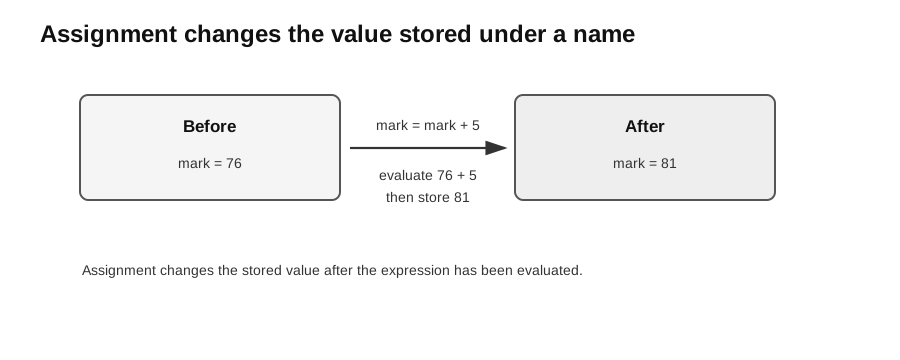
Caption: Assignment evaluates the expression on the right first, then stores the result under the name on the left.
mark = mark + 5This means: take the current value of mark, add 5, then store the new value back into mark.
When tracing assignment, keep a small state table:
| Statement | Value of mark after statement |
|---|---|
mark = 76 | 76 |
mark = mark + 5 | 81 |
This habit is more reliable than trying to remember the values mentally.
Common Data Types
| Conceptual type | Python example | Notes |
|---|---|---|
| integer | 12 | whole numbers, indices, counts |
| real | 12.5 | Python uses float for real-valued approximations |
| char | "A" | Python has no separate char type; use a one-character string |
| string | "S1234567A" | text; can contain digits that should not be calculated |
| Boolean | True | condition result or flag |
Use type() when learning or debugging:
value = "45"
print(type(value))
This prints <class 'str'>, so arithmetic cannot be done safely until conversion.
Type Conversion
Python may convert values automatically in some mixed numeric expressions, but beginner code should usually make conversions explicit.
whole_number = int("42")
measurement = float("3.5")
label = str(108)
int() converts a suitable value to an integer, float() converts it to a real-valued approximation, and str() creates text. Conversion may fail when the source text is unsuitable, such as int("four").
Input Is a String
Python’s input() function always returns a string.
raw_age = input("Age: ")
age = int(raw_age)
If the user types 17, raw_age is "17", not 17. Convert only when the input is expected to behave like a number.
price = float(input("Price: "))
quantity = int(input("Quantity: "))
total = price * quantity
print(total)
Common bug:
age = input("Age: ")
print(age + 1)  # error: age is a string
Correct version:
age = int(input("Age: "))
print(age + 1)
Operators
Arithmetic operators include:
| Operator | Meaning | Example |
|---|---|---|
+ | addition | 2 + 3 gives 5 |
- | subtraction | 7 - 3 gives 4 |
* | multiplication | 2 * 3 gives 6 |
/ | real division | 20 / 8 gives 2.5 |
// | floor division | 20 // 8 gives 2 |
% | remainder | 20 % 8 gives 4 |
** | exponentiation | 2 ** 3 gives 8 |
Floor division rounds down toward negative infinity: -5 // 2 is -3. With a float operand its result may be a float, such as 5.0 // 2 == 2.0. Syllabus pseudocode DIV may use a stated integer convention, so do not assume identical negative-operand behaviour unless specified.
The % operator is often used to test divisibility:
if number % 2 == 0:
    print("even")
Characters and Strings
The syllabus distinguishes a character from a string. Python does not have a separate char type, so a character is represented by a string of length 1.
initial = "A"
name = "Aisha"
A string is a sequence of zero or more characters.
name = "computing"
print(name[0])
print(name[1:4])
Indexing starts at 0. For "computing", name[0] is "c".
A slice [start:stop] includes start but excludes stop, so name[1:4] is "omp". An omitted start begins at 0, an omitted stop continues to the end, and index -1 selects the last character.
Strings are immutable. This means an existing string cannot be changed in place.
word = "cat"
new_word = "b" + word[1:]
The original word remains "cat". The expression creates a new string "bat".
Useful string operations include:
message = "  Hello  "
clean = message.strip()
lowercase = clean.lower()
position = clean.find("ll")
Common methods include lower(), upper(), strip(), find(), count(), startswith(), and endswith(). String methods return new strings or other results; they do not change the original string directly.
Cross-Topic Bridge: Character Encoding (Unit 3.2)
ASCII and Unicode allow characters to be stored as numbers. This is governed by the character-encoding topic rather than core Unit 2.2. Python provides:
code = ord("A")      # 65
character = chr(66)  # "B"
Use ord() when a program needs the code point of one character, and chr() to convert a valid code point back to a character.
Library Functions
The syllabus expects use of common library functions for input/output, strings, and mathematical operations. Some useful built-in functions are len(), abs(), round(), min(), and max().
values = [4, 9, 2]
print(len(values))
print(max(values))
Functions from a module must be imported before use:
import math

radius = 3
area = math.pi * radius ** 2
import math
root = math.sqrt(81)
lower = math.floor(3.8)
upper = math.ceil(3.2)
print("A", "B", sep=" | ", end=".\n")
name = " Aisha "
print(f"{name.strip().upper()} has {len(name.strip())} letters")find() returns the first position or -1 when absent; in gives a Boolean containment result. F-strings place evaluated expressions inside {...}.
Lists as 1D Arrays
Python lists model syllabus arrays here, but they are dynamic and may mix types. A conceptual exam array is often fixed-size and single-type; follow the stated representation. To initialise an array means to create its dimensions and starting values before use.
The syllabus refers to one-dimensional arrays. In Python teaching code, lists are normally used for this role.
scores = [72, 85, 68]
scores.append(91)
scores[0] = 75
Important ideas:
- index starts at 0;
len(scores)gives the number of items;scores[-1]gives the last item;- lists are mutable, so an item can be replaced.
Example:
scores = [72, 85, 68]
total = 0

for score in scores:
    total = total + score

average = total / len(scores)
print(average)
Nested Lists as 2D Arrays
Syllabus-style 2D arrays are normally rectangular nested lists with equal row lengths. Python also permits ragged rows, so do not assume a common column range unless the contract guarantees it.
A two-dimensional array can be represented as a list of lists.
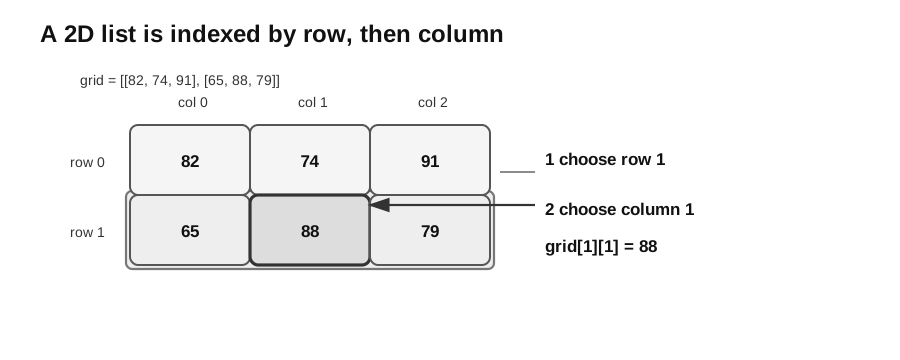
Caption: Read grid[1][1] in two steps using zero-based indexes: first select the whole inner list at row 1, [65, 88, 79]; then select column 1 within that row, giving 88.
marks = [
    [82, 74, 91],
    [65, 88, 79],
]

print(marks[1][1])
This prints 88. The first index 1 selects the second row. The second index 1 selects the second item in that row.
Traversing Collections
A list can be processed by value:
for score in scores:
    print(score)
or by index:
for index in range(len(scores)):
    print(index, scores[index])
Use direct traversal when only the values are needed. Use index-based traversal when the position is also needed or when an item must be replaced.
For a 2D list, nested loops visit rows and columns:
for row in marks:
    for value in row:
        print(value)
Choosing the Right Representation
Use a number when the value will be calculated.
mark = 75Use a string when the value is text or an identifier where the digits are not meant for arithmetic.
student_id = "S1234567A"Use a Boolean when the value answers a yes/no question.
is_valid = mark >= 0 and mark <= 100Use a list when there are many values with the same role.
temperatures = [28.1, 29.4, 30.2]Common Bugs
- Forgetting that
input()gives a string. - Confusing
=assignment with==comparison. - Using an index that is outside the list.
- Forgetting that strings cannot be changed in place.
- Mixing integer division
//and real division/. - Storing numeric-looking identifiers as integers, which may remove leading zeroes.
Practice Trace
Trace this code:
values = [3, 5, 7]
values[1] = values[0] + values[2]
print(values)
After the assignment, values[1] becomes 3 + 7, so the list is [3, 10, 7].
Check Your Understanding
Try these before looking back at the explanations:
- What is the type of the value returned by
input()? - Why is
"0123"usually stored as a string instead of an integer? - If
scores = [4, 6, 8], what isscores[0] + scores[2]? - In
grid[2][0], which index selects the row?
Answers:
str.- The leading zero is part of the identifier; converting to an integer would lose it.
12.- The first index,
2, selects the row.