Incident Response for Beginners
This is optional enrichment. It connects H2 Computing security concepts to real actions after something goes wrong. It is not required for H2 exam answers unless a question explicitly gives an incident-response scenario.
This note is not professional legal, cybersecurity, or emergency advice. For real school, organisation, or workplace incidents, follow the official reporting procedure and involve the responsible teacher, administrator, parent, or security team.
Beginner Mental Model
An incident is a security event that may harm confidentiality, integrity, or availability.
Examples:
- an account is compromised;
- malware may be running on a device;
- private data may have been leaked;
- a website is defaced;
- users cannot access a service because of an attack or misconfiguration.
The response should be calm and structured. The goal is to reduce harm, recover safely, and learn what weakness allowed the incident to happen.
Caption: Incident response is iterative. Detect and record signs, escalate early, contain harm while preserving evidence, eradicate the cause, recover and monitor, then improve controls. Communication and documentation span the cycle; phases can overlap as new evidence appears. Follow authority and do not destroy evidence or investigate beyond your role.
Incident Response Versus Prevention
Prevention tries to reduce the chance of an incident before it happens. Incident response reduces damage after something may already have gone wrong.
| Before an incident | After an incident |
|---|---|
| use MFA | reset credentials and remove attacker sessions |
| keep backups | restore from a known-good backup |
| use firewalls and monitoring | check logs and preserve evidence |
| limit access permissions | revoke compromised tokens or accounts |
Both are needed. A good response should not only restore the visible system; it should also reduce the chance of the same incident happening again.
The Response Cycle
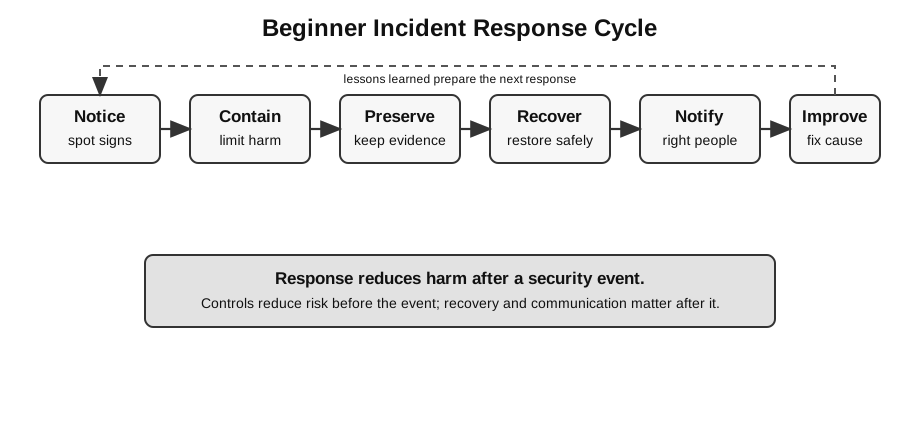
Use this simple cycle:
Notice -> Contain -> Preserve evidence -> Recover -> Notify -> Improve| Step | Meaning |
|---|---|
| notice | recognise signs that something may be wrong |
| contain | stop the harm from spreading |
| preserve evidence | keep useful information for diagnosis and reporting |
| recover | return to a trusted working state |
| notify | tell the right people, not random public channels |
| improve | fix the weakness and reduce repeat risk |
Do not rush straight to deleting everything. Some evidence may be needed to understand what happened.
A beginner-safe rule is:
Contain first, but preserve enough evidence to explain and report the incident.If an Account Is Compromised
Signs:
- you cannot log in;
- password or recovery email was changed;
- friends receive strange messages from your account;
- unfamiliar devices or locations appear in login history;
- password-reset emails arrive unexpectedly;
- new forwarding rules or connected apps appear.
Beginner response:
| Action | Why |
|---|---|
| use a clean trusted device | avoids typing new passwords into an infected machine |
| change the password | removes known stolen credentials |
| enable MFA if available | makes password theft less damaging |
| check recovery email and phone | attacker may have changed recovery paths |
| sign out other sessions | removes existing attacker sessions where possible |
| review connected apps | attacker may have authorised another app |
| warn contacts if spam was sent | reduces phishing spread |
| report through official support | provider may help secure or recover the account |
Do not reuse the old password on other accounts. If the same password was used elsewhere, those accounts are also at risk.
Prioritising the First Few Minutes
When something suspicious happens, ask two immediate questions:
| Question | Why it matters |
|---|---|
| Is harm still spreading? | decide whether to disconnect a device, restrict access, or pause a service |
| Is important evidence at risk of being lost? | decide whether to preserve logs, screenshots, timestamps, or account history |
For beginners, this is more useful than trying to name a perfect technical fix immediately.
If Malware Is Suspected
Signs:
- unusual pop-ups;
- browser redirects;
- unknown programs installed;
- device becomes unusually slow;
- security tool warns about a file;
- accounts show suspicious activity after using the device.
Beginner response:
Disconnect from the network if spread or data theft is suspected.
Stop using the device for passwords and banking.
Ask a responsible adult, teacher, or administrator for help.
Run trusted security scans or follow official device-management procedure.
Change important passwords from a clean device.
Restore from a trusted backup if needed.
Important distinction:
Changing passwords on an infected device may give the new password to the attacker.
Use a clean device for recovery when possible.
Trusted Device Principle
If an account or device may be compromised, do recovery work from a trusted device where possible.
Example:
Bad: change every password on the laptop that may contain a keylogger.
Better: use a clean trusted device to change passwords and review account sessions.
This connects incident response to the malware topic: if the original device is still infected, new secrets typed into it may also be stolen.
If Data Is Leaked
A data leak means information may have been exposed to unauthorised people.
Examples:
- a database file is uploaded to a public repository;
- a spreadsheet with student data is shared with the wrong group;
- API keys or passwords are committed to GitHub;
- private form responses become public;
- a screenshot includes confidential information.
Beginner response:
| Action | Why |
|---|---|
| remove public access | limits further exposure |
| preserve a record of what was exposed | needed for assessment and reporting |
| tell the responsible teacher/admin | data leaks may have legal or school-policy implications |
| rotate leaked secrets | changing code is not enough if keys were exposed |
| identify affected people or systems | determines notification and recovery steps |
| check logs or history | helps estimate when and how exposure happened |
| prevent recurrence | update permissions, .gitignore, review process, or access control |
Do not silently hide a data leak. Responsible disclosure is part of ethical computing.
If a Website Is Defaced
Website defacement means the visible content was changed without authorisation.
Signs:
- homepage replaced with attacker message;
- unfamiliar files appear in the site;
- admin account settings changed;
- users report strange redirects;
- deployment history shows unknown changes.
Beginner response:
Take the site offline or restrict access if needed.
Preserve logs, screenshots, and deployment history.
Revoke or reset compromised credentials.
Restore from a known-good version.
Check how the change happened before redeploying.
Patch, update, or tighten access control.
Monitor after recovery.
For a static wiki, likely places to check:
- repository history;
- hosting deployment logs;
- DNS or domain settings;
- admin accounts;
- build output;
- connected deployment tokens.
For a dynamic app, also check:
- server logs;
- database changes;
- file uploads;
- admin routes;
- dependencies;
- environment variables and secrets.
What Not To Do
Avoid these beginner mistakes:
| Mistake | Why it is risky |
|---|---|
| panic-delete everything | destroys evidence and may not remove the cause |
| change passwords on infected device | attacker may capture the new password |
| restore old backup without fixing cause | attacker may re-enter through the same weakness |
| publicly accuse someone without evidence | can harm others and complicate investigation |
| hide a data leak | affected people may remain at risk |
| keep using leaked API keys | attacker may still have access |
| assume one control solves everything | incidents often need several controls |
Worked Scenario
Scenario:
A school project website suddenly shows an unfamiliar message on the homepage.
The student uses GitHub for source code and a hosting platform for deployment.
No one in the group remembers making the change.
Reasoning:
| Check | Why |
|---|---|
| repository commit history | content may have changed in source |
| hosting deployment log | host may have deployed unexpected output |
| admin and deployment tokens | attacker may have gained access |
| DNS/domain settings | domain may point to a wrong target |
| screenshots and timestamps | evidence helps reconstruct the event |
| known-good backup or commit | needed for safe restoration |
Good response:
Do not only replace the homepage.
First preserve evidence, restrict access if needed, check repository and hosting history,
reset compromised credentials, restore from a known-good version, and fix the cause before redeploying.
Weak response:
Just upload the old page again.The weak response may hide the symptom without removing the attacker’s access.
Link to Security Controls
Incident response connects directly to H2 security ideas.
| Incident | Relevant concepts |
|---|---|
| compromised account | authentication, MFA, access control, phishing |
| suspected malware | malware, safe recovery, backups |
| data leak | confidentiality, privacy, access control |
| website defacement | integrity, authentication, deployment control |
| service unavailable | availability, DoS/DDoS, monitoring |
Security controls reduce risk before an incident. Incident response reduces harm after something has gone wrong.
Communication Discipline
Incident communication should be accurate, limited to the right audience, and respectful of privacy. A student should not post screenshots containing private data into a public chat just to ask for help. A better approach is to tell the responsible teacher, administrator, or security contact and share only the evidence needed for diagnosis.
Link to Ethics
Incidents involve people, not just machines.
Ethical questions:
Who may be harmed?
What information was exposed?
Who needs to know?
What evidence should be preserved?
What should not be made public?
How can the system be improved without blaming carelessly?
Responsible behaviour includes honesty, careful communication, privacy protection, and learning from mistakes.
How to Use This in Exam Answers
For H2 exam answers, use syllabus terms first:
- malware;
- DoS/DDoS;
- firewall, IDS, IPS;
- encryption;
- authentication;
- confidentiality, integrity, availability;
- ethical, legal, social, and economic impact.
Mention incident-response steps only if:
- the question gives an incident scenario;
- the question asks what should be done after a compromise;
- you are writing optional enrichment beyond the core syllabus.
Avoid:
- giving vigilante-style responses;
- publishing private incident details unnecessarily;
- promising perfect recovery;
- ignoring evidence, notification, and prevention;
- treating incident response as only a technical task.
Connect Back to Topics
- Network Security: malware, account compromise, availability, authentication, and controls.
- Social, Ethical, Legal, and Economic Issues: privacy, responsible disclosure, stakeholder harm, and accountability.
- Backups, Recovery, and Version Control: known-good restore points, rollback, and recovery checks.
Final Takeaway
Incident response is structured damage control.
Use this reasoning pattern:
What happened?
What harm may still be spreading?
What evidence must be preserved?
What trusted state can be restored?
Who must be notified?
What control reduces the chance of this happening again?