Web App Principles and Usability
You can read this note directly if you know that a browser can request pages from a server. A web application is interactive software accessed through a browser.
Beginner Problem
A web application is not merely a collection of pages. It helps users complete tasks.
Example:
Upload a project image and see it appear in a gallery.That task may require a form, a request, server-side processing, storage, a generated response, and clear feedback. Usability asks whether the intended user can complete the task effectively and with reasonable effort.
Web Application Model
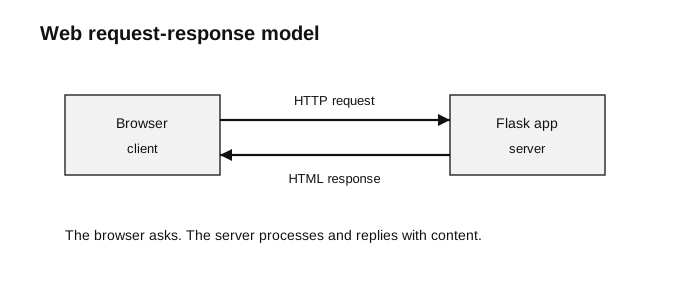
Caption: The browser initiates an HTTP request. Its method and path help select server processing; the Flask view returns content from which Flask constructs an HTTP response. The response may contain rendered HTML, but HTTP responses can also carry other content types.
browser sends HTTP request
-> server receives and processes it
-> server returns HTTP response
-> browser displays the result
Example:
Browser requests /search?keyword=tree
Server searches stored records
Server renders an HTML results page
Browser displays the page
Web Application Versus Website
The distinction is not absolute, but it is useful at this level:
| Mostly informational website | Web application |
|---|---|
| mainly presents content | mainly supports user tasks |
| little or no user data processing | accepts, processes, stores, or retrieves user data |
| example: school announcement page | example: student submission portal |
A single system can contain both informational pages and application features.
Web Application Versus Native Application
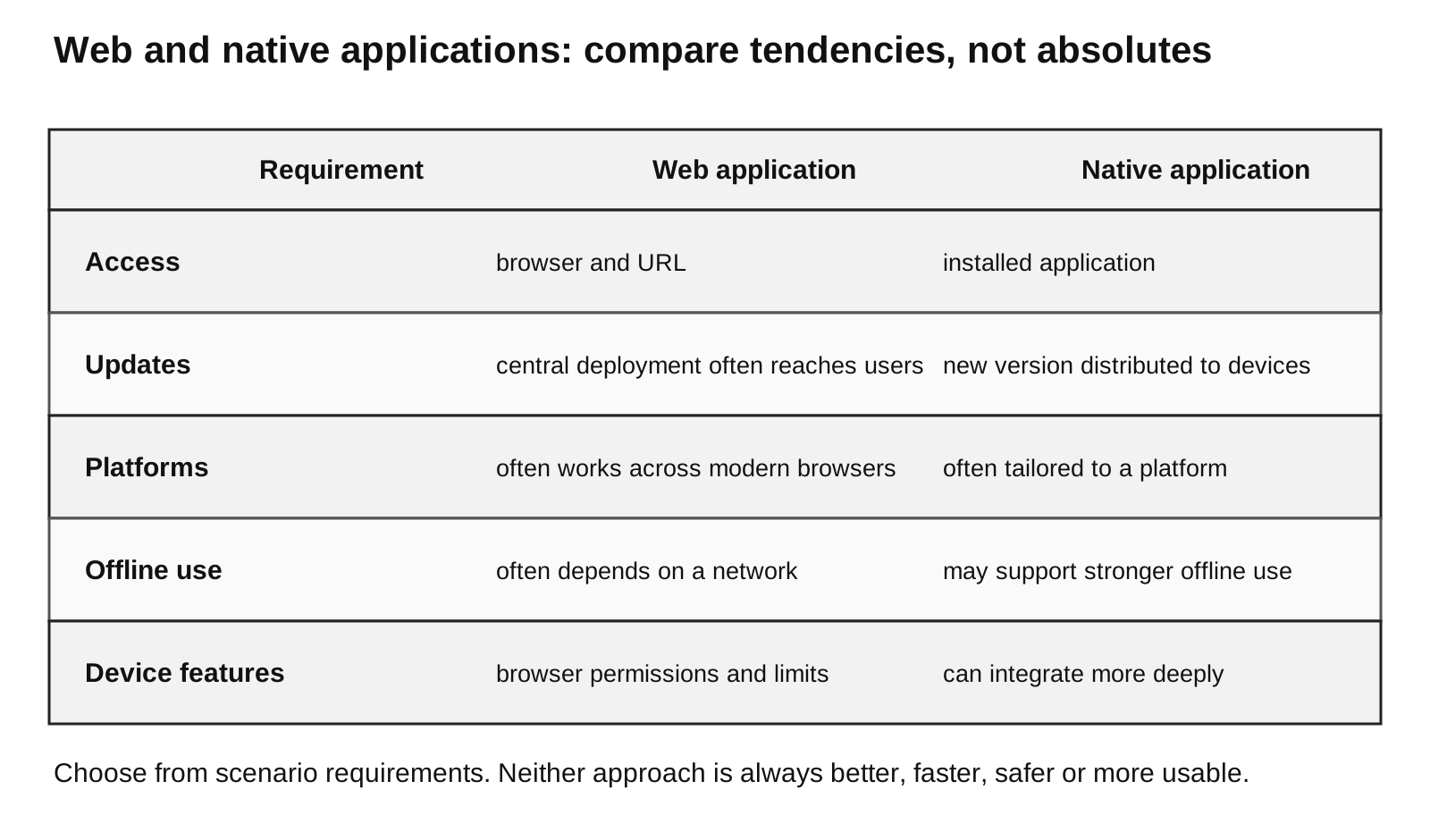
Caption: Read each row as a tendency, not an absolute rule. Browser access and central deployment often improve reach and update consistency, while native installation can enable deeper platform integration and stronger offline behaviour. The correct choice depends on user, connectivity, device-feature, maintenance and performance requirements; neither model is automatically superior or more secure.
| Consideration | Web application | Native application |
|---|---|---|
| access | through a browser | installed on a device |
| updates | server-side update can reach all users | updated copies must reach devices |
| platform | often works across systems with browsers | designed for particular platforms |
| offline use | often depends on connectivity | may provide stronger offline support |
| device integration | generally more limited or permission-dependent | can integrate more directly with device features |
| performance and interface | affected by browser and network | can be optimised for the target platform |
These are general comparisons, not absolute rules. Modern browsers can access some device features, and some web apps can work offline. For syllabus answers, state the broad distinction and relate it to the scenario.
What Usability Means
Usability concerns whether specified users can achieve specified goals:
- effectively — complete the task correctly;
- efficiently — complete it without unnecessary effort or delay;
- satisfactorily — use the interface with reasonable comfort and confidence.
Visual attractiveness can support usability, but appearance alone is not enough.
Ten Usability Principles
| Principle | Beginner meaning | Example |
|---|---|---|
| visibility of system status | keep users informed | show Uploading... and then Upload complete |
| match between system and real world | use familiar language and order | say Choose image, not Select binary object |
| user control and freedom | allow escape or correction | provide Cancel, Back, Undo, or Edit |
| consistency and standards | use the same conventions throughout | same label and style for all Save buttons |
| error prevention | stop likely errors before submission | restrict allowed file types and mark required fields |
| recognition rather than recall | keep choices and instructions visible | show allowed formats beside an upload control |
| flexibility and efficiency | support both beginners and frequent users | sensible defaults and keyboard shortcuts |
| aesthetic and minimalist design | keep attention on the task | remove unrelated controls and duplicate text |
| recognise, diagnose, and recover from errors | explain the problem and remedy | File is too large; choose one under 5 MB |
| help and documentation | provide concise, searchable guidance | short instructions near a difficult form |
Applying the Principles
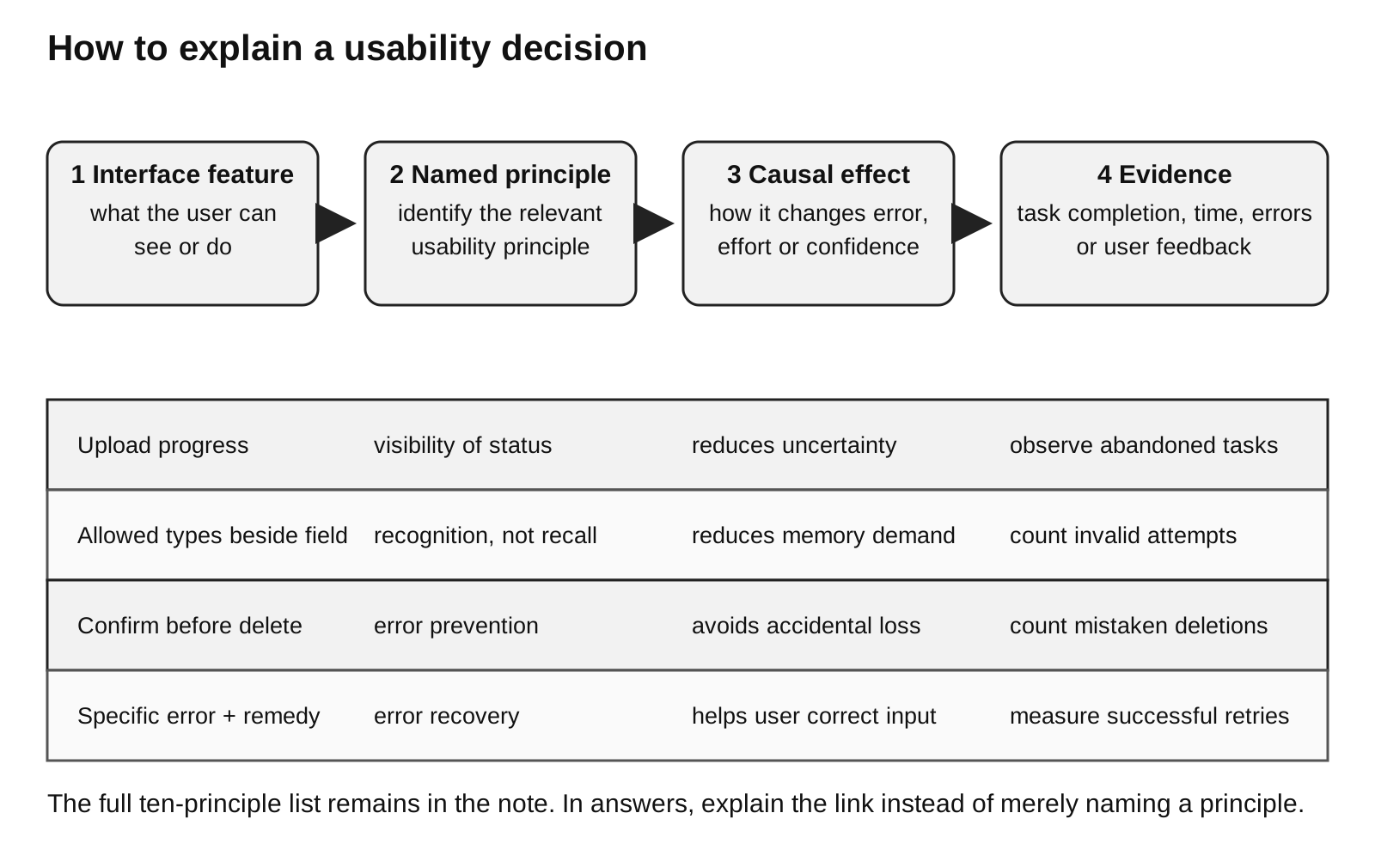
Caption: A strong usability explanation links four things: a visible interface feature, the named principle it implements, the causal effect on the user, and evidence that could be collected during testing. Naming a principle without explaining its effect is incomplete.
Scenario: upload an image to a project gallery.
| Poor design | Principle involved | Better design |
|---|---|---|
button says Submit with no context | match real world | use Upload image |
| no response after clicking | visibility of system status | show progress and success feedback |
| invalid file silently fails | error recovery | explain the rejected type and allowed types |
| destructive delete happens immediately | error prevention | ask for confirmation |
| user must remember the size limit | recognition rather than recall | show the limit beside the file field |
| every page uses different button styles | consistency | use one visual convention for the same action |
| form is crowded with irrelevant text | minimalist design | keep only task-relevant information |
| no way to leave an edit screen | user control | provide Cancel or Back |
Error Prevention Versus Error Recovery
These are related but different.
error prevention: reduce the chance of the error occurring
error recovery: help the user understand and fix an error that occurred
Example:
- prevention: the score field uses a suitable numeric control and states the valid range;
- recovery: after an invalid score, the page says
Enter a whole number from 0 to 100.
Internal and External Consistency
- Internal consistency: the same application uses the same words, symbols, layout patterns, and actions for similar tasks.
- External consistency: the application follows conventions users already know from other systems.
Consistency reduces the amount users must learn and remember.
Evaluating an Interface
When applying a principle, write a three-part answer:
identify the feature
-> name the usability principle
-> explain its effect on the user
Example:
The interface shows a progress indicator while the image is uploaded.
This demonstrates visibility of system status because the user knows that processing is continuing and is less likely to submit the form repeatedly.
Avoid merely naming a principle without connecting it to a concrete design feature.
Common Mistakes
- Treating usability as decoration only.
- Listing principles without applying them to the given interface.
- Confusing error prevention with error messages after an error.
- Assuming every web app always needs internet while every native app always works offline.
- Claiming web apps can never use device features.
- Saying one platform is always faster or more secure without reference to design and context.
- Giving vague advice such as
make it user-friendlywithout explaining how.
Check Your Understanding
- Why can web applications often be updated centrally?
- What is the difference between an informational website and a web application?
- Give one example of error prevention and one example of error recovery.
- Why does recognition reduce cognitive load?
- How should you structure an applied usability answer?
Answers:
- Updating the server-side application can affect all users who access it through a browser.
- A website mainly presents information, while a web application processes input or supports interactive tasks.
- Prevention: restrict invalid file types. Recovery: explain which file types are accepted after rejection.
- Users can see available actions instead of remembering them.
- Identify the feature, name the principle, and explain the benefit to the user.