APIs and JSON
This is optional enrichment. It helps connect the syllabus concept to real systems, but it is outside H2 exam-core scope unless a question explicitly gives this context.
APIs and JSON are important in modern web applications, cloud services, and software agents. For H2 Computing, the core idea is structured client-server communication, not memorising API products or advanced API design.
The goal is to understand the idea: applications can exchange structured data using HTTP requests and JSON responses. You do not need to memorise real API products, authentication schemes, REST theory, or JavaScript frameworks for H2 Computing.
Beginner Mental Model
A normal web page request often returns HTML for a browser to display.
An API request often returns data for a program to process.
Browser page request:
client asks for page -> server returns HTML -> browser displays page

API data request:
program asks for data -> server returns JSON -> program reads values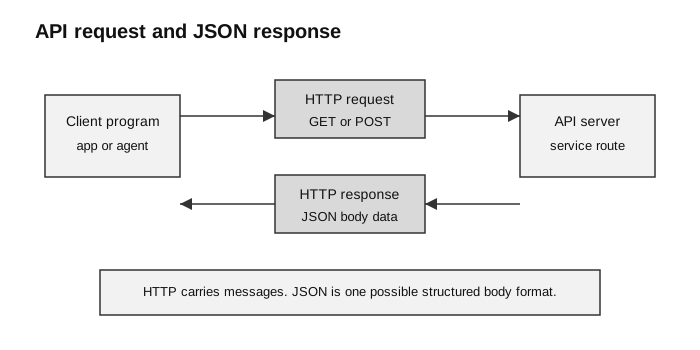
Caption: An API request and response travel using HTTP; JSON is a common format for the structured data carried in the message body.
What Is an API?
API means application programming interface.
For this note, think of a web API as a controlled way for one program to ask another system for data or action.
Examples:
| Situation | API-style meaning |
|---|---|
| weather app shows forecast | app asks a weather service for structured forecast data |
| school portal loads timetable | front end asks server for timetable records |
| agent calls a tool | agent sends a structured request and receives structured output |
| payment page checks status | app asks payment service whether a transaction succeeded |
An API is not the same as a visible web page. A web API exposes defined operations or data for software clients to request.
What Is JSON?
JSON stands for JavaScript Object Notation. It is a text format for representing structured data.
Example JSON:
{
  "student": "Aisha",
  "level": "H2 Computing",
  "completed": true,
  "scores": [8, 10, 9]
}
JSON is useful because many programming languages can read and write it.
Basic JSON shapes:
| JSON shape | Example | Similar Python idea |
|---|---|---|
| object | {"name": "Aisha"} | dictionary |
| array | [8, 10, 9] | list |
| string | "H2 Computing" | string |
| number | 42 | integer or float |
| boolean | true, false | True, False |
| null | null | None |
Important syntax details:
- JSON object keys use double quotes;
- JSON strings use double quotes;
- JSON booleans are lowercase
trueandfalse; - JSON uses
null, not PythonNone; - JSON text must be parsed before a program can safely use it as structured data.
HTTP Request and JSON Response
An HTTP request has a method, a path or URL, headers, and sometimes a body.
Example API request:
GET /api/assignments/42 HTTP/1.1
Host: example.edu.sg
Accept: application/json
Example JSON response body:
{
  "assignment_id": 42,
  "title": "Binary Conversion Practice",
  "due": "2026-07-15",
  "completed": false
}
The response may also include a status code:
| Status | Beginner meaning |
|---|---|
200 OK | request succeeded |
201 Created | new resource was created |
400 Bad Request | client sent invalid data |
401 Unauthorized | authentication credentials are missing or invalid |
403 Forbidden | the server understood the request but refuses access |
404 Not Found | requested resource does not exist |
500 Internal Server Error | server-side error |
Status codes are not JSON values. They are part of the HTTP response. The JSON body is the structured content carried by the response.
GET and POST as Beginner API Actions
For this enrichment note, two common request methods are enough for a beginner model.
| Method | Beginner meaning | Example |
|---|---|---|
GET | retrieve data | get one assignment record |
POST | send data to create or process something | submit a new answer |
Example POST request body:
{
  "student_id": "S1024",
  "question_id": 7,
  "answer": "101101"
}
Possible response:
{
  "accepted": true,
  "mark": 1,
  "feedback": "Correct binary representation of 45."
}
In a Flask app, a form submission and an API request both send data to the server. A common difference is the expected representation of the input or response:
| Route type | Input | Output |
|---|---|---|
| page route | form values or URL parameters | HTML page |
| API route | often JSON or query values | often JSON data |
Scope reminder: You are not expected to design a REST API, implement authentication protocols, or memorise status-code lists for H2 Computing. Use these examples only to strengthen the request-response mental model.
Reading JSON in Python
Python’s json module can parse JSON text into Python data structures.
import json

response_text = """
{
  "assignment_id": 42,
  "title": "Binary Conversion Practice",
  "completed": false,
  "scores": [8, 10, 9]
}
"""

data = json.loads(response_text)

print(data["title"])
print(data["completed"])
print(sum(data["scores"]))
Expected output:
Binary Conversion Practice
False
27
Notice the conversion:
| JSON text | Python value after parsing |
|---|---|
false | False |
| JSON object | dictionary |
| JSON array | list |
Do not treat JSON text as if it were already a Python dictionary. Parse it first.
APIs, Agents, and Tools
When building software agents, APIs and JSON become especially visible.
Simple model:
agent decides what it needs
agent sends structured tool/API request
tool/API returns structured JSON-like result
agent reads fields from the result
agent decides the next step
Example tool-style request:
{
  "tool": "weather_lookup",
  "arguments": {
    "location": "Singapore",
    "date": "2026-07-08"
  }
}
Example tool-style response:
{
  "ok": true,
  "temperature_c": 31,
  "condition": "cloudy"
}
The important computing idea is not the agent product. It is structured communication: both sides must agree on field names, value types, and meaning.
Common Beginner Mistakes
| Mistake | Correction |
|---|---|
| thinking an API is always a visible web page | an API is usually for software to call |
| confusing HTTP with JSON | HTTP carries the message; JSON is one possible body format |
| assuming every response is successful | check status code and error body |
| using field names that do not exist | inspect the actual JSON keys |
| treating JSON booleans as Python booleans before parsing | parse JSON first |
| storing secrets inside API request examples | keep API keys and tokens private |
Security and Ethics Notes
APIs can expose data, so they need controls.
| Risk | Control idea |
|---|---|
| unauthorised access | authentication and authorisation |
| too much data returned | only return necessary fields |
| invalid input | validation before processing |
| leaked API key | environment variables, access control, key rotation |
| excessive requests | rate limiting |
| personal data exposure | privacy-aware design and consent |
This connects to H2 topics even though API design itself is enrichment.
How to Use This in Exam Answers
Default H2 answer:
A web application uses HTTP requests and responses between client and server.
Data must be represented in an agreed format so the receiving program can interpret it.
Only mention APIs and JSON if:
- the question gives an API or JSON example;
- you are explaining a real-world extension;
- you are connecting web apps to modern software systems after giving the syllabus answer.
Avoid:
- making JSON part of core character-encoding answers;
- assuming every web app route is an API;
- discussing REST, OAuth, GraphQL, API gateways, or cloud products unless the question supplies them.
Connect Back to Topics
- Web Applications: HTTP request-response, Flask routes, and client-server web apps.
- Data Representation and Character Encoding: structured text data, strings, numbers, booleans, and encoding context.
- Fundamentals of Computer Networks: HTTP protocol, clients, servers, ports, and network communication.
Final Takeaway
APIs and JSON are a modern extension of ideas already in the syllabus:
client-server communication
+ agreed protocol
+ agreed data representation
+ validation and security
= programs that can exchange structured data reliably