Authentication in the Real World
This is optional enrichment. It helps you connect the H2 Computing idea of authentication to real login systems such as password managers, two-factor authentication, passkeys, and “Sign in with Google” style buttons. It is not required for H2 exam answers unless a question gives this kind of scenario.
For H2 Computing, you mainly need the concept: authentication checks whether a user is who they claim to be. You do not need to memorise OAuth flows, passkey implementation details, or the settings screens of a particular service.
Beginner Mental Model
Authentication is about proving identity. It is only one part of account security. After authentication, the system still needs sessions, permissions, recovery, logging, and safe user behaviour.
Claim: I am this user.
Evidence: Here is something that proves the claim.
Decision: Allow or deny access.
The evidence can come from different factor types:
| Factor type | Meaning | Example |
|---|---|---|
| something you know | secret knowledge | password, PIN |
| something you have | physical or digital possession | phone, security key, authenticator app |
| something you are | biological characteristic | fingerprint, face recognition |
In many modern systems, a fingerprint or face scan unlocks a local device credential. The website usually receives a cryptographic proof, not the raw fingerprint or face image.
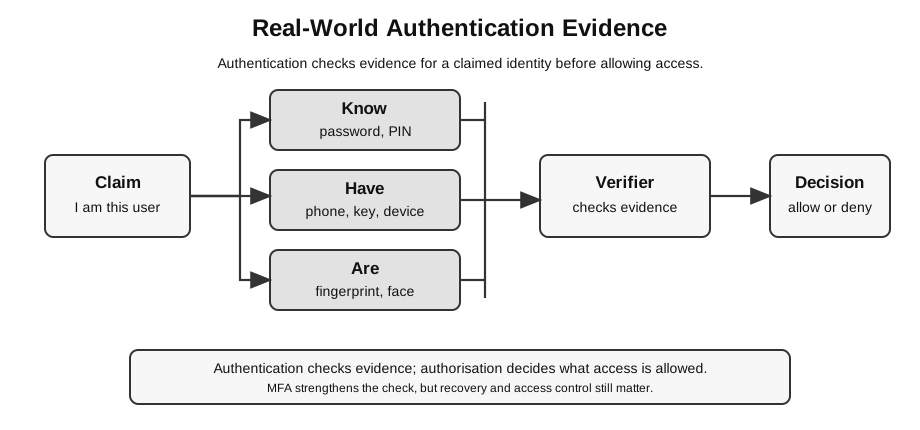
Caption: Authentication checks evidence in the knowledge, possession and inherence categories. MFA uses different categories—two passwords are not two factors. The result accepts or rejects an identity claim; only after that does authorisation decide what the identity may do. A device may generate a passkey assertion after local biometric verification, but the site does not receive the raw biometric.
Authentication, Sessions, and Authorisation
A login system usually involves more than one step.
| Step | Question | Example |
|---|---|---|
| authentication | who are you? | password, security key, passkey proof |
| session management | how does the site remember you after login? | session cookie or token |
| authorisation | what are you allowed to do? | student can view own marks but not edit all marks |
| recovery | how do you regain access safely? | recovery email, backup codes, admin reset |
This note focuses on authentication, but the other steps explain why a strong login method does not automatically make the whole application secure.
Passwords
A password is a secret that the user knows. It is simple to understand, but it creates common problems:
- weak passwords can be guessed;
- reused passwords make one breach affect many accounts;
- leaked passwords can be tried automatically on other sites;
- users may be tricked into typing passwords into fake login pages;
- forgotten passwords require account recovery.
Weak password behaviour:
Use the same short password for school email, games, shopping, and social media.Safer password behaviour:
Use a long, unique password for each important account.
Store it in a trusted password manager instead of memorising many weak passwords.
Exam-safe idea:
A password is one authentication factor. It should not be treated as perfect proof of identity because it can be guessed, stolen, reused, or phished.Password Managers
A password manager stores passwords securely and helps generate unique passwords.
Why this helps:
| Problem | How a password manager helps |
|---|---|
| user reuses passwords | generates a different password for each site |
| user chooses weak passwords | creates long random passwords |
| user forgets many passwords | remembers them in an encrypted vault |
| phishing risk | may refuse to autofill on a different domain |
A password manager does not remove all risk. The manager account itself must be protected, usually with a strong master password and MFA. If the user enters the master password on a fake page or loses access to recovery methods, there can still be serious problems.
Beginner bridge:
Password manager = reduces weak and reused passwords.
It does not remove the need to protect the manager account.
Two-Factor and Multi-Factor Authentication
Two-factor authentication, or 2FA, uses two different factor types. Multi-factor authentication, or MFA, uses more than one factor.
Examples:
| Login method | Factor types used |
|---|---|
| password only | something you know |
| password plus SMS code | something you know plus something you have |
| password plus authenticator-app code | something you know plus something you have |
| password plus security key | something you know plus something you have |
| passkey unlocked by fingerprint | authenticator possession with a local user-verification signal; whether policy treats this as two independent factors depends on the authenticator and system |
MFA is stronger because stealing one factor may not be enough. For example, a stolen password may not be enough if the attacker also needs the user’s phone or security key.
For a passkey, the site receives a cryptographic assertion and may receive an indication that local user verification occurred; it does not receive the user’s raw fingerprint. Do not assume every passkey ceremony is automatically 2FA under every policy.
Limitations:
- SMS codes can be intercepted or redirected in some attacks;
- users can be tricked into approving login prompts;
- recovery codes must be stored safely;
- losing the second factor can lock the real user out.
Good reasoning:
MFA reduces account-takeover risk because an attacker needs more than one kind of evidence.
It does not make login impossible to attack, especially if users approve fraudulent prompts or lose recovery methods.
Recovery and Lockout
Stronger authentication can create a usability trade-off. If an account requires a phone, security key, or passkey, the real user may be locked out when the device is lost or damaged.
Good account design therefore needs recovery methods that are secure but usable. Weak recovery can become the easiest attack path. For example, a strong password plus MFA is less helpful if an attacker can reset the account through an unprotected email address.
Passkeys
A passkey is a modern passwordless sign-in method based on public-key cryptography. In simple terms, the site stores a public part of the credential, while the user’s device keeps the private part. To sign in, the device proves possession of the private part after the user unlocks the device with a PIN, fingerprint, face recognition, or similar local method.
Simple model:
Registration:
device creates a key pair for this website
website stores public key
device keeps private key

Login:
website sends a challenge
device signs the challenge with private key
website checks the signature using public key
Why passkeys help:
| Password problem | Passkey advantage |
|---|---|
| password can be typed into fake site | passkey is bound to the real site identity |
| password can be reused | each site gets its own credential |
| password database can leak reusable secrets | server stores public keys, not passwords |
| user must remember many secrets | user signs in by unlocking a device |
Important limitation:
Passkeys still need account recovery, device management, and trust in the user's device or passkey provider.For exam use, keep the explanation high-level. You do not need to describe WebAuthn messages, FIDO certification, or operating-system passkey storage.
OAuth-Style “Sign In With Google”
Many websites let users sign in using a large identity provider, such as Google, Apple, Microsoft, or GitHub.
This is often described casually as “OAuth login”, but there is an important distinction:
| Term | Simple meaning |
|---|---|
| authentication | checking who the user is |
| authorization | allowing an app to access something |
| OAuth 2.0 | a standard framework mainly for authorization |
| OpenID Connect | an identity layer commonly used with OAuth 2.0 for sign-in |
For student understanding, you can use this simplified model:
User wants to use a new web app.
The app redirects the user to a trusted identity provider.
The identity provider authenticates the user.
The app receives a token or confirmation.
The app lets the user in without storing a separate password.
Why this helps:
- the new app does not need to store the user’s password;
- users do not need to create another password;
- MFA can be handled by the identity provider;
- account management can be centralised.
Risks and trade-offs:
- if the identity-provider account is compromised, many connected apps may be affected;
- the identity provider may learn which services the user uses;
- the user must understand what permissions are being requested;
- the app still needs its own access control after sign-in.
Phishing Resistance
Different authentication methods resist phishing differently.
| Method | Phishing risk | Reason |
|---|---|---|
| typed password | higher | user may type it into a fake site |
| password plus OTP | reduced but not removed | attacker may trick user into entering the current code |
| security key or passkey bound to a site | lower | the credential is designed to work only with the correct site identity |
This is a real-world extension. For H2 answers, keep the core idea simple: MFA and stronger authentication reduce account-takeover risk, but no method removes all account-security concerns.
Worked Scenario
Scenario:
A class project website lets students log in using either:
1. a username and password stored by the project website; or
2. "Sign in with Google".

The project website also stores students' project submissions.
Reasoning:
| Design choice | Benefit | Risk or limitation |
|---|---|---|
| local username and password | full control by the project website | website must store and protect password data |
| password manager recommended | students can use unique strong passwords | students must protect the manager account |
| MFA required | stolen password alone is less useful | recovery becomes important if the second factor is lost |
| Sign in with Google | project site avoids storing another password | Google account compromise may affect access |
| permission screen shown | user can see what access is requested | user may click through without reading |
Good answer:
Using an external sign-in provider can reduce password-storage risk for the project website,
but it introduces dependence on the provider account. MFA should be enabled on that provider
account, and the project website must still enforce its own access control for submissions.
Weak answer:
Sign in with Google is always safer.The weak answer ignores trade-offs and the remaining need for access control.
How to Use This in Exam Answers
Default H2 answer:
Authentication verifies the identity of a user before access is granted.
It may use passwords, tokens, biometrics, or multiple factors.
When an exam scenario mentions real login systems, you can add:
- password managers reduce password reuse and weak-password behaviour;
- MFA reduces the risk from a stolen password;
- passkeys use cryptographic proof instead of a typed password;
- external sign-in reduces local password storage but creates dependence on the identity provider;
- no authentication method removes the need for access control and secure recovery.
Avoid:
- describing OAuth as just “a password replacement”;
- saying biometrics are secret like passwords;
- saying MFA is impossible to bypass;
- saying a passkey means the whole account can never be compromised;
- giving vendor-specific setup instructions unless the question asks for them.
Connect Back to Topics
- Network Security: authentication, access control, phishing, confidentiality, and residual risk.
- Web Applications: login forms, sessions, external sign-in, and user accounts.
- Social, Ethical, Legal, and Economic Issues: privacy, identity providers, account recovery, and user consent.
Final Takeaway
Real-world authentication is not just “username plus password.” It is a design problem about evidence, risk, usability, recovery, and trust.
Use this reasoning pattern:
What identity is being claimed?
What evidence proves the claim?
What attack is reduced?
What risk remains?