AI Use in Programming and Ethics
This is optional enrichment. AI code assistants and chatbots are very relevant to modern programming, but detailed AI-tool use is outside H2 exam-core scope unless a question explicitly gives an AI-use scenario.
The main message is simple:
AI is a tool for support.
It is not a substitute for understanding, testing, or academic honesty.
Beginner Mental Model
An AI assistant can generate explanations, code, test ideas, and debugging suggestions. It does not automatically know whether the answer is correct for your exact task, syllabus, file structure, or marking scheme.
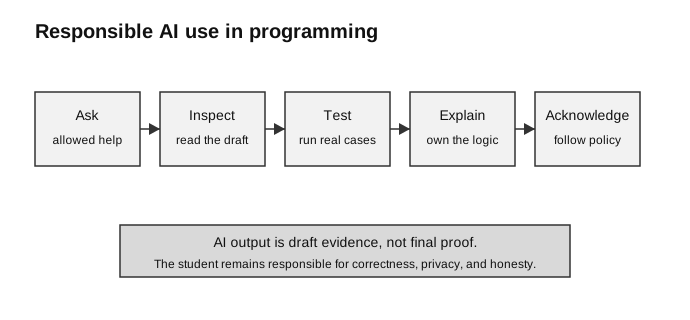
Caption: Check the task and tool policy before using AI; later acknowledgement cannot make prohibited use permissible. Remove confidential data, treat output as an unverified draft, inspect dependencies and security-sensitive operations, test representative normal/boundary/invalid/security cases with expected results, revise until you can explain it, and acknowledge assistance where required.
What AI Can Help With
AI can be useful when used carefully.
| Student need | Helpful AI use |
|---|---|
| understand an error message | ask for a plain-language explanation |
| plan a function | ask for pseudocode or edge cases |
| design tests | ask for normal, abnormal, and extreme cases |
| compare approaches | ask for trade-offs between simple solutions |
| improve explanation | ask for a clearer analogy or step-by-step trace |
| review code | ask what assumptions or failure cases to check |
Good use:
Ask AI to explain why my loop misses the last item.
Then inspect my code, fix it, and test boundary cases myself.
Weak use:
Paste the task, copy the whole answer, and submit it without understanding.Hallucinated Code
AI can produce code that looks confident but is wrong. This is often called hallucination.
Examples:
- imports a library that is not installed;
- calls a function that does not exist;
- assumes a file has different columns or keys;
- writes SQL for a table name that is not in the database;
- solves a similar problem, not the exact problem;
- passes one sample case but fails boundary cases.
This is why generated code must be treated as untrusted draft code.
Safe rule:
Generated code is not correct until it has been read, understood, and tested against the actual task.Testing Generated Code
Use the same testing discipline as for human-written code.
| Check | Question |
|---|---|
| syntax | does the code run at all? |
| task fit | does it solve the exact requirement? |
| data fit | does it match the actual file/database schema? |
| normal test | does it work for ordinary input? |
| abnormal test | does it reject or handle invalid input? |
| extreme test | does it work at boundaries? |
| explanation | can the student explain why it works? |
For example, if AI writes a validation function, do not only test one valid input. Test missing input, wrong format, boundary values, and unexpected types where relevant.
Plagiarism and Academic Honesty
AI assistance can create plagiarism risk when a student submits generated work as if it were entirely their own.
Different schools may have different rules, so follow the exact policy given by the teacher or exam authority. When in doubt, ask before using AI for assessed work.
Responsible behaviour:
- use AI to clarify concepts, not to hide lack of understanding;
- acknowledge AI assistance when required;
- do not submit generated code that you cannot explain;
- do not ask AI to produce answers to restricted assessments;
- do not upload private data, school credentials, or confidential files into public tools;
- keep drafts and final submitted work clearly separated.
Important distinction:
Learning from an explanation can be legitimate.
Submitting ununderstood generated work can be dishonest.
Explainability
Explainability means being able to explain how an answer, decision, or program works.
For student programming, explainability has a practical meaning:
Can I trace the code?
Can I explain each variable?
Can I predict output for a test case?
Can I justify the algorithm choice?
Can I modify the code if the requirement changes?
If the answer is no, the AI-generated code is not yet your working knowledge.
Weak defence:
The AI said it works.Stronger defence:
I tested the function with these normal, abnormal, and boundary inputs.
The trace shows why the loop terminates and returns the correct value.
Bias and Fairness
AI systems can reflect biases in their training data, design, or use context.
In programming help, bias may appear as:
- assuming a particular language, country, school system, or naming convention;
- giving examples that exclude some users;
- suggesting solutions that work for one group but not another;
- producing unfair or stereotyped descriptions;
- treating majority cases as if they cover all users.
In AI decision systems, bias can be higher risk because real people may be affected by decisions about access, ranking, recommendation, or classification.
Ethical questions to ask:
Who benefits from this AI system?
Who may be harmed?
What data was used?
Can affected users understand or challenge the result?
Is human review needed?
Privacy and Data Leakage
Students should be careful about what they paste into AI tools.
Avoid sharing:
- passwords, API keys, tokens, or
.envfiles; - private student data;
- unpublished exam questions if rules forbid sharing;
- database files containing personal data;
- proprietary school or project material;
- confidential deployment settings.
Safe alternative:
Replace real names, keys, and private data with small artificial examples before asking for help.Worked Scenario
Scenario:
A student asks an AI assistant to write a Flask route that saves attendance into SQLite.
The Flask app starts locally, but the student has not exercised the form-submission route.
That route inserts into a table called Attendance.
The supplied database actually contains a table called CCA_Attendance with different column names.
Reasoning:
| Issue | Why it matters |
|---|---|
| hallucinated table name | code does not match actual database |
| no schema check | student did not inspect the supplied resource |
| startup is not operation verification | the route may crash only when the form is submitted, and success also requires checking the stored database row |
| student cannot explain SQL | debugging becomes difficult |
Responsible next step:
Inspect the real database schema.
Adjust the SQL to match actual table and column names.
Run a small insertion test.
Query the database to confirm the stored row.
Explain the route before using it in the project.
Safe AI Workflow for Student Code
Use this workflow:
1. Read the task yourself.
2. Check the assessment and tool policy before sending anything; prohibited use remains prohibited even if later acknowledged.
3. Remove secrets, personal data, confidential content, and unsafe production details.
4. Ask for limited explanation, planning, or a draft only where allowed.
5. Compare the unverified draft with the actual files, schema, syllabus, dependencies, APIs, licences, and provenance requirements.
6. Inspect for injection, exposed secrets, unsafe file/database operations, and other security risks.
7. Run representative normal, boundary, invalid, and security tests with expected results.
8. Revise and explain the solution independently.
9. Acknowledge AI help if required.
This makes AI part of the learning process instead of a replacement for it.
How to Use This in Exam Answers
For H2 exam answers, use syllabus terms first:
- ethics and professional conduct;
- privacy and data protection;
- social and economic impact;
- validation, testing, and debugging;
- error types and test cases;
- correctness and reliability.
Mention AI code assistants, hallucination, prompt use, or generated code only if:
- the question gives an AI-use scenario;
- you are writing optional enrichment;
- you are discussing responsible computing practice beyond the core syllabus.
Avoid:
- saying AI output is automatically correct;
- saying AI use is automatically dishonest in every context;
- submitting generated work you cannot explain;
- using AI to bypass learning, testing, or citation rules;
- uploading private data or secrets into an AI tool.
Connect Back to Topics
| Topic | Connection |
|---|---|
| Social, Ethical, Legal, and Economic Issues | academic honesty, bias, privacy, accountability, responsible use |
| Data Validation, Testing, and Debugging | generated code still needs syntax, runtime, logic, and boundary testing |
| Lab Exam and Project Skills | inspect resources, test incrementally, keep final work explainable |
Final Takeaway
AI can speed up learning and drafting, but it does not remove responsibility.
Use this reasoning pattern:
What did AI help produce?
Do I understand it?
Have I tested it with the actual task data?
Is it allowed for this assessment?
Have I protected private data?
Can I explain and defend the final work?